

12月4日的Soundstorm for Hue应用程序分析

Soundstorm for Hue
- Scott Dodson
- Google Play 商店
- 付费
- 娱乐
Get your party started using your Philips Hue lights. Watch your lights pulse and flash to your favorite songs.*
*Hue Bridge required
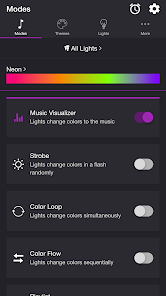
MODES
• Music Visualizer — Lights change colors to the music (Microphone access required)
• Strobe — Lights change colors in a flash randomly
• Color Loop — Lights change colors simultaneously
• Color Flow — Lights change colors sequentially
• Playlist — Each mode plays for a random duration
THEMES
Choose from one of the predefined themes or create your own on the Themes tab. Each mode uses the colors in the selected theme. To edit a user theme in the list, swipe the item to the left and tap the pencil icon. You can reorder colors for the Color Loop mode.
SETTINGS
Music Visualizer
• Change volume trigger for light effects
• Change minimum brightness of lights when inactive
• Change maximum brightness of light effects
• Change transition effects: Random, Pulse, Fade Quickly, Fade Slowly
• Change theme
• Toggle detect frequencies (Bass, Mid, Treble)
Bass, Mid, Treble (Music Visualizer)
• Toggle light effects
• Target lights for effects
• Change transition effects: Random, Pulse, Fade Quickly, Fade Slowly
• Change theme
• Change frequency range trigger
Strobe
• Change minimum brightness of lights when inactive
• Change maximum brightness of light effects
• Change theme
Color Loop, Color Flow
• Change brightness of lights
• Change color or light sequence: In Order, Reverse Order, Random Order
• Change transition effects: Random, Pulse, Fade Quickly, Fade Slowly
• Change transition timeout
• Change theme
Playlist
• Change sequence: In Order, Reverse Order, Random Order
• Change order
• Toggle modes
• Change duration range for each mode
General
• Change default end state: Revert, Off
• Change sleep end state: Revert, Off
• Select mode to automatically start when app opens
• Choose time to automatically stop selected mode
LIGHTS / GROUPS
Select one or more lights for your light show on the Lights tab. Choose a group that you set up using the Philips Hue app, or create a new zone in the Soundstorm for Hue app. To edit a room or zone in the list, swipe the item to the left and tap the pencil icon. You can reorder lights for the Color Flow mode. When you add, remove, or change lights, pull down the list to refresh.
ADDITIONAL FEATURES
• Sleep Timer — Choose the state of your lights after the timer ends with the Sleep End State setting.
I'd love to hear your thoughts and appreciate you taking the time to rate the app. By leaving a review, I can continue to improve Soundstorm for Hue and create a great experience for you and future users. Thank you! —Scott
商店排名
商店排名基于 Google 和 Apple 设置的多个参数。
所有品类在
美国--
娱乐在
美国#28



 Soundstorm for Hue VS.
 十二月 4, 2025