





Top Ecommerce Companies in the USA: The 100 Brands Winning the Traffic Race in 2026
by Inbar Eytan6 Min.
Aug 30, 2026
Do you wish you could instantly decode your competitors’ secret sauce, spy on exactly how shoppers behave, and snag hot sales leads before anyone else?
Well, you’re in the right place.
In July, we delivered updates that sharpened competitor insights, created crystal-clear shopper analytics, and laser-focused sales signals. So, you’ll be making smarter decisions at lightning speed backed by actual numbers rather than guesswork.
The result?
You’ll keep yourself ahead of the competition (whatever you do and whoever they may be).
Running ads without visibility into your competitors’ moves is like showing up to a fancy dress party in a suit. Sure, you might look great. But wouldn’t you rather know how many others have come as James Bond? 🎭
That’s where Ad Intelligence comes in. No more guessing games.
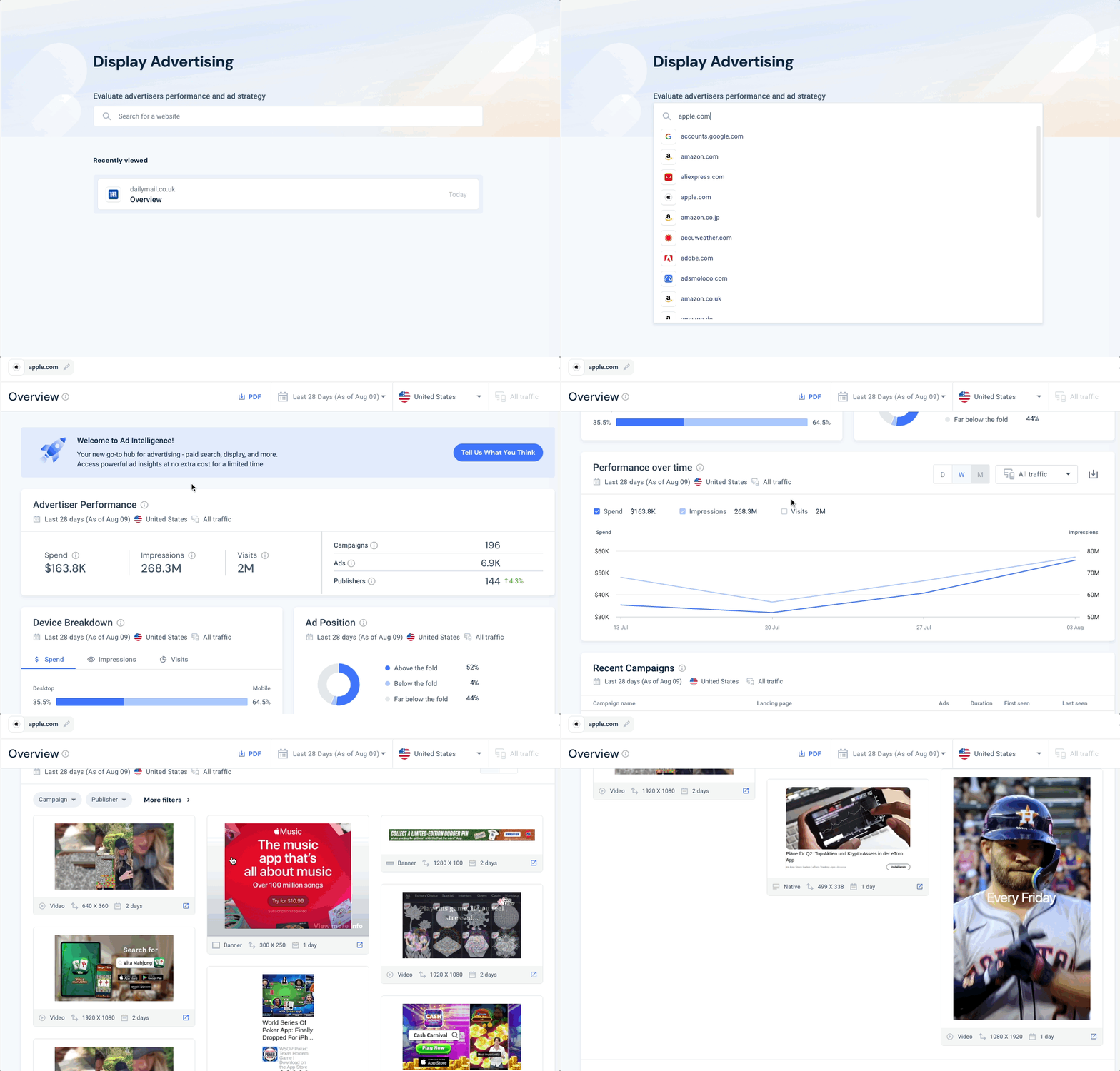
It’s your central hub for Display and Search ad insights. Now in open beta, it lets you benchmark ad performance, monitor spend and impressions, and (this is the fun part) actually see the creatives your competitors are running.
Why it matters: You’ll spot trends, uncover gaps, and fine-tune your strategy based on what’s really happening out there. Smarter planning, sharper execution, and fewer “oops” moments.
Finding the right channel strategy can feel like trying to find a specific grain of sand on the beach while seagulls squawk data points at you 🐦.
Especially with AI in full-on evolution mode.
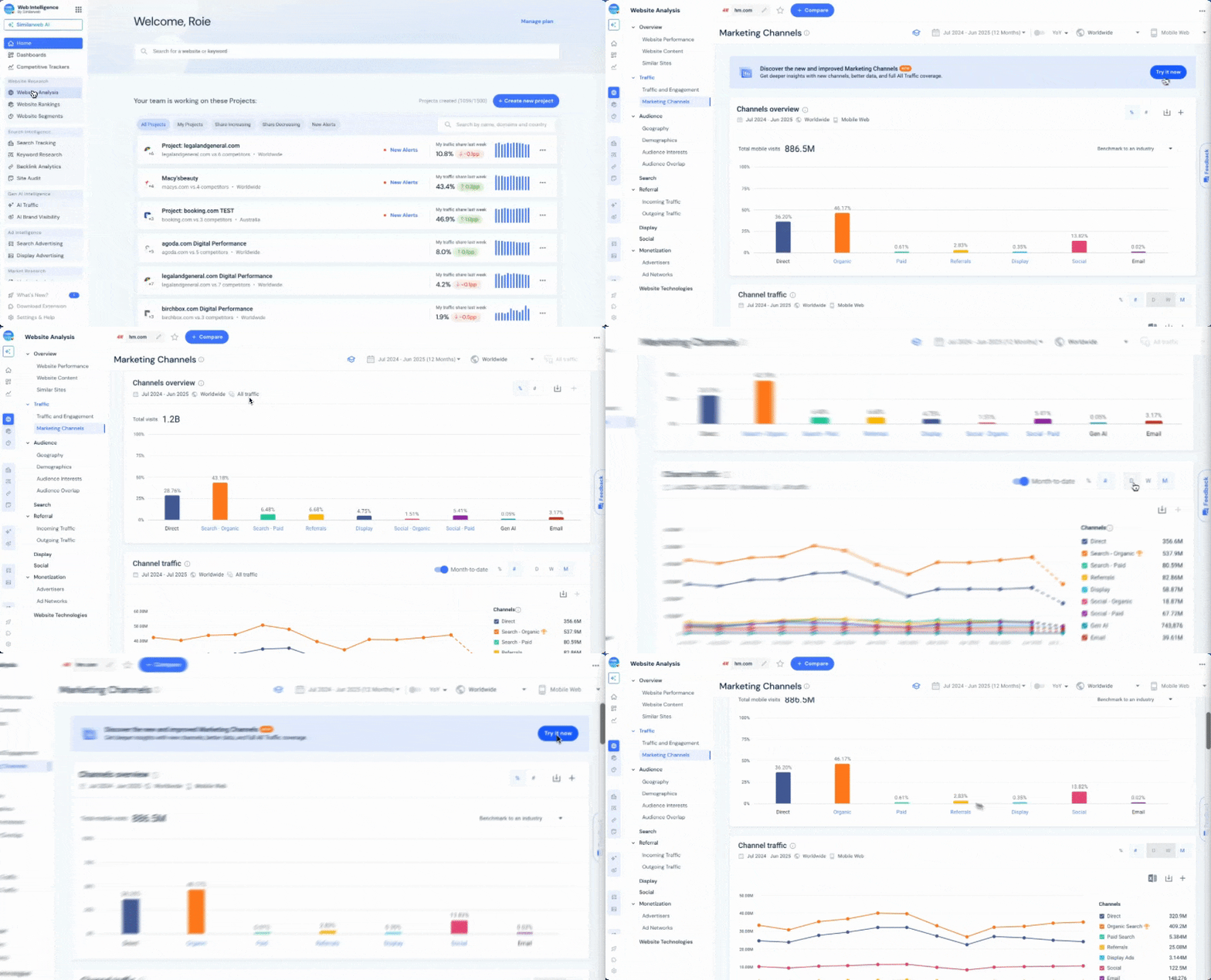
So discover the newly enhanced Marketing Channels page, now featuring Paid and Organic Social, and Gen AI insights.
Track precisely how competitors use Gen AI channels like ChatGPT and Gemini, revealing their complete traffic strategy.
Why it matters: Quickly understand your competitors’ full traffic mix, including crucial AI-driven traffic.
You’ve got competitors gaining ground, dashboards flashing red, and five teams arguing over what part of the business actually needs help ⛑️.
Meanwhile, your so-called ‘benchmarks’ are about as helpful as a map with no street names.
Introducing Business Lines: a targeted way to benchmark at the line-of-business level. It gives you benchmarking superpowers at the line-of-business level.
Instead of lumping everything into one messy average, it zooms in, showing you exactly where growth is happening (and where it’s… not). You’ll see your competitors’ strengths and weaknesses in high resolution.
Why it matters: Benchmark precisely and strategically take action on growth areas. Finally, a way to benchmark that doesn’t make your brain hurt. Now go be the person who actually knows what’s going on.
Keeping tabs on your competitors used to mean juggling five tabs, three tools, and the occasional LinkedIn-stalking session. 🔍
Enter Newslever: your new one-stop spy kit, minus the spooky trench coat.
Newslever streamlines competitive intel into a single email update, bundling your rivals’ latest social posts, ad launches, blog content, press releases, and website changes into one tidy package. All signal, no noise.
Why it matters: Now you can stay laser-focused without bouncing between platforms or chasing updates across the web. It’s effortless, it’s efficient, and you’ll spot competitor moves the moment they happen. All without lifting more than a finger (on your inbox).
You didn’t sign up to be a full-time spreadsheet wrangler. Yet somehow, you’re knee-deep in a pile of keywords that all kind of mean the same thing… but not really 🌀.
Time to break up with keyword chaos and meet something smarter.
Topics is your shortcut to clarity. It automatically groups related keywords into meaningful themes across both paid and organic search, so you can instantly spot what’s driving traffic to you and your competitors. No manual sorting. No duplicate headaches. Just clear, strategic insight.
Why it matters: Identify what’s working, what’s missing, and where the next big opportunity is hiding, without needing five Americanos and a pivot table.
You’ve got the keywords. You’ve got the data. But trying to spot a trend by eyeballing 5,000 individual click lines? That’s not analysis, that’s an optician’s eye test. 👓
Let’s make things a little easier on your retinas and your strategy.
Clicks Over Time is the newest addition to the Keywords page, and it’s here to do the heavy lifting. It aggregates clicks across up to 5,000 keywords into a single, powerful chart, so you can instantly spot traffic spikes, seasonal swings, and shifts in performance over time.
Why it matters: No more click-by-click detective work. Just a clear, at-a-glance view of what’s happening in your market, and how your performance stacks up. It’s trend-spotting made simple.
Sometimes, the standard categories just don’t cut it. You’re trying to track niche product groups, and all your data has is ‘Miscellaneous’ 🙄.
Good news: you’re not stuck with cookie-cutter categories anymore.
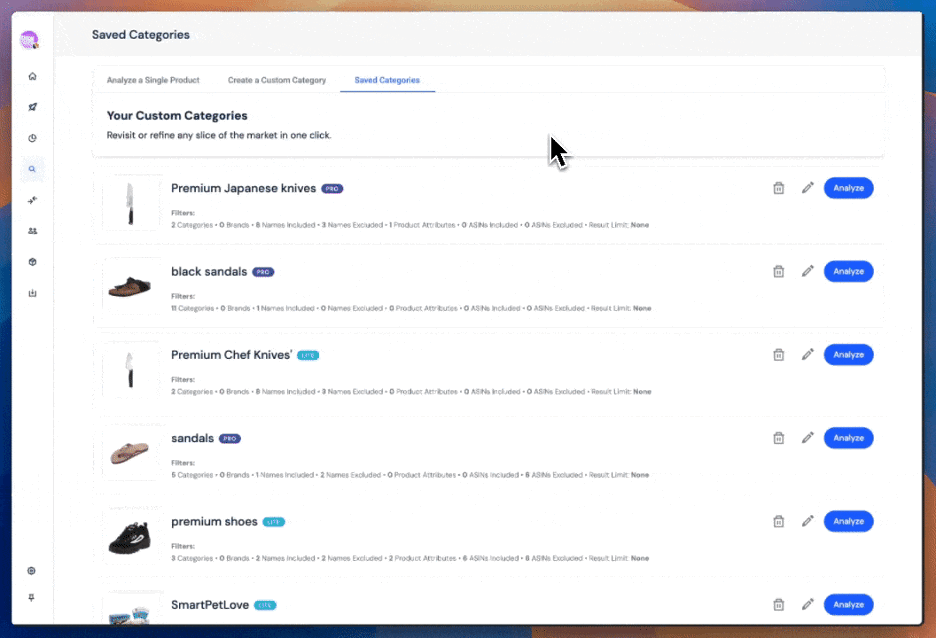
Custom Categories are now fully rolled out across Shopper. They give you the power to build and analyze your own tailored groups, on any Category or Product page in the Sales Performance and On-Site Search Overview modules.
And yes, you get the same level of insight as the built-in Amazon ones. You’ll also find your team’s shared categories neatly organized under “Favorites.”
Why it matters: That means no more forced fits. Just clean, relevant analysis built around the way you work, your unique product sets, and the way your customers actually shop. Because ‘Other’ is not a strategy.
Monthly updates would be fine if you also waited a month to notice your top product tanked⏳.
That’s why we gave the Shopper Category Digest email a ramp-up.
The Category Digest is now weekly, synced to the platform’s freshest data updates. So you get faster visibility into performance trends. We’ve also redesigned the layout to highlight the KPIs you actually care about (think revenue and units sold), and made subscription controls easier to find in “My Analytics.”
Why it matters: With earlier insight into what’s moving (and what’s not), you can act quicker, spot shifts before they snowball, and show up to meetings already five steps ahead.
You think your brand is winning Amazon search. Then you wake up to find a competitor has swooped in and stolen your sales. Now, you’re left wondering when that happened and how you missed it. 😑
Stop getting blindsided. Start taking control.
With Brand Share of Amazon Search, you can track any brand’s presence across both paid and organic results. See how market share shifts over time – at the category level or within your own custom keyword list.
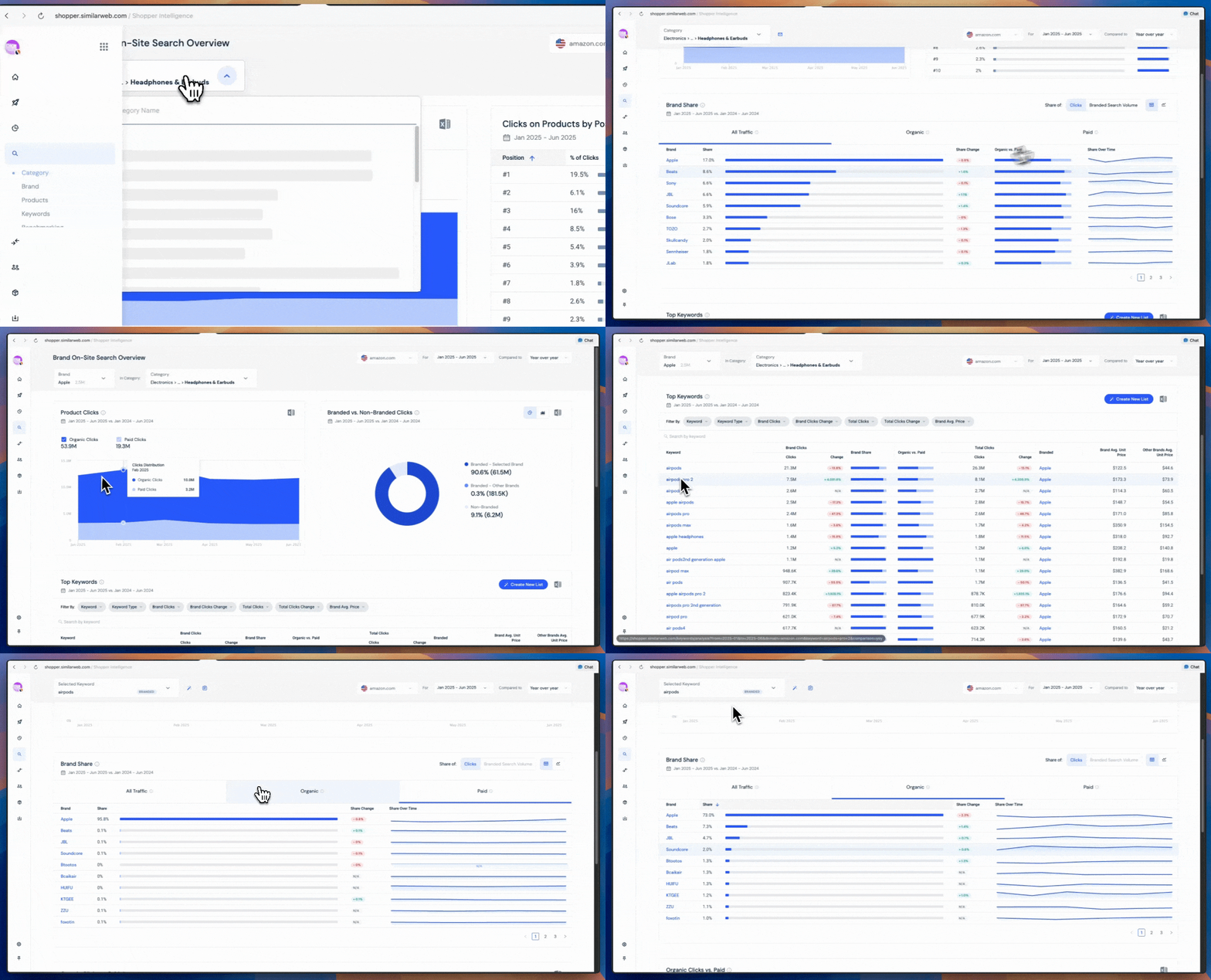
Why it matters: This gives you the context you need to act fast against competitor threats. You’ll catch emerging threats early, validate what’s working, and fine-tune your strategy down to the keyword.
Somewhere in that mountain of app reviews is a bug report, a feature request, and a user who just really hates your loading screen. 🙃 Good luck finding them, unless you’ve got backup.
That’s where App Reviews Analysis steps in – no scroll-hunting required.
With over 4 billion reviews from 58 countries (in all the major languages), App Reviews Analysis transforms noisy feedback into clear, structured insight. See what users are saying – broken down by sentiment, topic, and even app version – across both your app and your competitors’.
Why it matters: Now you can pinpoint what’s delighting users, what’s driving them nuts, and what needs fixing before it turns into a 1-star meltdown.
Your prospect just had a traffic spike, changed their tech stack, and started sniffing around competitor pages. But sure, go ahead and send that email you wrote three weeks ago 📧 .
Or… plug into something that actually tells you when to move.
The new Sales Signals API delivers real-time alerts on buyer intent, traffic surges, and tech shifts, right into your CRM or internal tools. No more tab-flipping or digging through dashboards. Just instant, actionable signals when something changes.
Why it matters: Now you’ll know which accounts are heating up, why they’re worth chasing, and when to strike.
You open a new account in your CRM… and instantly have questions. Is this the right site? Do they even do what you think they do? 🤨
You need clear information, not a research rabbit hole.
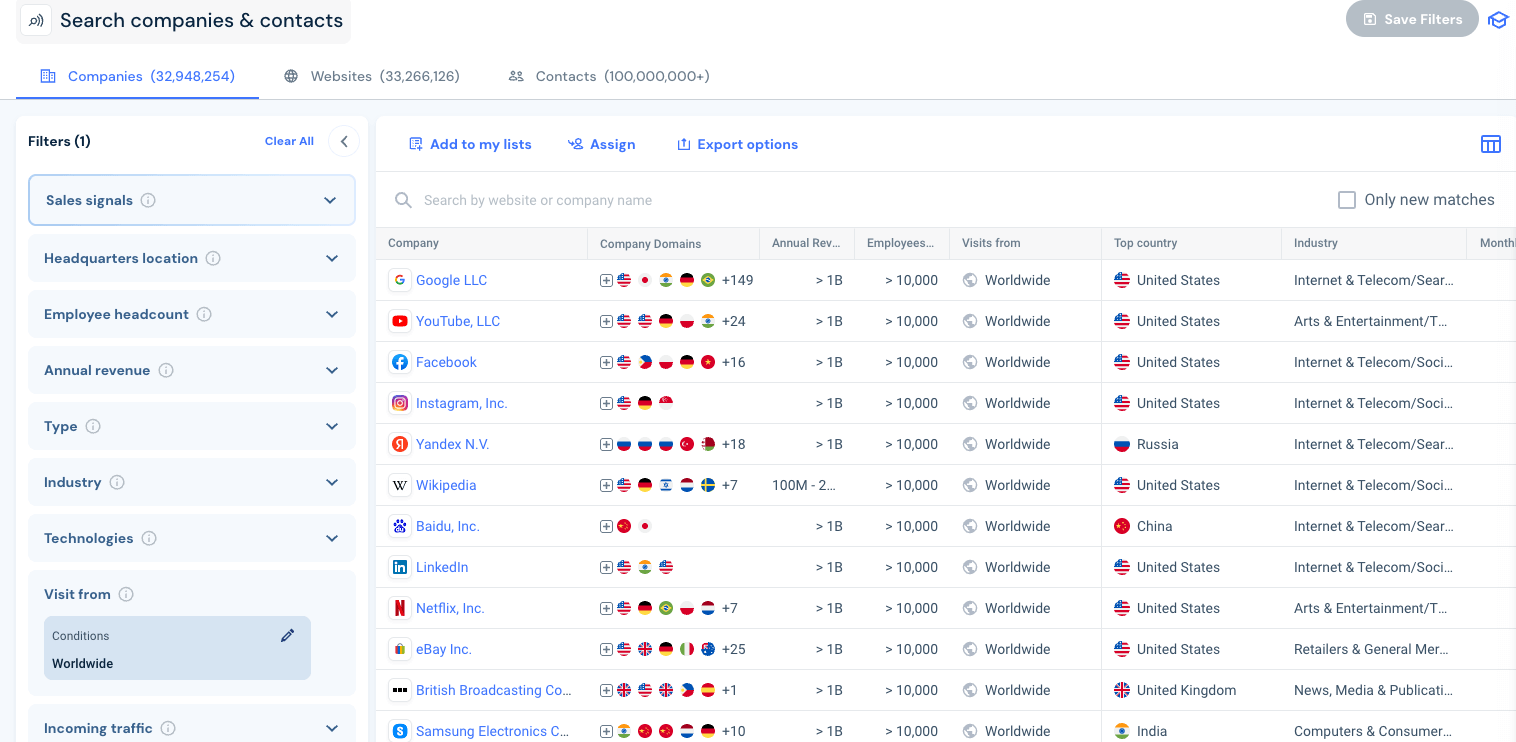
The updated Enriched Company Data set now covers over 32 million companies (up from 20M), with enhanced website and app mapping, consistent naming, and cleaner, more descriptive profiles. You’ll even find new fields like app ownership, fully integrated into your existing Sales Intelligence workflow.
Why it matters: Gain clearer, richer insights faster, so you can quickly act on promising opportunities.
The Company view page has always delivered powerful insights. But now it works even more like your sales process: start with the account, then go deeper. 🏢🔍
We’ve redesigned the UX to bring company-level clarity front and center.
With the updated Company view. You now begin at the business level where firmographics, digital assets, traffic trends, and real-time signals come together in one streamlined space. From there, it’s easy to drill down into specific websites or apps via the top menu or direct links.
Why it matters: You’ll get sharper context, faster qualification, and smoother navigation without losing any of the depth you had before. Whether you’re prioritizing accounts or planning outreach, the improved structure gets you to the insight faster and with less friction.
Every update here is designed to help you move faster, see further, and act with certainty, whether you’re closing a deal, tracking a trend, or spotting your next big opportunity.
And you’re not in it alone.
Our team’s on hand to walk you through any of these features and help turn insights into action. Just say the word, we’re here to make sure you stay one step ahead.

Team Manager, Content Marketing
James is an former journalist & content strategist in B2B tech, who has previously created content for companies like EDF and X (Twitter). He also has a journalism post-grad from LCC.
Top Ecommerce Companies in the USA: The 100 Brands Winning the Traffic Race in 2026

3 of the Sharpest Minds Weigh in on the State of Gen AI in 2026

Give it a try or talk to our insights team — don’t worry, it’s free!
