


 Marketing Intelligence
Prompt Intent: Analyzing How Gen-AI Engines Define User Intent

Are you looking at prompts the same way we looked at keywords in 2022, as short strings that map cleanly to intent categories and pages?
That mental model is now the bottleneck.
If you don’t understand how these systems interpret intent, you’ll keep optimizing content that technically ‘matches’ a query but never gets surfaced, retrieved, or used. For an SEO team or a content marketer, this is disastrous.
Modern search engines and AI systems don’t treat queries or prompts as keywords to be matched. They treat them as signals of intent. Signals that help the system decide what the user is trying to accomplish and which content is most useful for completing that task. Ranking and generation both depend on this step.
Don’t get me wrong. I understand why keyword optimization became the standard.
I spent years optimizing pages in agency environments, including title tags, H1s, and first-paragraph placement. That work wasn’t wrong, and it’s still valuable today.
Keywords still matter. They just don’t tell the whole story.
This article breaks down how search engines and AI systems analyze prompt intent, how they match that intent to documents, and why shifting away from keyword thinking is now essential for SEO and GEO. I’ll also show you how to break down intent using a handy prompt that I use, so that you can create a content network that LLMs will love.
Why our understanding of user intent is outdated
I remember the moment I realized this. While reviewing the Search Console queries report, I noticed a query that made semantic sense but didn’t appear anywhere in the article.
If Google only surfaced keyword-optimized content, why would this page rank for that query?
And then I realized, search engines match the meaning of the prompt to your content, not to keywords.
Once I saw it, I began to see it everywhere.
For years, SEO has relied on a familiar search intent framework:
- Informational
- Navigational
- Commercial
- Transactional
This model became popular because it is useful. It helps group keywords, choose page types, and prioritize content.
But it simplifies what user intent really is.
Search engines do use intent classifications internally, as patent research has shown. These signals help systems decide things like ranking strategies, result layouts, and page-type weighting. In that sense, intent buckets are real. But they’re also coarse-grained.
They were never meant to describe the full shape of what a user wants.
Modern systems go beyond intent labels
Both search engines and LLMs break queries and prompts down into finer semantic components. This is what systems actually extract from prompts.
- Entities and attributes
- Relationships and modifiers
- Implied actions and outcomes
How does AI approach user intent?
When patents talk about ‘intent,’ they’re describing a problem to be solved.
AI and search engines start by figuring out what the user actually needs to know or accomplish. Once that information need is clear enough, the system can decide what content to retrieve or generate to resolve it.
What this means for SEO and GEO
The job as an SEO and GEO is no longer to match content to keywords or even to intent categories. It’s to help the system confidently resolve the user’s informational need.
SEO and GEO are now about task completion
Once the system has interpreted the user’s informational need, it looks for content that helps resolve that need. This happens during the retrieval stage.
From this perspective, the exact wording of a prompt or query matters far less than what the user is trying to accomplish.
This shift has real consequences downstream. It directly affects how you analyze prompts, create content, and optimize it for both search engines and generative systems.
Because at the end of the day, visibility depends on how useful your content is to the system.
That means:
- Structuring content so its purpose and scope are easy to infer
- Reducing ambiguity about the problem the page is meant to solve
- Ensuring key information can be easily extracted, understood, and reused
The better your content helps the system resolve intent, the more likely it is to be ranked, retrieved, cited, or synthesized.
You now know how AI analyzes user prompts to understand user intent. Now let’s see what intents search engines recognize.
Known prompt intent types
In the Similarweb Gen AI Landscape report, our data team analyzed millions of user prompts and identified five high-level prompt intent categories.
To make this framework more granular, I then reviewed relevant patent literature to understand how large language models and search systems break intent down internally. Using the categories identified by our data team as a starting point, I mapped and segmented the intent signals described in patents into these broader groups.
The result is a set of intent types that reflect both real-world prompt behavior and how modern systems interpret and resolve intent.
Understanding these prompt intents will help you build the right content that AI retrieves and cites.
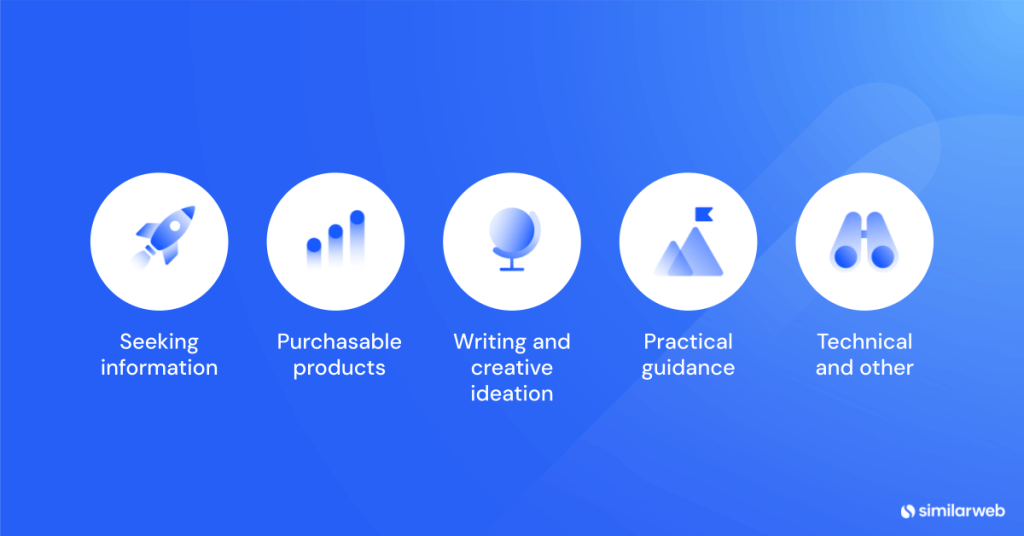
Here they are:
A. Seeking information
Patent meaning:
The user wants understanding, facts, explanations, or awareness, not necessarily to act immediately.
- Learn & explain
- Fact lookup/reference
- Feature & capability discovery
- Foundational understanding
- Trends & market research
- Conceptual comparison (e.g. category differences)
B. Purchasable products
Patent meaning:
The user intent is oriented toward evaluation, selection, or acquisition of a product, even if the query doesn’t say “buy.”
- Evaluate & decide
- Compare (decision-oriented)
- Product suitability (use-case fit)
- Specs & constraints (as filters)
- Buy / sourcing
- Price–value optimization
C. Writing & creative ideation
Patent meaning:
The user wants to generate or transform content, not retrieve facts per se.
- Create / draft
- Rewrite/transform
- Summarize
- Synthesize
- Plan (content-oriented)
D. Practical guidance
Patent meaning:
The user wants to do something correctly or fix something.
- How-to/procedure
- Troubleshoot / diagnose
- Maintenance & care
- Setup & configuration
- Assurance/verification
E. Technical & other
Patent meaning:
This is a catch-all for high-risk, constraint-heavy, or system-level concerns that don’t fit cleanly into the above.
- Compliance / risk / ethics
- Privacy & legal concerns
- Security use cases
- Professional/regulated usage
- Edge or non-standard technical scenarios
You’ve now seen how LLMs break down intent. Now, let’s see how you can break down prompt intent (with a handy prompt and some Similarweb data).
How to break down prompt intent
Let’s look at a practical example using Ray-Ban’s Gen AI visibility and explore how conducting prompt analysis can uncover content opportunities.
Using the Similarweb AI Brand Visibility tool in the Brand Overview section, we can start by identifying a topic where visibility could be improved.
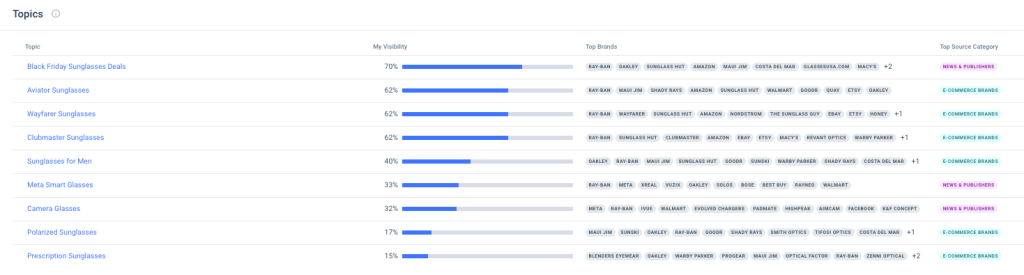
In this case, Ray-Ban’s visibility for camera glasses sits at just 32%. Let’s see how we can improve it.
The goal isn’t to ‘fix’ this with a single on-page change. Prompt-driven content should always be part of a broader strategy, ideally supported by a strong off-page and citation-building approach. But for the purpose of this post, I’ll focus specifically on how I analyze prompts to identify intent-driven content opportunities.
Step 1: Review prompt-level visibility
By navigating to the Prompt Analysis tool, we can see all tracked prompts related to Ray-Ban and whether the brand appears in AI-generated answers.
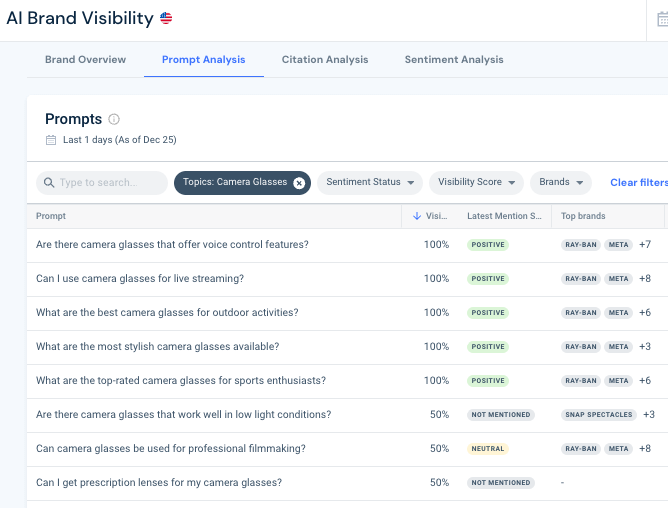
To narrow the scope, filter by topic so you’re only looking at prompts relevant to the area you want to improve, in this case, camera glasses.
This view shows:
- Which prompts Ray-Ban appears in
- Which competing brands are cited
- Sentiment
- Other contextual signals
At this stage, we’re not optimizing content yet. We’re first trying to understand how users are asking questions and where visibility is missing.
Step 2: Segment prompts by intent
To turn this data into something actionable, I downloaded the prompt list and worked with it in Excel.
After filtering it to only see camera glasses prompts, I uploaded the data into an AI platform and used the following prompt:
The goal at this stage is to group prompts by granular user intent, the same way a search engine or LLM would interpret them.
Here is the output.
| Prompt | Primary Intent | Secondary Intent | Notes (LLM interpretation) | Content Type Needed |
| Are there camera glasses that work well in low light conditions? | Product suitability | Specs & capabilities | User wants models optimized for a condition | Use-case buyer guide (low-light) |
| How do camera glasses integrate with smartphones? | Learn & explain | How-to | Concept + practical workflow | Explainer + integration guide |
| Are there any camera glasses that are waterproof? | Specs & capabilities | Evaluate & decide | Binary filter + shortlist | Specs comparison table |
| How do camera glasses compare to traditional action cameras? | Compare | Evaluate & decide | Category comparison | Comparison article |
| Can camera glasses be used for security purposes? | Product suitability | Compliance / risk | Use-case + legality implied | Use-case analysis + caveats |
| How do I troubleshoot connectivity issues with my camera glasses? | Troubleshoot | How-to | Problem-resolution intent | Troubleshooting KB |
| What is the battery life like on most camera glasses? | Learn & explain | Specs & capabilities | Market-level expectation | Explainer + averages |
| What are the best camera glasses for outdoor activities? | Evaluate & decide | Product suitability | Ranking intent | “Best for X” list |
| Are there camera glasses that offer voice control features? | Specs & capabilities | Evaluate & decide | Feature-based filtering | Feature comparison |
| What are the differences between camera glasses and smart glasses? | Compare | Learn & explain | Category boundary clarification | Conceptual comparison |
| How do I ensure my camera glasses are recording properly? | Assurance / verification | How-to | Prevent failure | Checklist / validation guide |
| What are the best camera glasses for capturing fast-moving action? | Evaluate & decide | Product suitability | Performance-driven buying | Buyer guide (sports/action) |
| How do I transfer videos from my camera glasses to my computer? | How-to / procedure | Learn & explain | Step execution | Step-by-step guide |
| What are the top-rated camera glasses for sports enthusiasts? | Evaluate & decide | Compare | Ranking with social proof | Review roundup |
| What are the most affordable camera glasses with good quality? | Evaluate & decide | Buy | Price-value optimization | Budget buyer guide |
| Where can I find camera glasses with high-definition recording? | Buy / sourcing | Specs & capabilities | Acquisition + spec constraint | Where-to-buy + filter page |
| Can I use camera glasses for virtual reality experiences? | Product suitability | Learn & explain | Edge use-case validation | Capability explainer |
| Are there camera glasses that can record in 4K? | Specs & capabilities | Buy | Hard spec requirement | Spec-filtered list |
| What are the latest trends in wearable camera technology? | Trends & market research | Learn & explain | Horizon scanning | Trends / thought leadership |
| What features should I look for in camera glasses for travel vlogging? | Research / investigation | Evaluate & decide | Pre-purchase research | Buyer framework |
| Are there any camera glasses that offer augmented reality features? | Specs & capabilities | Trends | Feature discovery | Emerging tech overview |
| How do I clean and maintain my camera glasses? | Maintenance & care | How-to | Longevity intent | Maintenance guide |
| What are the most stylish camera glasses available? | Evaluate & decide | Compare | Aesthetic-driven | Curated style roundup |
| Can I use camera glasses for live streaming? | Product suitability | How-to | Capability + workflow | Capability explainer |
| Can camera glasses be used for professional filmmaking? | Evaluate & decide | Product suitability | Quality threshold question | Use-case feasibility analysis |
| What are the privacy concerns with using camera glasses? | Compliance / risk | Learn & explain | Ethics & legality | Risk / compliance explainer |
| Where can I buy camera glasses with a warranty? | Buy / sourcing | Risk mitigation | Trust & assurance | Purchase guide |
| Can I get prescription lenses for my camera glasses? | Product suitability | Buy | Personalization constraint | Compatibility guide |
| How do I update the firmware on my camera glasses? | How-to / procedure | Maintenance | Operational upkeep | Step-by-step guide |
| What are the best camera glasses for hands-free recording? | Evaluate & decide | Product suitability | Core value prop | Buyer guide |
Step 3: Translate intent into a content plan
The output gives us:
- Intent-based prompt segments
- Clarity on what users are trying to accomplish
- Recommendations for the most appropriate content type to resolve each intent (e.g. explanatory, comparative, procedural)
What you end up with is a content roadmap aligned with how LLMs and search engines understand intent.
This makes it far easier to prioritize what to create, how to structure it, and why it should exist in the first place.
This is how you build a prompt-led content roadmap.
When meaning matters more than words
User intent has evolved over time.
Search engines and AI systems interpret prompts as signals, resolve underlying information needs, and select content based on how well it helps complete a task. That shift changes how content is evaluated, retrieved, ranked, and generated.
For SEOs and GEOs, the takeaway is straightforward.
Visibility now depends less on matching terms and more on semantic clarity, task alignment, and intent resolution.
But understanding this shift conceptually isn’t enough.
To act on it, you need the right data. Data that shows how users are actually prompting AI systems, where your brand appears (or doesn’t), and how intent is expressed across topics, formats, and use cases.
That’s where insight turns into execution and where modern SEO and GEO strategies start to scale.
FAQs
What is the difference between intent and prompt?
A prompt is the text a user writes. Intent is the underlying information need or task the system infers and tries to resolve using that prompt.
What is a prompt example?
A prompt could be: “Are camera glasses worth it for travel?” The intent may include comparison, evaluation, and decision-making, not just information lookup.
What are three types of intent?
At a high level, intent can be described as:
- informational (learning or understanding),
- procedural (how to do something),
- decisional (comparing or choosing between options).
These often overlap and are resolved together by modern systems.
How can I measure my brand’s visibility in generative AI engines?
Similarweb’s AI Brand Visibility Tool shows how often your brand appears in ChatGPT answers for specific topics and lets you benchmark against competitors. It identifies which sites drive citations and reveals the prompts behind those answers, giving actionable insight into which topics and question types you should target.

Related Posts

Why AI Engines Cite UGC Over Brand Content And How To Leverage It For AEO

AI Mentions vs. AI Citations: What’s the Difference and Why It Matters for GEO


How to Do A Competitive Analysis: Complete Guide & Free Templates


Wondering what Similarweb can do for your business?
Give it a try or talk to our insights team — don’t worry, it’s free!