


 Marketing Intelligence
How to Track Brand Visibility in Google’s AI Mode

The rise of generative search has turned the old SEO rulebook on its head. Traditional search still matters, but millions of users now get answers directly from AI assistants like ChatGPT and Google’s new AI Mode.
An August 2025 research shows that 61% of American adults have used AI in the past six months, and global adoption translates to billions of people engaging with AI tools, with millions using them daily. This isn’t just curiosity: consumer AI has reached habit‑forming scale. Usage is concentrated in a handful of platforms.
Similarweb’s data indicates that ChatGPT reached 7 billion monthly visits and over 570 million MAU of ChatGPT’s mobile app (iPhone + Android). On the search side, Google announced that AI Overviews now serve 2 billion monthly users, and its AI Mode chat interface already has more than 100 million monthly active users in the US and India alone.
These figures highlight how generative engines, whether stand‑alone like ChatGPT or integrated into Google Search, influence information discovery for hundreds of millions of people.
Google’s AI Mode acts like a research assistant layered on top of traditional search. According to Google, AI Mode uses advanced reasoning and a “query fan‑out” technique to break complex questions into multiple sub‑queries, then synthesizes responses (answers) using its Gemini model.
Because the model pulls from many sources, it rewards trust signals and can cite supporting pages. As a result, Generative Engine Optimization (GEO) has emerged: instead of chasing rankings, marketers must ensure that AI models understand, cite, and recommend their brands.
This introduces SEOs to new trackable GEO metrics and KPIs (citation share, AI share of voice, influence score, sentiment, and more) that are as important as classic keyword rankings.
This guide explains how to track and analyze brand visibility in Google’s AI Mode using Similarweb’s AI Brand Visibility tool. I’ll use a real Adobe campaign as a unified example and keep the focus on actionable steps, frameworks, and benefits.
Why is it important to track AI Mode visibility specifically?
It’s tempting to treat all AI engines the same, but visibility in ChatGPT doesn’t automatically translate to visibility in AI Mode.
Google’s AI Mode sits inside the Search experience and is powered by Gemini: it pulls from the live web index, the Knowledge Graph, and the Shopping Graph, issues multiple background queries, and cites supporting sources.
In contrast, ChatGPT and Claude are stand‑alone chatbots that rely on pre‑trained language models, with optional browsing. They cite sources only when browsing is enabled and don’t integrate with Google’s personalization signals.
AI Mode can drive clicks because cited links appear directly below the answer, and ads are beginning to roll out, whereas ChatGPT generally keeps users within the chat interface.
These architectural differences produce distinct citation patterns. A 2025 BrightEdge study analyzing tens of thousands of prompts found that ChatGPT includes brands in 99.3% of eCommerce responses, while Google AI Mode includes brands in about 81.7% of responses.
ChatGPT’s citations overwhelmingly point to retail and marketplace domains (41.3% of its citations go to Amazon, Target, or Walmart). AI Mode, on the other hand, favors brand and original equipment manufacturer (OEM) sites (15.2% of citations) and balances commercial and informational sources.
Social and community sources also carry more weight in AI Mode than in ChatGPT. Similarweb’s Gen‑AI Landscape report shows that 61% of AI citations come from earned media, and that social/UGC sites have greater influence in AI Mode. At the same time, business services websites are less visible. ChatGPT almost never cites social sources (0.4% of citations).
The takeaway is clear: optimizing for ChatGPT alone won’t guarantee visibility in Google’s AI Mode.
You must tailor your strategy to each engine:
- For AI Mode, invest in authoritative content on your own domains, earn citations from trusted publishers and social communities, and structure your content so Google can easily extract it.
- For ChatGPT, ensure your products are well represented on major retail sites and that your brand appears in the long tail of marketplace reviews and comparison guides.
Understanding these nuances helps you prioritize where to allocate resources and prevents cannibalization between your AI visibility efforts.
Historical challenges in measuring AI Mode visibility and traffic
Tracking the impact of AI Mode used to be nearly impossible.
When Google launched its assistant‑style AI Mode in May 2025, it shipped with a serious attribution bug: links in the answer box were marked with a noreferrer attribute, so analytics platforms treated resulting visits as Direct or Unknown traffic.
Industry observers confirmed that AI Mode clicks often appear as “Direct” or “Unknown” in Google Analytics, making performance tracking difficult. Publishers lamented that AI Mode could summarize their content, yet the resulting visits would show up as direct traffic in GA4.
To make matters worse, Google Search Console aggregates AI Mode and AI Overviews data into the regular “Web” search type and offers no filter to isolate these AI features. Even after Google fixed the noreferrer bug on May 28, 2025, AI Mode performance is still blended with organic search.
John Mueller has stated there are no plans for a separate reporting view, so SEO teams cannot tell how often AI Mode triggers or whether their pages were cited. This aggregation means impressions can rise while click‑through rates plunge, leaving marketers guessing whether AI Mode cannibalizes their traffic.
Before purpose‑built tools existed, teams resorted to manual SERP checks, spreadsheets, and qualitative observation to gauge AI exposure. They would track spikes in direct traffic after AI Mode rolled out and infer that generative answers were driving unreported visits.
Not only was this time‑consuming, but it also couldn’t connect AI visibility to downstream conversions. With AI Mode traffic masked as direct/none, it was impossible to attribute revenue or leads to specific prompts or topics.
Similarweb’s AI Brand Visibility and AI Traffic tools were designed to close this gap. They measure how often your brand is mentioned and cited in AI Mode answers, identify which domains influence AI responses, and show the visits those AI answers drive.
By connecting visibility metrics to actual traffic, you can prioritize prompts and topics that not only earn mentions but also deliver meaningful business outcomes.
Now that you know why it’s so essential to track AI Mode performance, it’s time to dive into our working framework.
Using the DEEP Framework for AI Visibility
To organize the process, I use the DEEP framework, which I also showed in other guides.
This framework is quite simple, and structures the workflow from scoping to planning, ensuring you don’t miss critical steps. It helps you Define your objectives and baseline, Explore where your brand appears, Evaluate the quality of that presence, and Plan improvements.
The DEEP framework divides the workflow into four stages that align with modern AI‑search metrics:
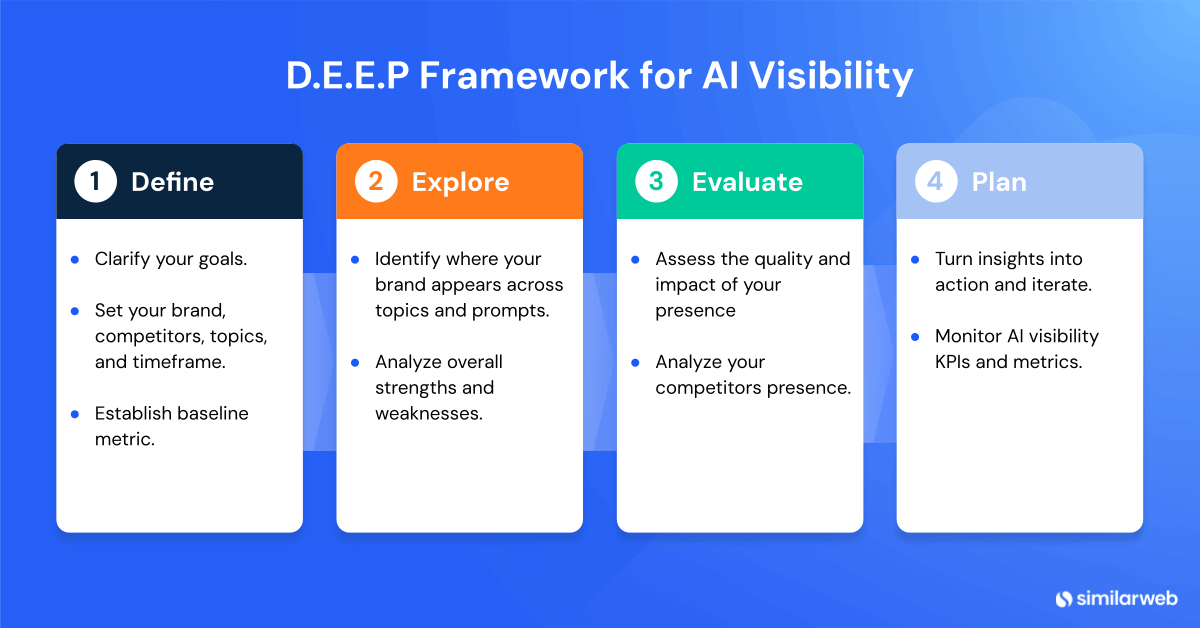
Following the DEEP cycle regularly helps you diagnose visibility gaps and prioritize the right content and outreach strategies. The following sections show how to operationalize this framework in Similarweb.
Step 1: Define your scope and baseline
Open your AI Brand Visibility dashboard: In Similarweb’s Gen AI Intelligence suite, go to AI Brand Visibility, then choose the campaign you created (here, I’ll use Adobe).
Set the date range: Click the date picker in the top‑right corner and select Last 7 Days to follow my example. A narrow window is helpful in monitoring recent performance and identifying quick wins. Once applied, the dashboard recalculates metrics for the selected period.
Confirm the model: Ensure AI Mode is selected.
Now that the ranges are set, the first thing I recommend doing is benchmarking.
The Brand Overview tab summarizes your brand’s presence across AI responses. It’s great for giving a first glimpse into a brand’s performance.
For Adobe, the campaign included data from 1,260 AI responses.
Key metrics include:
- Brand Visibility: the percentage of AI responses mentioning your brand (Adobe) out of all answers analyzed. In the past week, Adobe was mentioned in 196 of 1,440 AI responses, which equals 13.61% visibility.
- Brand Mention Share: your brand’s share of all brand mentions for the prompts in your selected topics. It compares your mentions against competitors and shows how much “mindshare” you command within AI responses. For example, Adobe has a 1.67% brand mentions share:


Record baseline metrics: Note your Brand Visibility, Brand Mention Share, Domain Influence, and sentiment distribution from the Brand Overview. These numbers establish your starting point and will help you measure progress in later DEEP stages.
Step 2: Explore topics and prompts
Analyze topical visibility
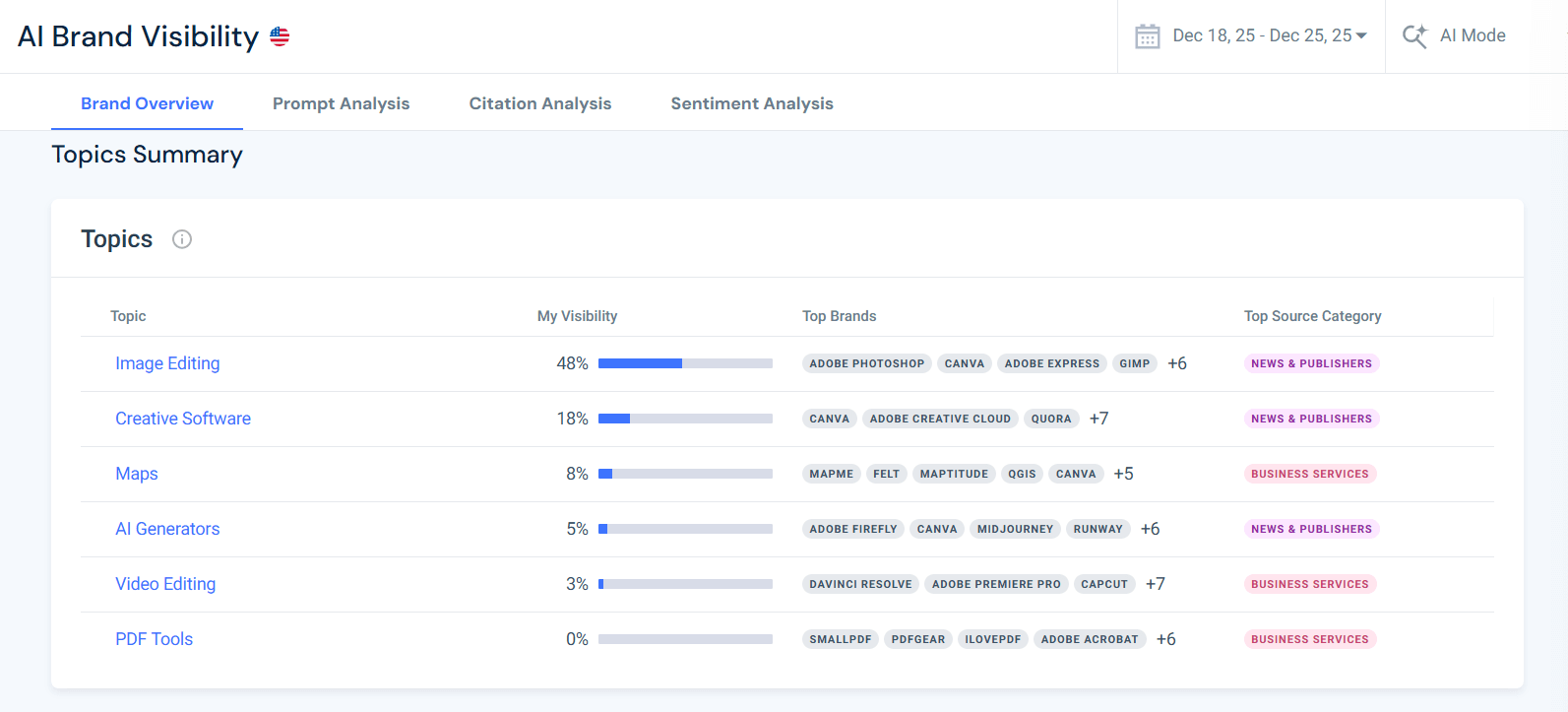
The Topics Summary reveals which categories drive your visibility. Check your selected topics to spot which you are strong at and which are weaker. These insights will guide you as you drill into the prompts and citations for each of them.
For Adobe, six topics were set for tracking (Image editing, creative software, etc.). All of them are presented in the “Topics” table, along with their individual visibility scores. This view is excellent for getting a first sense of your strengths and weaknesses.
Why does analyzing topical visibility in AI Mode matter?
Topics guide your content strategy, so understanding your weakest and strongest topics is crucial for later planning and prioritization, especially if you’re looking to create high impact.
If Adobe sees high AI visibility share around image editing, that signals strong authority in that domain. In contrast, a low share in video editing suggests an opportunity to produce more authoritative content on video and AI‑assisted storytelling. At the same time, despite having low visibility in PDF tools, Adobe can choose to deprioritize optimizing it since its goal is to achieve over 50% visibility in image editing.
Make sure your topic priorities and planning are always synced with your business goals. Align your editorial calendar with high‑opportunity topics and ensure your proprietary data appears in those areas, unique facts are “un‑hallucinatable” and therefore highly citeable.
Once you have your topics measured, it’s time to drill down into the individual prompts.
Analyze prompt‑level visibility and user intent
AI Mode responses are triggered by user prompts, so understanding the topics isn’t enough. Analyzing the prompts themselves is very important for understanding your visibility in AI Mode. Performing prompt analysis gives you insight into users’ needs and sentiment, how AI engines understand and interpret them, and how they provide answers.
The Prompt Analysis tool lists the top queries that mention your brand, alongside a Visibility Score, Sentiment, Top Brands mentioned, and the associated topic.
During our 7-day period, Adobe appeared in prompts such as:
- “How to convert PNG to SVG without loss of detail.”
Topic: Image Editing. Adobe appeared alongside other graphic tools. - “What tools can remove background from images?”
Topic: Creative Software. Adobe’s mention indicates its software is considered authoritative for background removal. - “What are the differences between different photo editing tools?”
Topic: Image Editing. This question highlights competitors and allows you to gauge relative positioning.
How to analyze prompts in AI Mode?
To learn how to analyze AI prompts, follow this simple process:
- Sort prompts by visibility or sentiment.
- Queries with a high visibility score but negative sentiment indicate brand‑perception issues.
- Low-scoring queries show where you need to build authority.
- Divide prompts by type.
- How-to’s
- Comparisons
- Definitions
- Analyze prompt intents.
- Export prompts
- Use the User intent segmentation prompt template to break them down into primary and secondary prompt intents.
- For each query, assess whether your existing content answers the question concisely.
Now you know:
- What users are trying to accomplish
- What would be the most appropriate content type to serve each intent (e.g., procedural, comparative, explanatory)
Beyond simple metrics, pay attention to competitor gaps and category clarity.
The Prompt Analysis tool can highlight prompts where competitors dominate, but your brand is absent. This absence may stem from a content‑intent gap (your site lacks authoritative information on that exact question) or a category clarity gap if the AI doesn’t associate your brand with the topic.
Identifying these gaps helps you prioritize content creation and clarify entity associations so generative models recognize your brand in the right context.
Step 3: Evaluate citations and domain influence
Citation share is the new backlink count. The more authoritative your brand is, the more citations and influence you’ll have in AI engines. Being used as a citation in AI Mode’s answer has the potential to drive actual traffic to your website (traffic that, according to the latest data, converts a lot better than traffic from other channels).
In the Citation Analysis tool, Similarweb shows how often your domains appear in AI answers, your domains’ influence on AI engines, and other external pages that influence the models (along with their individual influence score).
In my example:
Adobe’s Domain Influence is 72%, meaning Adobe’s own domains are cited in 72% of AI responses that mention the brand. This indicates strong authority.
- Citations in brand‑mentioned responses (number of URLs cited when the brand appears): 15% (3,243 URLs).
- Citations in non‑brand responses: 85% (19,076 URLs). This metric represents the broader citation universe. For Adobe, it highlights that many URLs influence the model even when Adobe isn’t mentioned, offering a roadmap for partnership and outreach.


The treemap in Similarweb shows top domains driving citations. By examining the most influential URLs, you can replicate their format or secure mentions.
A high citation frequency signifies that the AI engine regards your domain as a high‑authority source. When you lack citations, publish proprietary research or collaborate with trusted publishers to earn them.
In my example, I can see that the top-cited domains for Adobe’s topics include YouTube.com, Adobe.com, Reddit.com, Canva.com, LinkedIn.com, and tech review sites.
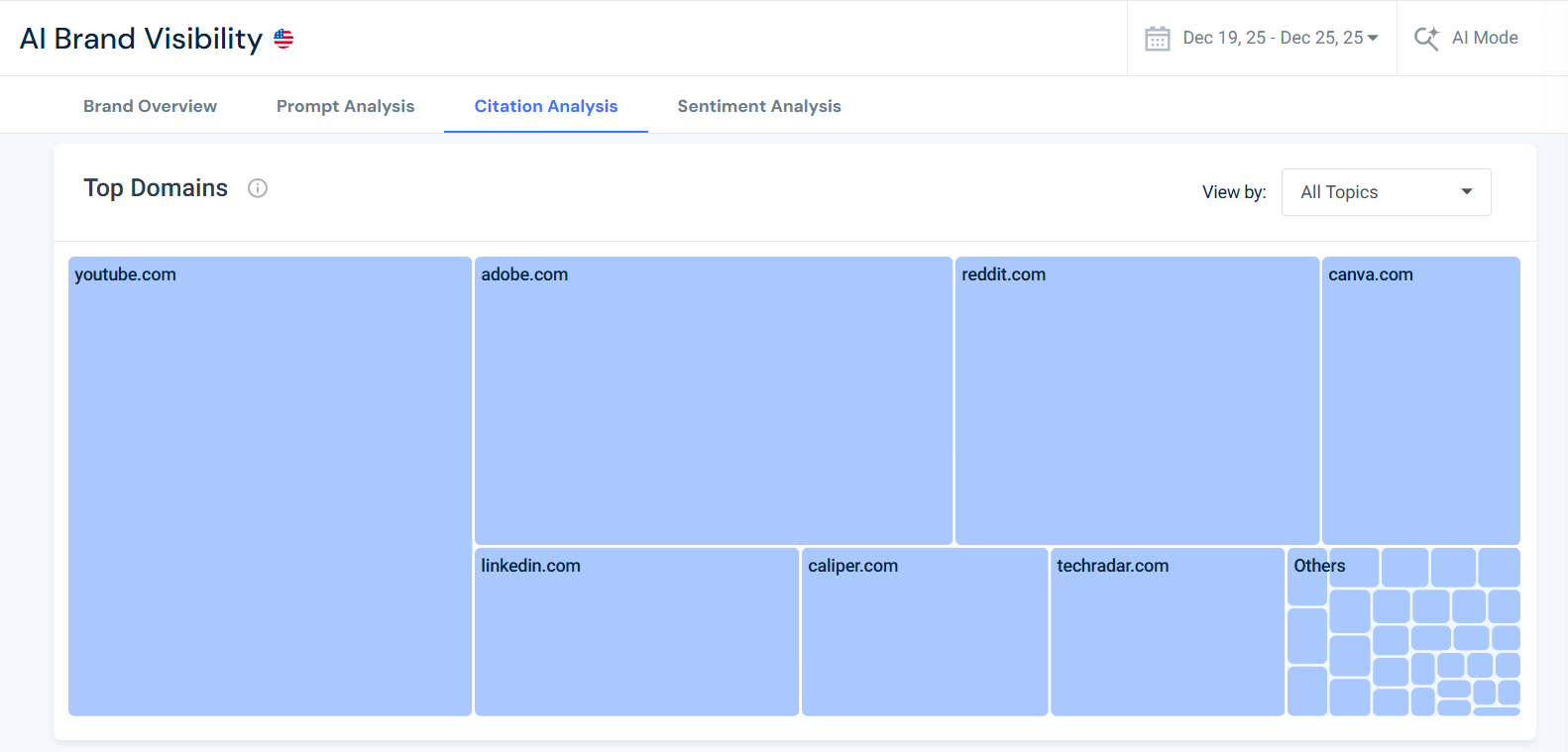
To increase their own influence scores and citation share, Adobe can publish specific articles on video editing software, AI image generators, or product comparisons.
Pro Tip: Performing citation analysis helps you prioritize your outreach and backlink efforts. It’s no longer just about getting backlinks, but about getting them from other high-influence websites.
Monitor sentiment and emotion.
Visibility alone isn’t enough. If you want to control the way that AI engines use your brand name, analyzing the tone of mentions is critical.
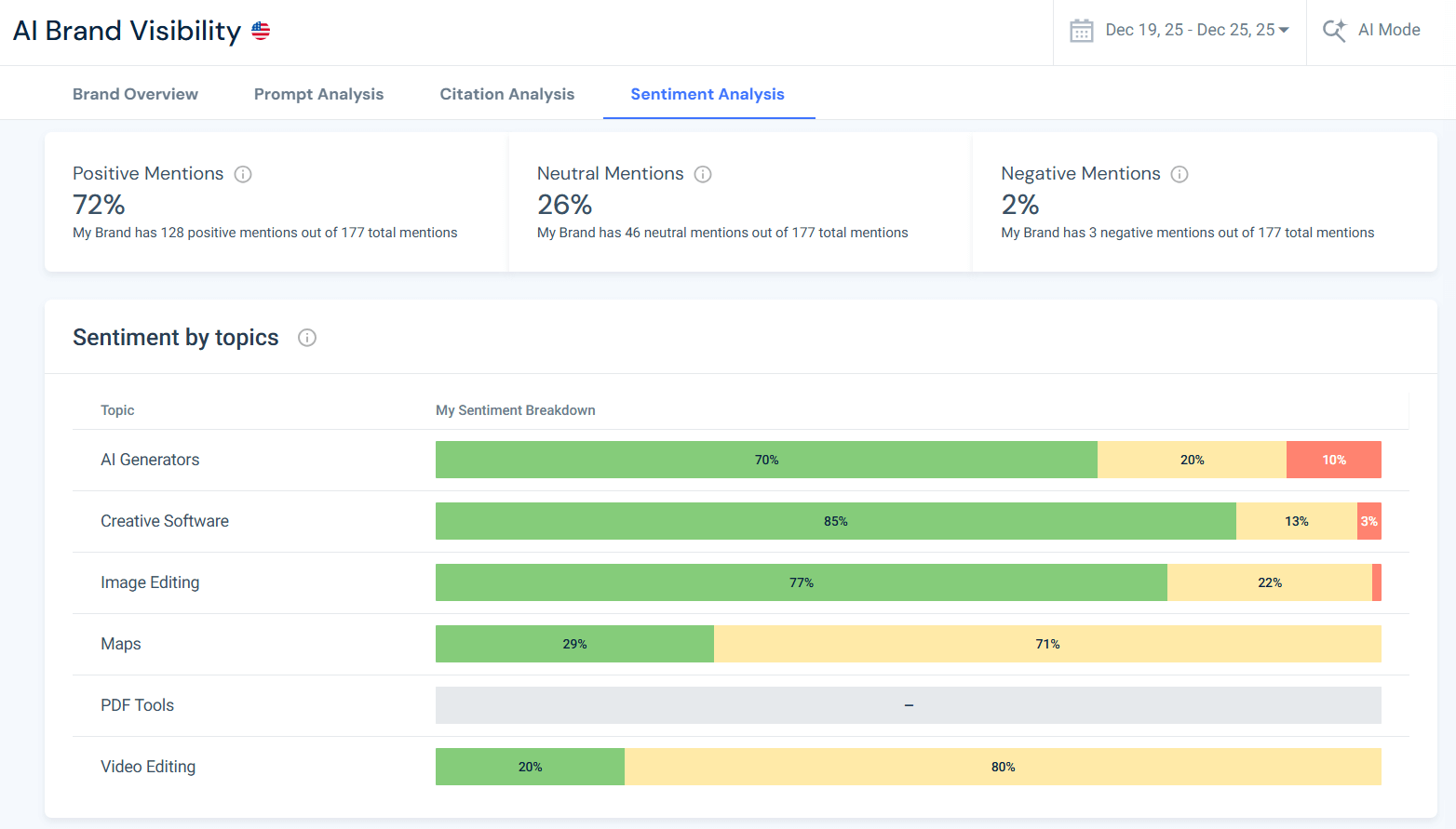
The Sentiment Analysis tool breaks down mentions into positive, neutral, and negative categories. For Adobe, over the last week:
- Positive mentions: 72% (128 out of 177 total mentions).
- Neutral mentions: 26% (46 mentions).
- Negative mentions: 2% (3 mentions).
The sentiment chart also displays sentiment by topic. Use this view to zero in on the topics where your brand has negative sentiment or high neutral sentiment. If you’re mentioned negatively, you should prioritize fixing the issues that lead to those negative views.
How to analyze user sentiment in AI Mode?
High positive sentiment indicates the AI has learned favorable narratives about Adobe’s products, while neutral sentiment signals informational mentions without explicit endorsement.
High neutral sentiment often indicates that your brand comes up frequently in comparative prompts. These types of prompts tend to trigger sources that appear objective in their comparisons,
Negative mentions, though few, require investigation: perhaps a particular feature is criticized or a competitor is more highly recommended.
Always cross‑reference sentiment with actual reviews or support tickets: AI sentiment should complement, not replace, traditional brand trackers.
How to Benchmark AI Mode visibility against competitors (share of voice)?
Tracking your AI Share of Voice means comparing how often AI mentions you versus competitors. Similarweb surfaces SoV metrics in its competitor comparison section (beneath the sentiment charts).
If your SoV is low despite a high domain influence, it may indicate that competitors are more frequently mentioned in high‑volume queries. Research from Seer Interactive found that brand search volume and domain rank both correlate with AI mentions. This means that building brand awareness through PR, social engagement, and thought leadership indirectly boosts your AI visibility.
Use AI-SoV benchmarks to identify whether you need to ramp up content creation, invest in brand campaigns, or pursue more citations.
Step 4: Plan actions and connect visibility to AI traffic
Visibility is valuable, but it’s also important to tie it to real user behavior. Similarweb’s AI Traffic tool lets you measure how many visits your site receives from AI chatbots like ChatGPT, Perplexity, and Copilot.
By entering your domain into the AI Traffic report, you can see what share of your traffic comes from AI sources, which prompts drive clicks, and which pages convert. This insight helps validate whether improved visibility translates into meaningful engagement.
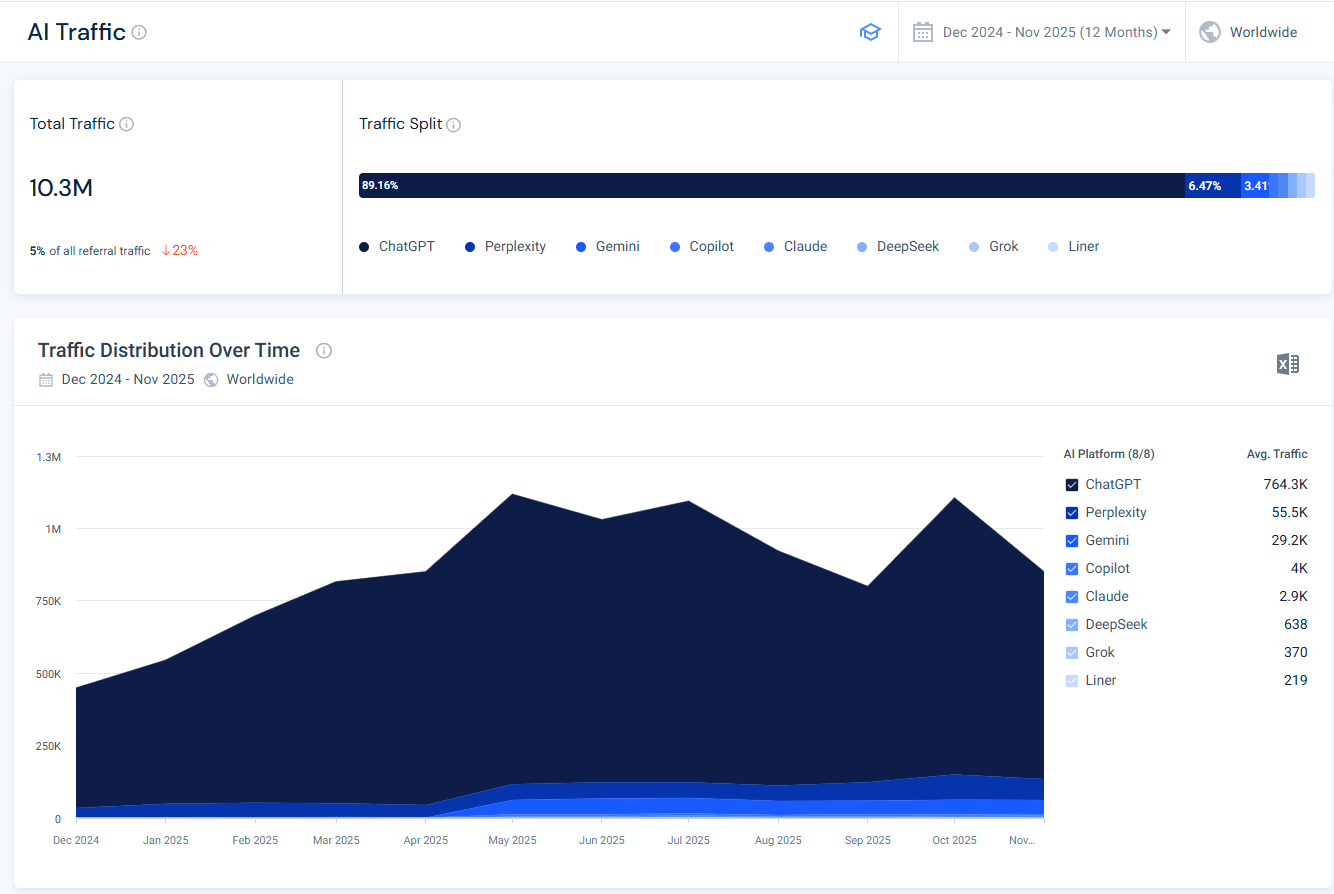
How to use it:
- Open the AI Traffic Analytics within the Gen‑AI Intelligence suite and enter your domain.
- Review the breakdown of traffic by AI platform and note the prompts that triggered clicks. You may discover that specific prompts drive high‑value visitors.
- Compare AI‑driven visits with traditional web traffic to understand AI’s relative contribution.
Use this data to prioritize content updates on pages that attract AI‑originated visits and to adjust your strategy when visibility isn’t resulting in traffic. Tracking AI traffic bridges the gap between visibility and performance, revealing which AI interactions lead to tangible outcomes.
Once you’ve connected brand visibility to actual website traffic, the next step is to prioritize how to use those insights.
How can you plan actions and prioritize work?
AI Mode forces us to rethink planning because generating traffic isn’t the only goal: visibility, citations, and brand authority now count. Here’s how I use the AI Brand Visibility and AI Traffic data to develop an action plan:
1. Identify high‑impact topics and gaps.
Start by ranking prompts and topics based on visibility share, traffic volume, and sentiment. High‑visibility topics that already drive visits should remain a focus, but you also need to close gaps. For example, if “image editing” queries mention your brand frequently but “maps” or “AI generators” barely do, shift resources to those lower‑coverage topics.
Gravity Global notes that KPIs should move beyond traffic to include impressions, brand mentions, and topic coverage, so factor those metrics into your prioritization.
2. Close negative sentiment loops.
Look for prompts with negative or neutral sentiment and investigate why. Are you being compared unfavorably, or are you not providing enough product information? Use this feedback to refine product pages, FAQs, and outreach efforts.
Sentiment is part of the visibility puzzle, and addressing negative mentions can quickly boost brand perception.
3. Plan cross‑format content ecosystems.
Generative AI systems pull from more than just articles. They incorporate videos, charts, and interactive visuals. The AI Mode fan‑out mechanism rewards content that is structured, comprehensive, and trustworthy, and experts recommend creating multimodal content ecosystems to ensure AI can find and accurately represent your brand.
Google’s own guidance echoes this: support your textual pages with high‑quality images and videos, and keep your page experience clean and navigable.
4. Strengthen technical foundations.
Make sure Google can access and interpret your content. Google advises providing a great page experience and ensuring pages meet technical requirements such as proper status codes and indexable content.
Use structured data to clarify entities and make key answers easier to extract. Implement llms.txt and other crawling signals so that generative models know which sections they can use.
5. Coordinate earned media and outreach.
AI Mode often cites high‑authority domains and trusted sources. If your citation share is low, partner with journalists, industry analysts, and review sites to secure third‑party mentions. This not only boosts domain influence but also diversifies the types of websites that reference you.
6. Allocate resources based on ROI.
The AI Traffic tool helps you identify which prompts and topics drive actual sessions. Compare traffic and conversion metrics across high‑visibility vs. low‑visibility topics to see which areas deserve more investment. For example, if “image editing tutorials” drive a high conversion rate but “general creative software” queries yield low engagement, prioritize the former.
In my previous article on GEO metrics and KPIs, I recommended looking beyond clicks to evaluate the full value of visits, so consider metrics like sign‑ups, dwell time, and assisted conversions when prioritizing your GEO activities and allocating resources.
7. Evolve with users and models.
AI Mode will continue to change as users adopt new search behaviors. Discovery is now cross‑platform, meaning that what works on Google must also serve ChatGPT, Perplexity, and other answer engines. Monitor prompt patterns regularly, update your content to match user intent, and be prepared to adjust your strategy as models and ranking signals evolve.
By following these steps, you can turn AI visibility insights into a structured, prioritized roadmap, ensuring that your brand not only shows up in AI Mode but also converts visibility into meaningful business outcomes.
AI Mode visibility roadmap template
To systematically improve your brand’s visibility in Google’s AI Mode, you need more than ad‑hoc actions – you need a structured plan. This template is designed to turn the insights from Similarweb’s AI Brand Visibility and AI Traffic tools into a prioritized, actionable roadmap.
Each row in the “Roadmap” sheet captures a specific focus area (like topic gaps, prompt improvements, or citation strategies) and pairs it with a clear recommendation, start and end dates, and an estimated impact. The companion “Visual Timeline” tab translates those dates into a simple Gantt‑style chart, so you can see at a glance how tasks overlap and when key milestones occur.
Copy the roadmap for your own use
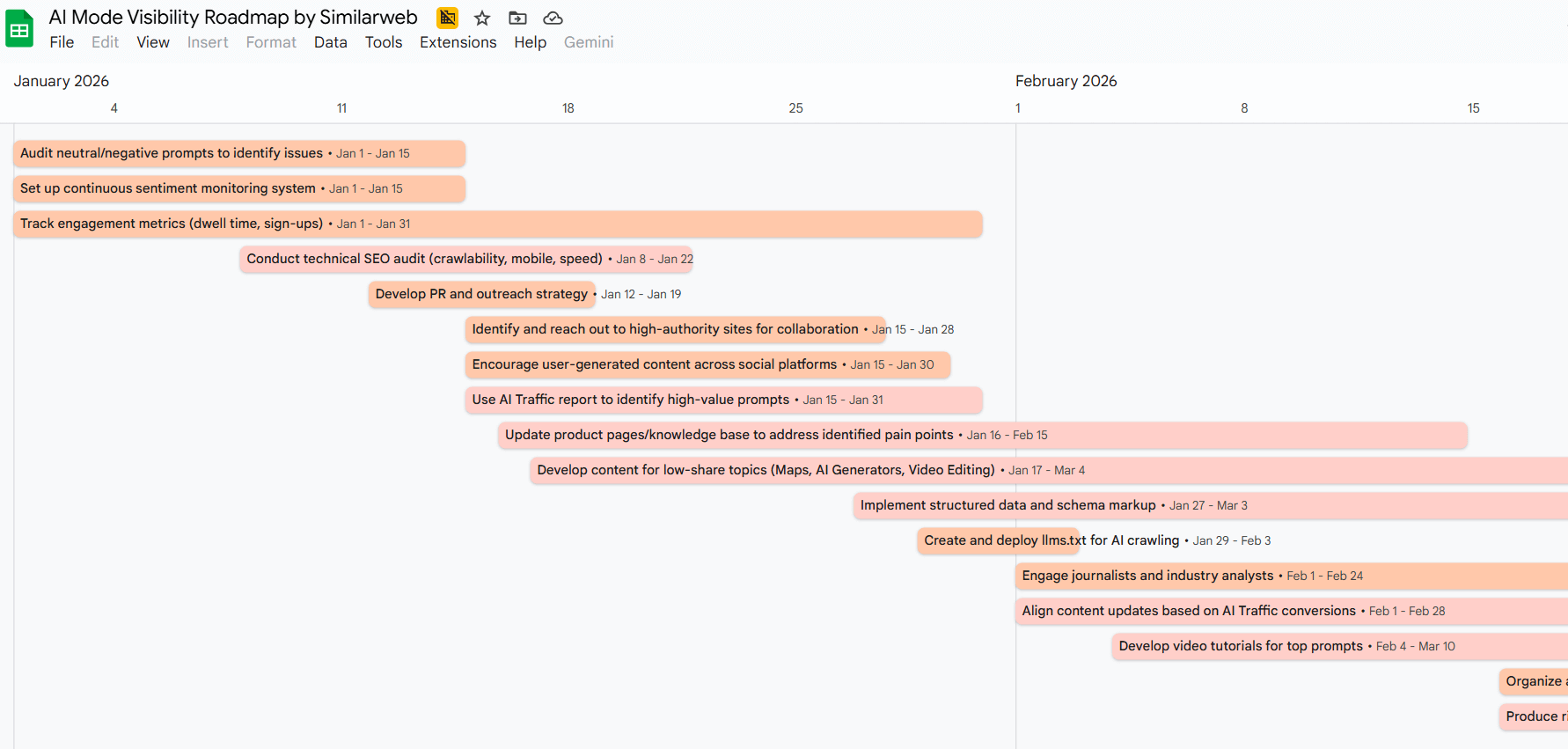
How to use the AI Mode visibility roadmap
Here’s a concise, step‑by‑step guide for filling out the roadmap template, including how to handle the start‑offset value used in the visual timeline:
- List each focus area separately.
- In the “Roadmap” sheet, start with the Focus Area column.
- Add one row per topic or KPI you want to work on.
- Each row should address a distinct aspect of AI Mode visibility.
- Add a clear recommendation for each row.
- In the Recommendation column, describe the specific action you plan to take.
- Keep each recommendation brief.
- Avoid combining multiple actions into a single cell. Use additional rows if you have multiple recommendations within the same focus area.
- Set realistic start and end dates.
- In the Start Date and End Date columns, specify the start and end dates for each task.
- The template assumes a baseline of January 1, 2026, so enter dates in 2026 and beyond. For example, if a task starts on January 15 and ends on February 15, enter those exact dates (1/15/26 and 2/15/26).
- Make sure the end date is not before the start date.
- Estimate the impact.
- Use the Impact column to rate the expected payoff. This helps you prioritize tasks.
- High-impact items should be scheduled earlier or allocated more resources.
- Duration and Start Offset calculations.
- The template automatically calculates the Duration in days.
- The Start Offset represents the number of days between the baseline (January 1, 2026) and the start date.
- You don’t need to enter these fields manually. They are formula‑driven and ensure that the visual timeline correctly positions each task.
- Review the Timeline Visual tab.
- After entering your rows, check the “Visual Timeline” sheet. It shows a bar chart where each task is represented by a horizontal bar that starts at its start offset and extends through its duration.
- This helps you see overlaps and plan resources over time.
By following these steps, you’ll produce a well‑structured, actionable roadmap that aligns with your goals for increasing visibility in AI Mode.
Copy the roadmap for your own use
Template for tracking AI Mode brand visibility
This is a template I already introduced in my AI visibility tracking guide, and it can be adapted to any brand or AI engine. Each row represents a review cycle (weekly or monthly):
Copy the AI Brand visibility template
Populate this template after each analysis cycle. Over time, trends will emerge (brand visibility increases after a new white paper, sentiment dips following a product update). Use the Actions column to assign tasks and follow up.
Best practices for optimizing AI Mode
From my experience, optimizing for AI Mode differs from classic SEO but still relies on many familiar principles. Based on independent research and industry guidelines, here are proven strategies:
Create snippet‑friendly content: Use the inverted pyramid style (answer the question directly, then provide supporting details). Frame headings as natural language questions, and use structured data so that AI models can parse your content accurately.
Publish proprietary data: AI engines cannot hallucinate facts. Unique studies, surveys, or benchmarks become authoritative sources and boost citation frequency.
Build brand awareness: Invest in PR, earned media, and partnerships. Brand awareness correlates with AI mentions, and top‑quartile brands for online mentions get roughly 10× more AI citations. Earned coverage also improves domain authority and co‑citation (being mentioned alongside trusted brands).
Optimize semantic relevance: Analyze the language your customers use and ensure your content aligns with their terminology. Semantic relevance improves your chances of being selected by AI engines.
Monitor sentiment and act quickly: Negative AI mentions can spread widely. Implement real‑time sentiment monitoring across AI, social, and support channels to address issues early.
Maintain technical SEO: AI engines still rely on crawling accessible web pages. Make sure your site is crawlable, fast, secure, and uses canonical tags correctly. These factors influence your domain authority.
Implement structured data: Use schema markup to provide context directly to AI models. Structured data helps AI systems extract accurate snippets from your content and improves visibility in AI Mode answers.
Optimize site experience: AI Mode still values fast, accessible, and secure pages. Compress images, improve Core Web Vitals, and design for mobile. A well‑structured layout aids both users and AI crawlers.
Cluster by topic: Build interconnected topic clusters rather than isolated posts. Pillar pages supported by detailed subpages signal deep authority to AI and enhance coverage across related queries.
Keep content fresh: AI Mode favors recent, accurate information. Update high‑performing pages regularly with new data, examples, and “last updated” labels.
Update KPIs: Classic metrics like page rank and raw traffic are no longer sufficient. Track visibility share, sentiment, and engagement quality (e.g., scroll depth, dwell time) to understand influence. Combine AI visibility metrics with AI traffic reports to connect citations and prompts to real visits and conversions.
Earned media and off‑page authority: Generative models draw heavily from external sources (up to 61% of AI citations come from earned media). Invest in PR, thought leadership, and user‑generated content to secure mentions on high‑authority sites. Social media and UGC sites carry more weight in AI Mode than business service websites do, so harness existing brand assets and encourage customers to share their experiences.
To wrap things up:
Generative AI search represents a structural shift in how people discover information. While classic SEO remains vital, brands must expand their measurement toolkit to include AI‑specific metrics: citation frequency, share of model, topic coverage, and sentiment.
Investments in brand awareness, proprietary data, and structured content pay dividends in AI search. With continuous monitoring and optimization, you’ll ensure that AI assistants not only mention your brand but do so positively and frequently, driving long‑term brand relevance in the AI era.
Similarweb’s AI Brand Visibility tools make this possible by surfacing real data from AI Mode conversations and turning it into actionable insights.
FAQs
Which tools can help me track brand visibility in AI Mode?
Generic analytics platforms typically don’t separate AI‑generated results. Specialized tools like Similarweb’s AI Brand Visibility and AI Traffic dashboards provide visibility share, mention share, citation share, domain influence, sentiment distribution, and AI‑driven traffic. These data points help you quantify how often your brand appears in AI-generated answers and which citations drive visits.
Which metrics matter most for measuring brand visibility in AI Mode?
Traditional metrics such as clicks or conversions are no longer sufficient. Experts advise focusing on search impressions, brand mentions in AI‑generated answers, and the breadth of topic coverage. These metrics reveal how often your brand appears in AI responses and whether your content is viewed as authoritative on the subject.
How often should I check AI brand visibility?
I recommend running a weekly check for high‑priority brands and a monthly review for secondary brands. Use the template above to track changes and correlate them with marketing activities.
Why are citations important in AI Mode?
AI search engines use selective citation: they attach sources only to claims that directly support their reasoning. Building a strong citation share demonstrates that your content is authoritative and increases the likelihood that your answers will drive traffic from AI‑generated summaries.
Does high citation frequency guarantee traffic?
No. AI Mode often answers questions directly, so it may not drive clicks—this is the “billboard effect”. However, repeated exposure builds awareness and can influence branded search and direct visits. Track downstream metrics like branded search volume and lead quality, to capture the impact.
What’s the difference between AI Overviews and AI Mode?
AI Overviews provide quick snapshots at the top of Google results, typically summarizing simple queries. AI Mode is an assistant‑style experience that allows deeper follow‑up questions and uses more complex query decomposition. Optimizing for AI Mode requires building robust topical authority and citations.
Can small brands compete with large brands in AI search?
Yes. While larger brands benefit from higher brand awareness, small brands can punch above their weight by publishing unique data, earning authoritative citations, and targeting niche questions where large brands are silent. The correlation between brand awareness and AI mentions is significant but not deterministic.
What is query fan‑out, and why does it matter for AI Mode visibility?
Query fan‑out is a process where an AI search engine breaks a complex question into multiple related sub‑queries. It uses large language models to generate many synthetic sub‑queries across different types, enabling it to craft a thorough answer. Your content needs to address not just the main question but also these related sub‑questions to appear in AI‑generated summaries.
How do AI search engines differ from chat‑based generative AI?
Stand‑alone chatbots rely primarily on their internal training data, which may be static. AI search engines employ retrieval‑augmented generation: for each sub‑query generated during fan‑out, they fetch fresh information from external websites in real time and blend it into a single answer. Because of this, visibility in a chat‑only model doesn’t guarantee visibility in AI search.

Related Posts


LLMs Comparison: How Different LLMs Contribute to Category Visibility
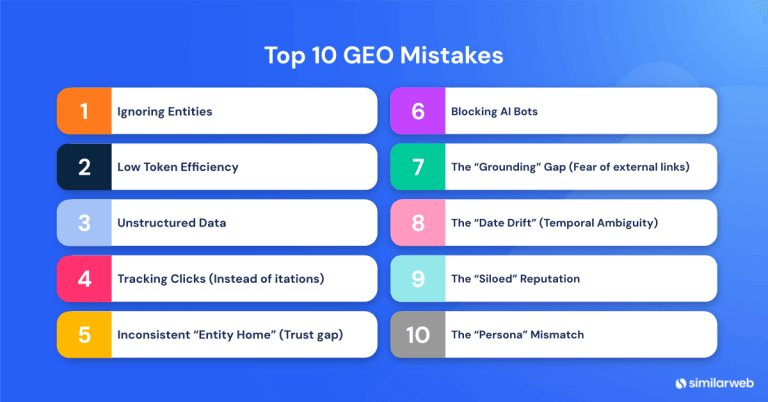
The 10 Biggest GEO Mistakes That Keep You Invisible to AI (+ One You May Be Doing Without Knowing)


The UCP Era: Why Visibility Matters More Than Ever In Agentic Commerce


Wondering what Similarweb can do for your business?
Give it a try or talk to our insights team — don’t worry, it’s free!