

You’ve hit your search limit
Start your free trial to keep exploring full traffic and performance insights.
Get StartedGPSTest app analytics for April 8

GPSTest
- Sean Barbeau
- Google Play Store
- Free
- Tools
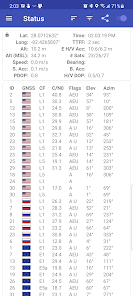
No ads, and no trackers - GPSTest displays real-time information for GNSS and SBAS satellites in view of your device. A vital open-source testing tool for platform engineers, developers, and power users, GPSTest can also assist in understanding why your GPS/GNSS isn't working.
Supports dual-frequency* GNSS for:
• GPS (USA Navstar) (L1, L2, L3, L4, L5)
• Galileo (European Union) (E1, E5, E5a, E5b, E6)
• GLONASS (Russia) (L1, L2, L3, L5)
• QZSS (Japan) (L1, L2, L5, L6)
• BeiDou/COMPASS (China) (B1, B1-2, B2, B2a, B3)
• IRNSS/NavIC (India) (L5, S)
• Various satellite-based augmentation systems SBAS (e.g., GAGAN, Anik F1, Galaxy 15, Inmarsat 3-F2, Inmarsat 4-F3, SES-5) (L1, L5)
*Dual-frequency GNSS requires device hardware support and Android 8.0 Oreo or higher. More at https://medium.com/@sjbarbeau/dual-frequency-gnss-on-android-devices-152b8826e1c.
The "Accuracy" feature lets you measure the error in your device's position against your *actual* location (entered by you). Other apps show you the *estimated* accuracy, which is generated by your device. GPSTest lets you to compare this estimated accuracy to *actual* accuracy!
Menu options:
• Inject Time Data - Injects Time assistance data for GPS into the platform, using information from a Network Time Protocol (NTP) server
• Inject PSDS Data - Injects Predicted Satellite Data Service (PSDS) assistance data for GNSS into the platform, using information from a PSDS server. Note that some devices don't use PSDS for assistance data - if this is your device, you'll see a message saying "Platform does not support injecting PSDS data". PSDS is the generic term for products like [XTRA assistance data](http://goo.gl/3RjWX).
• Clear Assist Data - Clears all assistance data used for GNSS, including NTP and XTRA data (Note: if you select this option to fix broken GNSS on your device, for GPS to work again you may need to ‘Inject Time’ and ‘Inject PSDS’ data. You may also see a large delay until your device acquires a fix again, so please use this feature with caution.)
• Settings - Switch between light and dark themes, change map tile type, auto-start GPS on startup, minimum time and distance between GPS updates, keep screen on.
Beta versions:
https://play.google.com/apps/testing/com.android.gpstest
Open-source on Github:
https://github.com/barbeau/gpstest
FAQ:
https://github.com/barbeau/gpstest/wiki/Frequently-Asked-Questions-(FAQ)
GPSTest discussion forum:
https://groups.google.com/forum/#!forum/gpstest_android
Nostalgic for old releases? Don't have Google Play Services on your device? Download old versions here:
https://github.com/barbeau/gpstest/releases
If you want to see the map on the Map tab, you'll need to install Google Play Services.
Also available on F-Droid:
https://f-droid.org/packages/com.android.gpstest.osmdroid/
GPSTest Usage Rank
The usage rank is based on Similarweb's algorithm that calculates current installs and active users over a 28-day period.
All Categories in
Germany--
Tools in
Germany#1,517
Users Interests & Top Categories
Top categories and apps used by GPSTest users
Top categories
Affinity
Top apps within the category
More apps
12%





11%


9%




9%



Top Competitors & Alternative Apps
Apps with a high probability of being used by the same users, from the same store.

WhatsGPS

Magic Earth Navigation & Maps

Orca: Boat GPS, Charts, Routes

TomTom - Maps & Traffic
GPSTest VS. April 8, 2026