

You’ve hit your search limit
Start your free trial to keep exploring full traffic and performance insights.
Get StartedWatermark: Logo, Text on Photo app analytics for March 29

Watermark: Logo, Text on Photo
- ZipoApps
- Google Play Store
- Free
- Photography
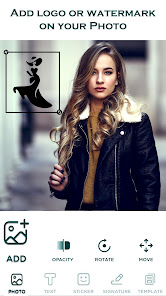
Add Watermarks, add text, or logo to photos. Create adequate protection and add a watermark on photos instantly with the #1 Watermark app. Watermark allows you to create and add logo, sticker, text, or signature to photos.
Protect your content and add a Watermark easily!
Maintain your intellectual property and reputation by watermarking your valuable content.
With Watermark Maker, you can:
➕ Add text on photos - write on photos
➕ Add logo on photos - protect your content with a logo on photos
➕ Add watermark on photos - of course :)
➕ Add PNG images
➕ Add a signature - create your watermark with a signature
➕ and many more amazing features
Protect your valuable content easily.
Add a Watermark - logo, signature, text, PNG images on photos!
If you were looking for the best watermarking app, you found it! - Watermark Maker - The ultimate watermarking app to add watermark on photos.
Protect your content with the Watermark Maker app
Brand and secure your photos before sharing them online. Digitally sign your photos, posters, banners, flyers, artwork, and documents.
Watermark Maker has 1000+ funny stickers and emojis to add to your content.
You can also add timestamps, hashtags, and other properties as text watermarks.
How to use Watermark Maker?
1. Select a photo from the photo gallery on which you want to add a watermark.
2. Add signature, text, logo, or stickers to add watermark on photos.
3. Adjust your watermark on photos; pinch it, drag it and rotate it. Adjust its opacity precisely with the slider.
4. Save and share watermarked photos with friends and family. Watermarking lets you create and save templates for future use.
Add text to photos - write on photos
Maintain your intellectual property and add text to photos, and choose your font out of a 250+ variety of cool fonts. Write on photos and create beautiful content for whatever needs you may have with our amazing add text to photos feature.
Add a logo on photos
Protect your content and easily add logo on photos. Protect your pictures with your copyright mark or sign. Watermarking has never been easier!
Crop and resize photos
Resize and crop photos in a wide variety of sizes: 1:1, 3:4, 4:3, 9:16, 16:9, Facebook Ads, Facebook Cover, Facebook Page Post, Pinterest Ads, and Youtube Art.
Create Signature:
Watermark Maker allows you to create your signature and add to photos or other types of content. Unique signatures or text on photos will help you protect your content.
- Make signature or Draw Signature by adjusting pen thickness - write on photos.
- Pinch zoom on a signature to adjust the size of text on photos.
- Apply beautiful colors and make your signature color.
- Drag the signature to set on any location of the screen.
- You can save your signature and use it later.
Q&A:
How to add a watermark to photos?
+ Simple, use our Watermark Maker the #1 watermarking tool!
Should I use another app to add text to photos?
+ No need! With Watermark Maker, you get two apps in one, you can add text to photos with our amazing write on photos feature.
Should I add a watermark to photos to protect my content?
+ Yes, watermarking your valuable content by adding text, logo, sticker or other types of the watermark is highly recommended.
b>Start protecting your content with the Watermark Maker!
Feel free to contact us at:
support.water@zipoapps.com
- Disclaimer
All product names, logos, brands, trademarks and registered trademarks, which are not owned by us, are property of their respective owners.
All company, product and service names used in this app are for identification purposes only. Use of these names, trademarks and brands does not imply endorsement.
The Watermark application is owned by us and is not an official Meta Platforms or Google (Youtube) application. We are not affiliated, associated, authorized, endorsed by, or in any way officially connected with Meta Platforms and Google.
Watermark: Logo, Text on Photo Usage Rank
The usage rank is based on Similarweb's algorithm that calculates current installs and active users over a 28-day period.
All Categories in
United States--
Photography in
United States--
Users Interests & Top Categories
Top categories and apps used by Watermark: Logo, Text on Photo users
Top categories
Affinity
Top apps within the category
More apps
34%


26%




11%

8%




Top Competitors & Alternative Apps
Apps with a high probability of being used by the same users, from the same store.

PhotoSpot: For Travel Planning

Geulgram - Text on Photo

DesignEvo - Logo Maker

Logo Maker Design AI Generator
Watermark: Logo, Text on Photo VS. March 29, 2026