

You’ve hit your search limit
Start your free trial to keep exploring full traffic and performance insights.
Get StartedX AIR Q app analytics for March 4
X AIR Q
- Empower Tribe Innovations DE GmbH
- Google Play Store
- Free
- Music & Audio
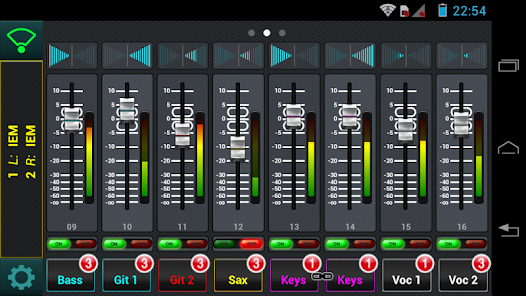
BEHRINGER X AIR Q for Android brings full personal monitor mixing to Android-powered devices for all X AIR Digital Mixers. Musicians can control their own monitor mix with full access to all input channels, either individually or through the app's MCA (Mix Control Association) faders. The app also provides channel panorama sliders to allow mixing to a stereo aux bus. Each user can group the inputs to 4 MCAs, allowing for one-fader control over a group of channels – which greatly simplifies adjustments during live performance.
Setup is simple – just download the free Android app and connect your smartphone or tablet to the X AIR mixer’s wireless network. Various devices and display resolutions are supported for hassle-free performance with no additional hardware or computer requirement. Thanks to the BEHRINGER X AIR Q App, a virtually endless number of users can now remotely control of their own monitor mixes.
KEY FEATURES
- Select the Aux Bus for your Personal Monitoring Control from your Android smartphone or tablet
- Assign any combination of inputs to any of the four available MCA (mix control association) faders in the app
- MCAs allow concurrent trimming of all assigned channel signal levels via a single fader for: more me, less band; more click track, less percussion – the choice is yours!
- Nickname your MCA selection for intuitive overview on stage
- Choose the target Aux Bus for monitoring
- Indication of stereo-linked channels and monitor buses
- Control all Channel Send Levels for all Inputs in your Aux Bus
- Control the Auxiliary Stereo Channel and all 4 Stereo Effects Return Levels in your Aux Bus
- Meter all Input Channel levels for visual feedback
- Multiple Android or iOS devices can be used simultaneously with the same console
REQUIREMENTS:
Compatible with Android versions 2.2 or higher and X AIR Mixer firmware versions 1.09 or higher.
X AIR Q Usage Rank
The usage rank is based on Similarweb's algorithm that calculates current installs and active users over a 28-day period.
All Categories in
Brazil--
Music & Audio in
Brazil--
Users Interests & Top Categories
Top categories and apps used by X AIR Q users
Top categories
Affinity
Top apps within the category
22%



15%



13%



11%


Top Competitors & Alternative Apps
Apps with a high probability of being used by the same users, from the same store.

USB Audio Player PRO

Music Equalizer - Bass Booster

Thomann Official
n-Track Studio Pro | DAW
 X AIR Q VS.
 March 4, 2026