

You’ve hit your search limit
Start your free trial to keep exploring full traffic and performance insights.
Get StartedReading mode app analytics for March 28

Reading mode
- Google LLC
- Google Play Store
- Free
- Tools
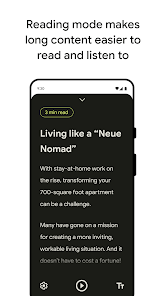
Designed for and with people with low vision, blindness and dyslexia, Reading mode helps improve your screen reading experience with a focus on customizable contrast, text size, text-to-speech, page clutter, and font types. Once downloaded, the app integrates into your quick settings and can be easily accessed across apps and web pages.
Instructions:
To get started:
1. Download and install Reading mode via Play Store
2. Find Reading mode on your home screen and tap to open it
3. Read the tutorial and it will redirect you to the settings at the end
4. In the settings, tap “Reading mode” and toggle on “Reading mode shortcut” to allow Reading mode to access your device
5. Please refer to https://support.google.com/accessibility/android/answer/7650693 to set up different Reading mode entry points
Key Features:
• Focused reading view: Reading mode provides a customizable reading environment without clutter to make it easier to access content and focus
• Text-to-speech: Hear written content read out loud to you at the touch of a button. Choose from a selection of high quality long-form voices. Easily accessible audio control options to rewind, fast forward, and change reading speed on the go
• Adjust font type and size: Toggle quickly between font sizes, styles, colors, and line spaces to customize what’s best for your reading needs
• Quick access: Once downloaded, Reading mode is integrated into the phone interface for fast access
• Multi-language support: Reading mode supports English, French, Italian, and Spanish with additional languages to follow
• Compatible with Talkback: Easily use Reading mode when using your screen reader.
• Designed with privacy in mind: Content is never sent off your phone.
Join the https://groups.google.com/forum/#!forum/accessible to provide feedback and receive product updates.
Requirement:
• Available for phones on Android 9 and later
• Currently Reading mode supports English, French, Italian, Spanish
Permissions Notice:
• Accessibility Service: Since this app is an accessibility service, it can observe your actions and window content.
Reading mode Usage Rank
The usage rank is based on Similarweb's algorithm that calculates current installs and active users over a 28-day period.
All Categories in
Brazil--
Tools in
Brazil--
Users Interests & Top Categories
Top categories and apps used by Reading mode users
Top categories
Affinity
Top apps within the category
28%




16%





16%





10%


Top Competitors & Alternative Apps
Apps with a high probability of being used by the same users, from the same store.

Dolphin EasyReader
NaturalReader - Text to Speech

Text reader - text and voice

Speechify – Text to Speech
 Reading mode VS.
 March 28, 2026