

You’ve hit your search limit
Start your free trial to keep exploring full traffic and performance insights.
Get StartedScanify- PDF Camera Scanner app analytics for April 7

Scanify- PDF Camera Scanner
- Lufick Apps
- Google Play Store
- Free
- Productivity
One of the most trusted document scanning app on the Play Store with an average rating of 4.5 stars.
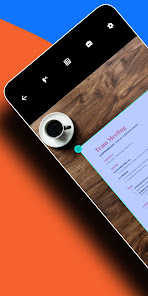
Scan your documents digitally and convert them into crystal clear high quality PDF files with a lot of editing options.
Apart from just scanning, this app provides you with a ton of features from which you can easily edit and manage your PDF files-
1) Compression, auto-cropping, Color Filters, Original Signature, Erase, Watermark, Batch editing, OCR, Notes, and more.
2) Scan Documents, ID cards, Books, QR codes and convert images to text(OCR) through the camera screen.
3) PDF Tools have options like Merge PDF, Split PDF, PDF to image, Image to PDF, Text to PDF, Long image, PDF to text, PDF to ZIP, add a link, and Add/Remove Password (coming soon).
What's more?
Document Scanner App – An Indian scanner app that provides you with more advanced scan options as compared to any other apps on the store.
Advanced Artificial Intelligence(AI) - The smart AI lets you scan without a tap on the screen. It automatically detects the edges of the document and captures it automatically.
Scan Document - Now scan your documents with a far superior quality without taking the help of a Xerox machine. All you need is a smartphone and you are ready to go.
Key Features:
* Various Scan Modes – ID Card, Document, Book, Photo, QR Scanner, and OCR Text.
* Perfect shot – Grid mode to get the perfect click of the document.
* Select Scan quality from High to Custom Scan Quality.
Color Filters - This app comes with various color filters which will help you to choose the perfect color combination for your documents. You can also adjust the intensity of the color filters. Filters like the Vibrant(Magic color), Soft tone, Sharp black, OCVColor, etc provide you with a variety of options to choose from.
Key Features:
* Options to further adjust the intensity of the color filters.
* Vibrant and Soft tone can be used as a magic color filter.
Original Signature on Documents - Now you can directly put your original signature on your digital Document. You can Scan your signature through the App’s camera and can put it directly on a document. You can also import your existing signature through the gallery and can put it on a document. Also, you can even draw your signature on the screen and add it to the document.
Key Features:
* Get your Signatures scanned through the Camera.
* Option to import signature from Gallery.
* Options to edit the signature like Darken, Color, Opacity, Blend, Flip, Resize, etc.
* Option to directly share and save the original signature.
Compression - Compression technology in this app is one of the best technology in this segment. This is one of the features that our users like the most. This app significantly reduces the size of a document without much reducing the image quality.
Key Features:
* Reduce file size with a very minimal effect on scan quality.
* Various file compression options from Low to High.
Copy Text from Image(OCR) - Now with the help of the OCR feature of the app, you can easily copy all the text from your photos. This app also comes with OCR on the Camera Screen.
Cam Scanner - Easily scan your documents and paper through your camera and convert them into high-quality PDF or JPEG files. Take a picture of the whiteboard or blackboard and produce it the same with the help of Scanify Scanner at any place even if you're offline.
Easy Scanner - Scan and Instantly print out documents in any size like A1, A2, A3, A4, Postcard, Letter, Note, etc.
QR and Barcode Scanner - Scanify Scanner also has a QR and BarCode Scanner feature.
Paper Scanner - Scan your exam papers and submit them directly to your school and colleges into PDF as well as JPG format.
Portable Scanner - The Doc scanner once installed can turn every smartphone into a portable scanner.
Scanify- PDF Camera Scanner Usage Rank
The usage rank is based on Similarweb's algorithm that calculates current installs and active users over a 28-day period.
All Categories in
United States--
Productivity in
United States--
Users Interests & Top Categories
Top categories and apps used by Scanify- PDF Camera Scanner users
Top categories
Affinity
Top apps within the category
41%


10%
9%


9%

Top Competitors & Alternative Apps
Apps with a high probability of being used by the same users, from the same store.

PDF Scanner Plus - Doc Scanner

Tiny Scanner - PDF Scanner App

Genius Scan - PDF Scanner

PDF Scanner - Document Scanner
 Scanify- PDF Camera Scanner VS.
 April 7, 2026