

You’ve hit your search limit
Start your free trial to keep exploring full traffic and performance insights.
Get StartedNotebloc Scanner - Scan to PDF app analytics for March 31

Notebloc Scanner - Scan to PDF
- Notebloc Scanner
- Google Play Store
- Free
- Productivity
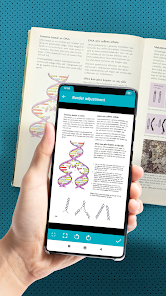
Notebloc is a 100% free document scanner app that helps you scan paper and declutter: scan receipts, tickets, notes, drawings and other documents.
You can create PDF documents or JPEG files.
• Notebloc Scanner is a 100% free scanner app supporting unlimited usage, developed by a notebook company in Barcelona.
• You can scan documents of any type: notes, receipts, drawings, sketches, photos or images.
• Use our multiple page scan to scan multiple pages at once.
• You can create single or multi page documents and organize them in folders and subfolders.
• It includes OCR for typed texts in 18 different languages (English, Spanish, French, Italian, Danish, Catalan, Dutch, German, Finnish, Hungarian, Latin, Norwegian, Polish, Portuguese, Romanian, Swedish, Tagalog and Turkish).
• The app will automatically detect the corners and correct the perspective of the image. Making it appear as if it was taken with a 90 degrees angle. • Any shadows or similar will disappear.
• You can crop a document or image directly inside the app.
• Your scanned documents can be saved or shared through email / Whatsapp / Dropbox, etc.
With the Notebloc® app:
We correct the perspective of your captured piece of paper: Notebloc geometrically fits your photos (see example above), making that the image on the screen completely straight, as if you had taken the picture in a perfect 90 degree angle.
We eliminate any trace of shade in your photos: Imagine you could have the perfect light intensity to digitize your notes in any circumstance, time and place. That may seem impossible, but with the Notebloc app your digitized notes will look perfect, clean, without any imperfection due to light and shadow. In your digital image you will only get what there is written or drawn on a completely white background.
Within the application you can:
- Create documents and save them as PDF or JPG.
- Share documents online: e-mail, instant messaging, social networks, etc.
- Rename documents.
- Classify documents by date of creation or edition.
- Choose in what size of PDF you want to keep your notes.
- Digitize images / other documents that you may want to save along with your Notebloc notes.
- Add, copy and order pages within the same document.
- Create folders to better organize your files.
When used in conjunction with our Notebloc® notebooks, you get optimal results. The gridlines and background of our paper will magically disappear.
---- About Notebloc® ----
Notebloc is a brand of digitizable paper notebooks, born in Barcelona in 2013. All Notebloc products are compatible with our mobile app that allows your ideas, notes, drawings and sketches from your Notebloc to be converted to digital.
About Notebloc Scanner app:
The Notebloc app is the only document scanner app developed by professionals in the notebook industry. At Notebloc, we care about the needs of all professionals and students who search for the best scanning and document organization tools.
Notebloc Scanner - Scan to PDF Usage Rank
The usage rank is based on Similarweb's algorithm that calculates current installs and active users over a 28-day period.
All Categories in
Brazil#4,834
Productivity in
Brazil#501
Users Interests & Top Categories
Top categories and apps used by Notebloc Scanner - Scan to PDF users
Top categories
Affinity
Top apps within the category
More apps
29%



15%




12%



8%




Top Competitors & Alternative Apps
Apps with a high probability of being used by the same users, from the same store.

Genius Scan - PDF Scanner

PDF Scanner Plus - Doc Scanner

Clear Scan - PDF Scanner App

Tiny Scanner - PDF Scanner App
Notebloc Scanner - Scan to PDF VS. March 31, 2026