

Pro-face Remote HMI app analytics for March 10

Pro-face Remote HMI
- Schneider Electric Japan Holdings Ltd.
- Google Play Store
- Paid
- Productivity
====================================================
Pro-face Remote HMI Price Revision!
====================================================
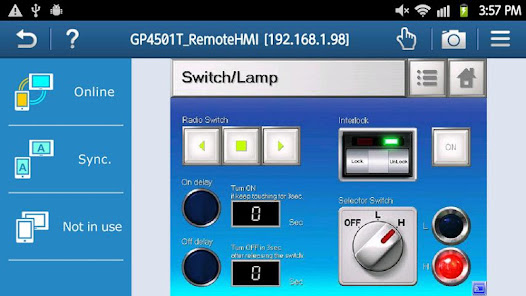
Pro-face Remote HMI software allows operators to check status of HMI screens on multiple applications remotely,
and assist HMI operation as a sub-display of HMI unit connected with Smartphone and Tablet.
- Quick 3 steps to use Pro-face Remote HMI
1. Prepare Wireless Router and connect to GP4000.
2. Adjust GP application in GP-Pro EX and transfer it to GP4000.
3. Download and install Pro-face Remote HMI in Smartphone and Tablet.
Application:
- Monitoring Anywhere of Large/Long Equipment
Using the remote monitoring and operation functions,
actions that previously required multiple staff for a large-sized machine or long-distance application can be easily accomplished by fewer operators.
- Troubleshooting before running to troubled machine
You can confirm possible causes of errors to prepare for necessary actions and tools before running down to the point of the problem.
- Efficiently and effectively monitor machines on the factory floor
Pro-face Remote HMI allows you to check machines and equipment for alarms, operating status,
and other information using Smartphone and Tablet from anywhere on the factory floor.
Features:
- Synchronized or Asynchronized Monitoring
Pro-face Remote HMI lets you switch communication modes to monitor status.
- Touch Exclusive Control
Setting the monopolize touch function prevents unexpected operational misuses caused by redundant operation.
Operation is re-enabled a preset time after Pro-face Remote HMI or the GP unit on the equipment has been operated.
- Remote Status Icon
A local operator can check the status of remote connection and touch monopoly of HMI server or remote client on a HMI screen for safer operation.
- Screen Shortcut
Images or texts of machines to monitor can be registered as shortcuts to easily jump from one HMI to another among multiple applications,
for various working environments, such as in an office or manufacturing site.
- Limitation
- Supported HMI Editor for HMI Server: GP-Pro EX Ver. 3.1 or later
- Refer to the GP-Pro EX manual for models (servers) that support the Pro-face Remote HMI feature.
- Text and picture for which Blink is set in the server are not displayed in blinking in the client.
- Reverse Display in 16 Level Monochrome color mode is not supported.
- Touch operation in the Asynchronous Mode is available only for the functions that allow you to check display, such as "Screen Change", "Previous Screen", "Scroll" of [Switch/Lamp] and so on.
When "Multifunction" mode is set, however, touch operation is disabled.
- In Asynchronous Mode, neither a user window nor a system keypad can be displayed.
This application is using the source code that is provided under the Apache License Version 2.0 (http://www.apache.org/licenses/LICENSE-2.0) and MIT License (https://mit-license.org/).
Pro-face Remote HMI Usage Rank
The usage rank is based on Similarweb's algorithm that calculates current installs and active users over a 28-day period.
All Categories in
United States--
Productivity in
United States--
Top Competitors & Alternative Apps
Apps with a high probability of being used by the same users, from the same store.
Smart Home Collection

Livano

Ply
 Pro-face Remote HMI VS.
 March 10, 2026