

You’ve hit your search limit
Start your free trial to keep exploring full traffic and performance insights.
Get Startedmicro:bit app analytics for March 31
micro:bit
- Micro:bit Educational Foundation
- Google Play Store
- Free
- Education
The best bits
• Create games on your phone then ‘flash’ them on to your micro:bit to get playing – no wires or cables needed!
• Snap a selfie by connecting your phone or tablet, and use your micro:bit as a remote control
• Never miss your mates again – now you can code your micro:bit to wake up and tell you when you’re getting a call or text
What’s in the app?
There are four areas to explore:
Discover takes you to the official website where you can find code ideas from other micro:bit fans. There’s loads of cool stuff to try out.
Create Code allows you to use the micro:bit MakeCode editor. You can also go back and edit code you’ve already created.
Connect is where you can go to pair your phone or tablet to your micro:bit. Choose the device you’d like to connect to through a secure Bluetooth pairing.
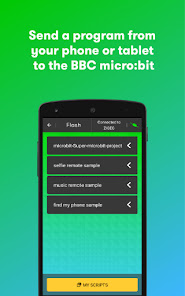
Flash is where the fun begins: send a program from your phone or tablet and see it on your micro:bit!
Permissions
read phone status and identity - This permission is used to allow the micro:bit to read basic state information of the phone. The user can write code on the micro:bit to react to these different states e.g. whether the display is on or off or a call or SMS message is received
receive text messages (SMS) - The micro:bit can react to different events on the phone and vice versa. This permission allows the user to make the micro:bit react in the event the user receives an SMS message. The message contents and details are not used or stored by the application.
take pictures and videos - The user can programme the micro:bit to send events to the phone to launch the camera or take a picture or video.
approximate location (network-based) – The application has to find and connect to the micro:bit over Bluetooth low energy. Scanning for Bluetooth low energy devices needs the approximate location service.
modify or delete the contents of your USB storage and read the contents of your USB storage - The application will save scripts, photos and any content you may have created to your USB storage. The application must be able to read, write and delete these files.
full network access and view Wi-Fi connections - The application needs access to the internet to access the micro:bit website so that the user can download code samples, access the code editors and to send usage statistics.
access Bluetooth settings and pair with Bluetooth devices - The application can discover, pair and connect to the micro:bit over secure Bluetooth.
draw over other apps - The user can program the micro:bit to display alerts on the phone or find the phone.
control flashlight, control vibration and prevent phone from sleeping - This permission is used to send a visual cue that a photo or video is being captured, to send events to make the phone vibrate and to prevent your phone from sleeping when it is flashing your micro:bit. "
micro:bit Usage Rank
The usage rank is based on Similarweb's algorithm that calculates current installs and active users over a 28-day period.
All Categories in
United States--
Education in
United States#2,445














Top Competitors & Alternative Apps
Apps with a high probability of being used by the same users, from the same store.

OctoStudio: Create-Code-Learn

Enki: Learn to code

Cuemath: Math Learning & Games

Airtable
 micro:bit VS.
 March 31, 2026