

You’ve hit your search limit
Start your free trial to keep exploring full traffic and performance insights.
Get StartedAnyview Cast to TV app analytics for May 2

Anyview Cast to TV
- Screen Mirroring TV - AI
- Google Play Store
- Free
- Tools
Anyview Cast to TV - The Ultimate Screen Mirroring Solution!
Want to enjoy your favorite content on the big screen? Anyview Cast to TV lets you wirelessly share your phone, tablet, or computer screen to any smart TV or casting device in seconds! Our powerful casting technology provides a seamless, lag-free mirroring experience for all your streaming needs.
#AnyviewCast #ScreenMirroring #CastToTV #AnyviewShare
WHY CHOOSE ANYVIEW CAST TO TV?
UNIVERSAL COMPATIBILITY - Anyview Cast works with virtually any screen-sharing protocol:
Cast to Hisense TVs with native Anyview Cast support
Compatible with Chromecast, Fire TV, Roku, and other casting devices
Works with smart TVs featuring screen mirroring capabilities
Connect to any DLNA/UPnP enabled device
MULTI-DEVICE SUPPORT - Share from any device to your TV:
Mirror your Android phone/tablet screen completely
Cast from iPhones and iPads
Share screens from Windows PCs and laptops
Compatible with Mac computers
Cast content from Chromebooks
SMOOTH MIRRORING EXPERIENCE
Cast in full HD 1080p resolution (4K on premium devices)
Enjoy low-latency mirroring with minimal delay
Stable connection that won't drop during streaming
Audio sync perfectly matched to video content
Adjustable quality settings for different network conditions
CAST ALL YOUR FAVORITE CONTENT - Share everything on your big screen:
Stream videos, movies, and TV shows
View photos and slideshows
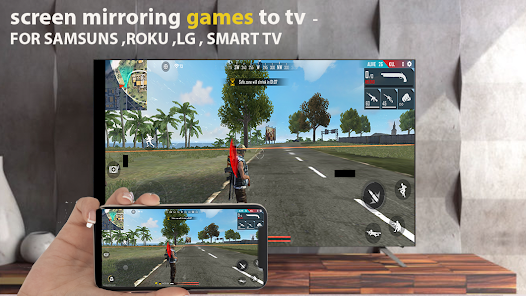
Play mobile games on your TV
Make presentations from your device
Browse websites together with friends and family
Video call on your TV screen
Display social media feeds
PRIVACY FOCUSED
Direct device-to-device connection
No account creation required
No data collection or tracking
Your content stays private and secure
EASY TO USE
Anyview Cast is designed for simplicity:
Connect your device to the same WiFi network as your TV
Open Anyview Cast to TV app
Select your TV from the device list
Start casting instantly!
POWERFUL FEATURES
Quick connect with QR code scanning
Share screen easily with one tap
Customize display resolution
Control volume directly from your device
Rotate screen orientation as needed
Pin protection for secure casting
Battery optimization for extended use
Background audio casting (continue using your phone while casting media)
Picture-in-picture mode
Custom screensaver options
Auto-reconnect to favorite devices
RELIABLE PERFORMANCE
Optimized for minimal battery drain
Works on both 2.4GHz and 5GHz WiFi networks
Bluetooth fallback option when WiFi isn't available
Wired connection support via adaptors
Automatic network detection and optimization
ANYVIEW SHARE MADE SIMPLE
Anyview Share has never been easier! With our dedicated support for Hisense Anyview Cast technology, you can mirror content from your device to compatible TVs with perfect performance. Whether you're using Anyview Cast from Hisense or another mirroring protocol, our app ensures the best casting experience available.
TECHNICAL SPECIFICATIONS
Supports Miracast, DLNA, AirPlay, and Google Cast protocols
HD streaming up to 1080p (4K available on compatible devices)
H.264 and H.265 video encoding
AAC and MP3 audio transmission
Required: Android 5.0+ or iOS 10.0+
Minimum 2GB RAM recommended for smooth operation
Works over WiFi, Mobile Hotspot, or direct connection
PREMIUM FEATURES - Upgrade to unlock:
4K Ultra HD casting
Advanced EQ audio controls
Custom overlay options
Extended screen recording
Multi-device simultaneous casting
Priority technical support
NEED HELP?
Our dedicated support team is ready to assist with any issues. Contact us directly through the app or visit our support website.
Don't settle for complicated or unreliable screen mirroring apps. Download Anyview Cast to TV today and experience the easiest way to share your screen with any television!
Anyview Cast to TV - making screen mirroring simple, reliable, and accessible for everyone.
Anyview Cast to TV Usage Rank
The usage rank is based on Similarweb's algorithm that calculates current installs and active users over a 28-day period.
All Categories in
Germany--
Tools in
Germany#2,861
Users Interests & Top Categories
Top categories and apps used by Anyview Cast to TV users
Top categories
Affinity
Top apps within the category
19%





15%



14%





12%


Top Competitors & Alternative Apps
Apps with a high probability of being used by the same users, from the same store.

yescan - PDF OCR Scanner
Remote Mouse

Lorex Classic

RICOH Smart Device Connector
 Anyview Cast to TV VS.
 May 2, 2026