

You’ve hit your search limit
Start your free trial to keep exploring full traffic and performance insights.
Get StartedWiFi Monitor: network analyzer app analytics for March 1

WiFi Monitor: network analyzer
- Alexander Kozyukov
- Google Play Store
- Free
- Tools
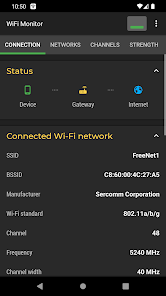
WiFi Monitor is a powerful tool that allows you to analyze the state of WiFi networks and track its parameters (signal strength, frequency, connection speed, etc). It is useful for setting up a wireless router and Wi-Fi usage monitoring. It can also be used as a scanner helping to discover devices connected to WLAN.
"Connection" tab helps to track information about the connected WiFi hotspot:
• name (SSID) and identifier (BSSID)
• router manufacturer
• connection speed
• router signal strength
• frequency and channel number
• ping info
• hotspot security options
• MAC address and IP address of smartphone
• subnet mask, default gateway and DNS address.
"Networks" tab allows to analyze all available WiFi networks by the following parameters: type, equipment manufacturer, signal level, security protocol. Access points with the same name (SSID) are grouped together.
"Channels" tab displays hotspots signal level depending on its frequencies. Routers using same frequencies provide bad quality of a Wi-Fi connection.
"Strength" chart helps to compare received power levels of available WiFi hotspots and track its dynamics. The higher router signal strength, the better quality of wireless connection.
"Speed" chart displays the real amount of transmitted and received data in the connected network. This will help to analyze usage of a hotspot.
"Scanning" section performs search of devices in the connected network and displays its parameters. If scanner reports about foreign devices in your WLAN, block them in router settings.
Collected data can be saved to log file and exported to other applications.
https://signalmonitoring.com/en/wifi-monitoring-description
WiFi Monitor: network analyzer Usage Rank
The usage rank is based on Similarweb's algorithm that calculates current installs and active users over a 28-day period.
All Categories in
United States--
Tools in
United States#4,755
Users Interests & Top Categories
Top categories and apps used by WiFi Monitor: network analyzer users
Top categories
Affinity
Top apps within the category
More apps
32%




9%





8%


8%




Top Competitors & Alternative Apps
Apps with a high probability of being used by the same users, from the same store.

WiFiman

Wi-Fi Toolkit

FAST Speed Test

WiFi Analyzer (open-source)
WiFi Monitor: network analyzer VS. March 1, 2026