

You’ve hit your search limit
Start your free trial to keep exploring full traffic and performance insights.
Get StartedSINC: Employee Time Clock app analytics for March 25

SINC: Employee Time Clock
- SINC
- Google Play Store
- Free
- Business
SINC Time Clock & Job Tracker
Take control of your team’s time, attendance, and job costing with SINC, the all-in-one employee time clock solution designed specifically for hourly shift workers and the businesses that employ them.
Why SINC?
Managing a workforce of shift-based, hourly workers can be complicated. SINC makes it simple to track employee hours, monitor job sites, verify attendance, and streamline payroll processes from any device, anywhere.
Key Features:
1. Easy Employee Clock In/Out:
Let staff clock in/out easily from their mobile devices or a central kiosk.
Record accurate timestamps for every shift without paper timesheets.
2. Job & Task Tracking:
Assign shifts to specific jobs, projects, or locations.
Track time spent on different tasks with job-level reporting for cost control.
3. Real-Time GPS Location Verification:
Know where your employees are working with GPS clock in/out verification.
Prevent time theft and buddy punching; perfect for remote or multi-site teams.
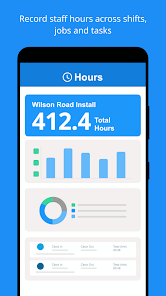
4. Simplified Timesheet Management:
All employee hours are automatically compiled into digital timesheets.
Review, approve, and export timesheets for accurate payroll processing.
5. Mobile & Web Access:
Enable your team to track time from any Android device or via web dashboard.
Managers can monitor attendance, review job progress, and create shift schedules on the go.
6. Job Costing & Reports:
Instantly see how many hours are spent on each job or client.
Generate detailed labor cost and productivity reports to maximize profitability.
7. Powerful Admin Controls:
Manage user permissions, edit entries, and set custom rules for clocking in and out.
Receive notifications for missed punches, overtime, and shift changes.
Who Is SINC For?
SINC is ideal for:
Construction crews and contractors
Field service companies
Retail stores & restaurants
Cleaning & maintenance businesses
Agencies with multiple job sites
Any small business with hourly shift workers
Whether you have a mobile workforce or on-site teams, SINC empowers you to run a more efficient, accountable, and profitable operation.
Benefits:
Cut labor costs: Prevent buddy punching and time theft.
Save time: No more manual timesheet calculations or paperwork.
Improve accuracy: Capture exact time and location for every employee.
Boost productivity: Identify areas for improvement with actionable insights.
Easy setup: Get started in minutes with no technical expertise required.
Why Shift-Based Businesses Choose SINC:
Designed specifically for the needs of hourly and shift-based teams
Intuitive interface your staff can use with minimal training
Robust support for job costing and payroll integrations
Free trial and flexible plans for teams of any size
Get Started Now – Free!
Download SINC Time Clock & Job Tracker today to experience effortless employee time tracking, attendance verification, and job management. Join thousands of businesses who trust SINC to make every hour count.
Choose the Right Plan for Your Business
SINC offers both a free version and paid plans to fit the needs of your business:
Free Plan: Includes time tracking, location monitoring, and scheduling for up to 3 users (reduced to 1 after 12 months).
Paid Plans: Unlock advanced features like unlimited users, automated overtime calculations, geofencing, and detailed job reports with monthly or annual payment options.
Try SINC Risk-Free
Enjoy a 30-day free trial with no credit card required. After that, benefit from flexible monthly payments with no long-term commitments.
Support and Web Access Anytime
Visit our help center at help.sinc.business or contact support from the app or at support@sinc.business. Access the web version anytime at users.sinc.business.
SINC: Employee Time Clock Usage Rank
The usage rank is based on Similarweb's algorithm that calculates current installs and active users over a 28-day period.
All Categories in
United States--
Business in
United States#1,662
Users Interests & Top Categories
Top categories and apps used by SINC: Employee Time Clock users
Top categories
Affinity
Top apps within the category
More apps
12%




9%


8%





8%





Top Competitors & Alternative Apps
Apps with a high probability of being used by the same users, from the same store.

Atto - Time Clock & Scheduling

When I Work Team Scheduling

Chargeway

Employee Link - Timesheets
SINC: Employee Time Clock VS. March 25, 2026