

You’ve hit your search limit
Start your free trial to keep exploring full traffic and performance insights.
Get StartedLarge LCD For Wear OS app analytics for April 1

Large LCD For Wear OS
- ZKin
- Google Play Store
- Paid
- Personalization
Large LCD For Wear OS
These watch faces run on Wear OS
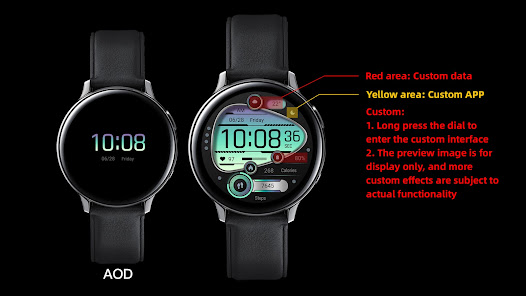
1. Top: Custom data, morning and afternoon, date, week, and custom app;
2. Middle: Time, heart rate, heart rate percentage progress, custom data;
3. Bottom: Calories, step target percentage progress, and step count.
Customization: 3 customizable areas for selection. After testing, the world clock icon is not displayed. Please be aware that the preview image is for reference only. For more customization functions, please refer to the actual effect
Compatible with devices: Pixel Watch, Galaxy Watch 4, Galaxy Watch 5, Galaxy Watch 6 and other devices
How do I install the watch face on WearOS ?
1. Install it from Google Play Wear Store on your watch
2. Install the companion app for fully customization (Android phone devices)
Large LCD For Wear OS Usage Rank
The usage rank is based on Similarweb's algorithm that calculates current installs and active users over a 28-day period.
All Categories in
United States--
Personalization in
United States--
Large LCD For Wear OSApril 1, 2026