

You’ve hit your search limit
Start your free trial to keep exploring full traffic and performance insights.
Get StartedFlip Clock: World Clock app analytics for April 2

Flip Clock: World Clock
- wssc
- Google Play Store
- Free
- Productivity
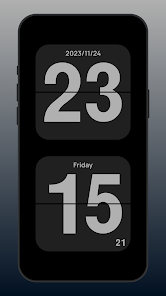
👉 Flip Clock is a simple full-screen clock with a minimalist and practical page-turn animation to display time changes. You can also use your phone as a time display. The simple design makes it easy to view time changes from any angle.
👉 Pomodoro Clock can be used as a study timer to effectively help you focus on studying, reading and working within a scientific time.
👉 World Clock helps you check the time and weather info of cities around the world, and you can also add the World Clock widget to the screen desktop
👉 Flip Clock also allows you to see the weather in your current location. You can also add a clock widget to your desktop to see the current time along with it.
👉 If you need a timer, flip clock, pomodoro timer, weather info, floating clock, this app is a very good choice.
Feature:👇 👇
• Full-screen flip-page animation with minimalist design
• Pomodoro clock helps learn timing;
• Supports both landscape and portrait orientations
• Customize time and date display according to your preference
• Choose between 12-hour and 24-hour modes with ease
• Switch freely between multiple themes
• Enjoy an ad-free experience with no permission requests required.
• pomodoro timer clock will help you focus better
• Use multiple fonts at will;
• The floating clock displays the page-turning clock in a floating window;
• Support viewing current location weather info;
• Widget functions can be added to the screen;
• Support checking the time by searching the city;
• Timer precise timing within a specific time period.
• World clock, view time and weather info for multiple cities, time zones.
• Clock widget, various styles of clock widget and world clock widget
How to use: 👇 👇
Swipe left or right to switch functions;
Swipe up to enter settings;
Flip Clock: World Clock Usage Rank
The usage rank is based on Similarweb's algorithm that calculates current installs and active users over a 28-day period.
All Categories in
Brazil#4,367
Productivity in
Brazil#450
Users Interests & Top Categories
Top categories and apps used by Flip Clock: World Clock users
Top categories
Affinity
Top apps within the category
More apps
18%





13%





12%



6%




Top Competitors & Alternative Apps
Apps with a high probability of being used by the same users, from the same store.

StandBy Mode: Clock & Widgets
Talking Alarm Clock Beyond

Focus To-Do: Pomodoro & Tasks
Digital Clock Widget
Flip Clock: World Clock VS. April 2, 2026