

You’ve hit your search limit
Start your free trial to keep exploring full traffic and performance insights.
Get StartedDevCheck Device & System Info app analytics for April 9

DevCheck Device & System Info
- flar2
- Google Play Store
- Free
- Tools
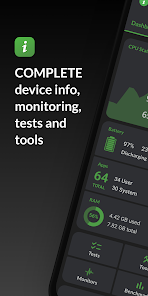
Monitor your hardware in real time and get complete information about your device, including model, CPU, GPU, memory, battery, camera, storage, network, sensors, and operating system. DevCheck presents all essential hardware and system information in a clear, accurate, and well-organized way.
DevCheck provides some of the most detailed CPU and System-on-a-Chip (SoC) information available on Android. View specifications for Bluetooth, GPU, RAM, storage, and other hardware in your phone or tablet. See detailed Wi-Fi and mobile network information, including dual-SIM support. Monitor sensors in real time and learn about your device’s operating system and architecture. Rooted devices and Shizuku are supported for accessing additional system information on compatible devices.
Dashboard:
A comprehensive overview of critical device and hardware information, including real-time monitoring of CPU frequencies, memory usage, battery statistics, deep sleep, and uptime, with summaries and shortcuts to system settings.
Hardware:
Detailed specifications for your SoC, CPU, GPU, memory, storage, Bluetooth, and other hardware, including chip names and manufacturers, architecture, processor cores and configuration, manufacturing process, frequencies, governors, storage capacity, input devices, and display specifications.
System:
Complete system and software information, including device codename, brand, manufacturer, bootloader, radio, Android version, security patch level, and kernel. DevCheck can also check root, BusyBox, KNOX status, and other operating system details.
Battery:
Real-time battery information including status, temperature, level, technology, health, voltage, current, power, and capacity. The Pro version adds detailed battery usage tracking with screen-on and screen-off statistics using the Battery Monitor service.
Network:
Detailed information about Wi-Fi and mobile/cellular connections, including IPv4 and IPv6 addresses, connection details, operator, phone and network type, public IP address, and one of the most complete dual-SIM implementations available.
Apps:
Detailed information and management for all installed apps.
Camera:
Advanced camera specifications including aperture, focal length, ISO range, RAW capability, 35mm equivalents, resolution (megapixels), crop factor, field of view, focus modes, flash modes, JPEG quality and image formats, and available face detection modes.
Sensors:
A complete list of all sensors on the device, including type, manufacturer, power usage, and resolution, with real-time graphical data for accelerometer, step detector, gyroscope, proximity, light, and more.
Tests:
Flashlight, vibrator, buttons, multitouch, display, backlight, charging, speakers, headset, earpiece, microphone, and biometric scanners (the last six tests require the Pro version).
Tools:
Root Check, Bluetooth Scan, CPU Analysis, Integrity Check (Pro), Permissions Summary (Pro), Wi-Fi Scan (Pro), Network Mapper (Pro), Usage Stats (Pro), GPS tools (Pro), and USB Check (Pro).
Widgets (Pro):
Modern, customizable widgets for your home screen. Monitor battery, RAM, storage, and other stats at a glance.
Floating Monitors (Pro):
Customizable, movable, always-on-top transparent overlays that display real-time information such as CPU frequencies and temperatures, battery status, network activity, and more while using other apps.
Pro Version
Available via in-app purchase.
The Pro version unlocks all tests and tools, benchmarking, Battery Monitor, home screen widgets, floating monitors, and custom color schemes.
Permissions & Privacy
DevCheck requires various permissions to display detailed device information.
No personal data is ever collected or shared.
Your privacy is always respected.
DevCheck is completely ad-free.
DevCheck Device & System Info Usage Rank
The usage rank is based on Similarweb's algorithm that calculates current installs and active users over a 28-day period.
All Categories in
United States#9,035
Tools in
United States#1,138
Users Interests & Top Categories
Top categories and apps used by DevCheck Device & System Info users
Top categories
Affinity
Top apps within the category
More apps
33%






8%


7%





6%





Top Competitors & Alternative Apps
Apps with a high probability of being used by the same users, from the same store.

G-CPU:Monitor CPU, RAM, Widget

3DMark — The Gamer's Benchmark
CPU Monitor - temperature
AccuBattery
DevCheck Device & System Info VS. April 9, 2026