

You’ve hit your search limit
Start your free trial to keep exploring full traffic and performance insights.
Get StartedScreen Mirroring - TV Cast app analytics for May 3

Screen Mirroring - TV Cast
- Simple Office App
- Google Play Store
- Free
- Tools
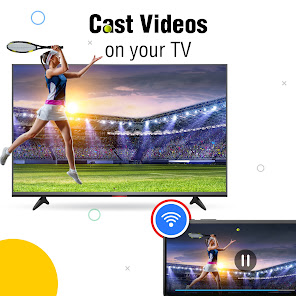
Introducing a TV screen mirroring app that supports screen mirror and TV casting features. Screen casting easily connects the device to a smart display and enjoy user high Chromecast. With easy controls, it is possible to photo cast, watch HD video screen cast to tv, listen to audio, and browse on the smart view TV. Wireless connectivity through Wi-Fi makes it easy to use.
Key Features of TV cast screen mirroring app
▸Screen mirror on the smart TV.
▸Screen Casting to TV.
▸Cast photos on the smart view screen.
▸Watch HD video screen cast to TV.
▸Listen to audio wirelessly on the TV.
▸Browse the cast display screen easily.
✦Screen Mirroring to TV
Chromecast feature allows users to connect their mobile device to a Smart View TV, allowing full mirroring of their device screen. Screen share app shares the device screen with others, making it different activities on a larger display mirroring.
✦Display Screen Cast
Screen mirroring app that allows users to cast to TV screen from their mobile devices. Allshare cast feature lets users easily display Photo cast, videos, or any other media stored on their phone or tablet directly on their screen sharing smart view.
✦Photo cast
Use the screen mirror function to show photos on tv-cast easily. It helps show pictures from the phone on a big TV screen. Cast to TV your photos, videos, and even audio with friends and family.
✦HD Video Screen Mirroring
Chromecast function enables users to cast HD videos from their mobile device to their TV. You don't need any wires because it works wirelessly. Screen casting is a way to cast videos with others on a bigger screen.
✦Cast Screen Audio
Chrome cast feature can let play music, podcasts, or any sound from your phone on TV without wires. Screen Share app makes the sound better by using the TV's speakers.
✦Wireless Connectivity
Screen sharing app links a phone to a TV with Wi-Fi, so no cables are needed. Make sure both devices are connected to the same network.
✦User-Friendly Interface
Screen casting has a simple and easy-to-use interface, so anyone can use it. You can set it up easily and start TV casting with just a few taps.
✦How to use TV screen mirroring app
▸Connect the phone and smart TV cast to the same Wi-Fi.
▸Enable the screencast display function on the TV.
▸Activate the Wireless Display feature on the phone.
▸Search and connect the device.
We value the experience with the Smart TV Cast app. If Chromecast has any ideas or problems, let us know. Chrome cast feedback helps us make the screen share app better for you.
Screen Mirroring - TV Cast Usage Rank
The usage rank is based on Similarweb's algorithm that calculates current installs and active users over a 28-day period.
All Categories in
Brazil--
Tools in
Brazil#2,120
Users Interests & Top Categories
Top categories and apps used by Screen Mirroring - TV Cast users





Top Competitors & Alternative Apps
Apps with a high probability of being used by the same users, from the same store.

Ar Drawing & Sketch App

All Data Transfer: Phone Clone
Cardboard

Cast for Chromecast & TV Cast
 Screen Mirroring - TV Cast VS.
 May 3, 2026