


 Marketing Intelligence
What is 502 Bad Gateway and How to Fix it

Imagine this: you’re trying to get to a webpage but instead of the content you were expecting, you see the 502 Bad Gateway error. It’s a common problem for those online all the time but the cause can be hard to find. This error means there’s a communication breakdown between servers which signals deeper issues with the backend server connections. Knowing what this error means and how to fix it can save you time and frustration. We will explain what this error is and we’ll also give you simple solutions so you can manage these server issues with confidence.
What does 502 bad gateway mean?
The 502 Bad Gateway error occurs when one server receives an invalid response from another server while processing a web request. This error, labeled as HTTP status code 502, signals a communication breakdown between servers. Common error messages include ‘502 Bad Gateway’ or ‘HTTP Error 502.’
This issue can result from various factors, such as server overload, network disruptions, scheduled maintenance, or configuration problems. In some cases, temporary issues like increased traffic or minor server glitches may cause the error and resolve themselves without intervention.
By understanding the causes of this error, web managers can identify when immediate action is necessary to maintain site functionality and minimize downtime.

How does a 502 error impact SEO?
A 502 error is more than just a technical issue – it can have significant consequences for SEO.
When search engines try to crawl your site and get a 502 error, those pages may be temporarily removed from the search engine’s index. If these accessibility issues persist, the site’s rankings will suffer, and traffic and visibility will decrease. These errors can also erode user trust and site authority by increasing your bounce rate. A spike in bounce rates or lower average session duration translates to frustrated users, which sends negative signals to search engines about the site’s reliability. Taking action quickly helps to maintain SEO performance, so regular server checks should be part of your strategy.
What causes a 502 status code
Several factors can lead to a 502 Bad Gateway error. Understanding these causes can help you troubleshoot and resolve the issue quickly. Here are the most common culprits:
1. Server overload
When a server receives more requests than it can handle, it can result in a 502 error. This often happens during traffic spikes or Distributed Denial of Service (DDoS) attacks. Ensuring the server has sufficient resources and implementing load balancing can prevent overloads and maintain smooth operations.
2. Network issues
Connectivity problems between clients and servers, such as flaky networks, poor DNS configurations, or packet loss, can trigger a 502 error. Stable and reliable networks are essential for seamless server interactions. Regular network checks can minimize these issues.
3. Server misconfiguration
Misconfigured servers, such as invalid routing or incorrect DNS entries, disrupt communication paths and lead to errors. Routine configuration reviews and updates can ensure server settings align with operational requirements.
4. Server maintenance
Scheduled maintenance can temporarily take servers offline. Without proper redirects in place, this can result in 502 errors. Administrators should carefully plan maintenance to minimize disruptions.
5. Browser extensions
Certain browser extensions, particularly those related to security or HTTP request modifications, can interfere with page loading and cause 502 errors. Disabling such extensions can resolve unexplained gateway errors during client-side operations.
6. Application errors
Faulty application code or unresolved dependencies can prevent proper request processing, leading to 502 errors. Regular code reviews, debugging, and updates can ensure robust applications and minimize these issues.
7. Website coding errors
Errors in website code can confuse servers and prevent them from responding correctly. Clean, error-free code is critical to avoiding communication breakdowns and maintaining reliable server interactions.
8. Firewall blocking access
Overly restrictive firewall rules can block legitimate traffic, rendering the server unreachable and causing errors. Adjusting firewall settings to allow genuine traffic while maintaining security can resolve these issues.
9. Incorrect proxy settings
Misconfigured proxy settings can disrupt communication between clients and servers, resulting in 502 errors. Correcting these settings can restore proper functionality.
10. DNS issues
Incorrect DNS configurations can direct traffic to the wrong servers, causing gateway errors. Regular DNS monitoring and updates ensure accurate traffic routing and prevent 502 errors related to DNS issues.
11. Server software timeouts
When server software takes too long to process a request, it may trigger a timeout and a 502 error. Optimizing server code and reducing processing times can address timeout-related errors and improve response efficiency.
How to detect 502 errors
Finding 502 errors can be done with advanced tools. Similarweb’s Site Audit tool will give you an in-depth report of your site’s health and will highlight 502 errors in the HTTP Status Breakdown report.
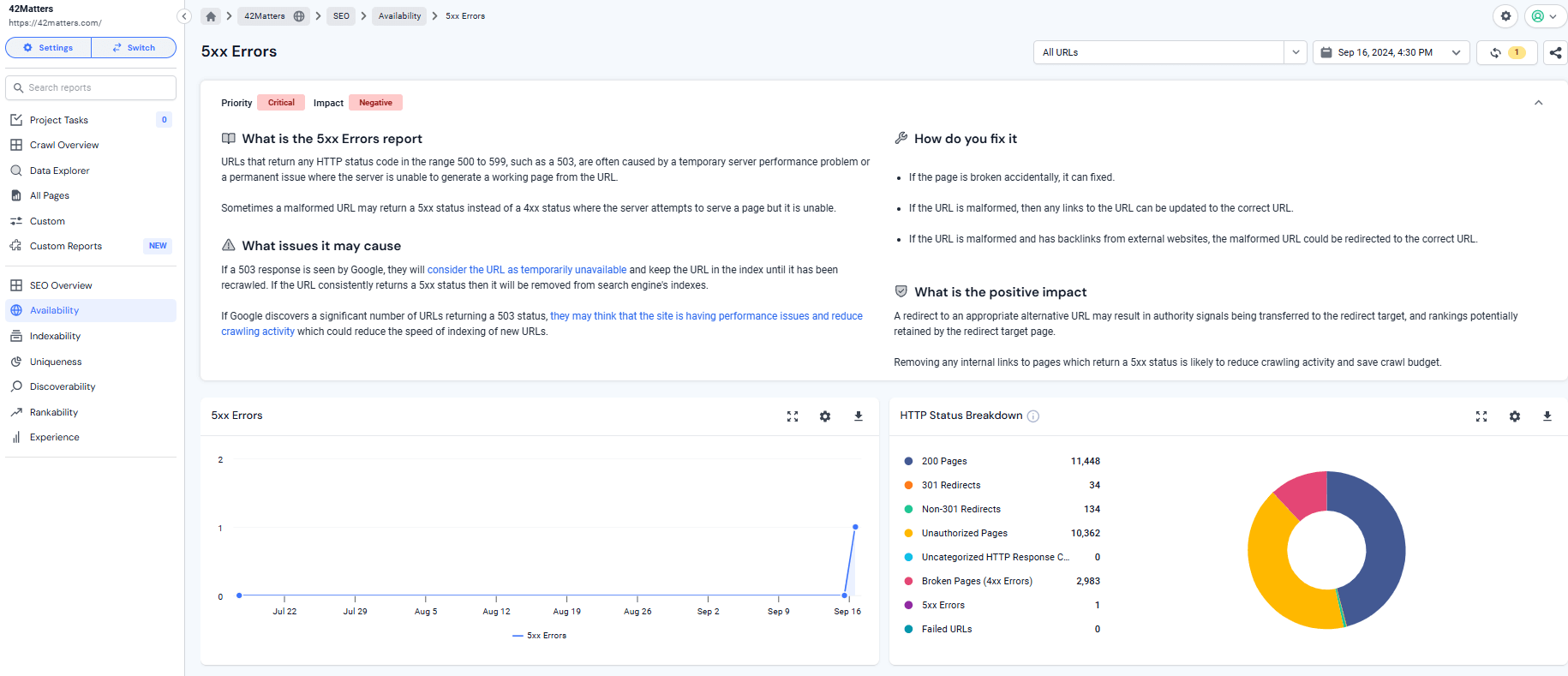
To locate these errors, navigate to the SEO tools section, select Availability, and look under the 5XX errors category. This section will display any server issues. With this detailed information, you can troubleshoot the root causes of the errors, resolve them effectively, and improve your website’s performance and SEO outcomes.
Top ways to fix the 502 bad gateway error
A 502 error doesn’t have to be a hassle. Here are some effective ways to resolve it:
1. Refresh the page
These errors are often temporary communication glitches. Simply refreshing the page can resolve the issue and restore access.
2. Double-check the URL
Typographical errors in the URL can cause error messages. Check the web address for typos, and you’ll be good to go when connectivity issues arise.
3. Use a private window
Private or incognito mode can avoid conflicts from cached data or cookies. This will often fix errors from previous browsing sessions and a cache that’s obstructive.
4. Try a different browser
Access the site using a different browser. This helps rule out browser-specific issues as the cause of the 502 error.
5. Contact hosting provider
For server-side issues, reach out to your hosting provider. They can investigate the root cause of the disruption and assist with a reliable fix.
6. Review server logs
Analyze server logs to gain insights into communication failures and identify the root cause of the problem.
7. Check server load
If servers can’t handle high traffic, an overload can cause a 502 error. Load balancing helps to mitigate this and stabilize the server when traffic spikes unexpectedly.
8. Clear your browser’s cache and cookies
Old cache and cookies can obstruct website access. Clearing them can often resolve the issue and improve connectivity.
9. Disable your plugins and restart one by one
Turn off browser plugins or applications, then re-enable them one by one to isolate any that may be causing the error.
10. Check your firewall
Make sure your firewall settings aren’t blocking legitimate requests. Correct settings will allow trusted traffic to go through and fix the gateway error.
11. Check your CDN
Check your Content Delivery Network (CDN) settings. CDNs can sometimes alter server responses, so review your CDN settings carefully to fix the issue.
12. Check your DNS
Misdirected traffic due to incorrect DNS settings can cause 502 errors. Regularly monitor and correct DNS configurations to avoid such issues.
13. Verify application code
Faulty application code can block request processing. Thoroughly review and test your code to ensure smooth site-server interactions.
14. WordPress users
- Update themes and plugins: Outdated WordPress themes or plugins can cause server access issues. Keeping them up to date helps prevent errors.
- Disable themes and plugins: If the error persists, disable themes and plugins one by one to identify the source of the problem.
Mitigate 502 disruptions quickly
Understanding the causes and solutions for a 502 Bad Gateway error enables you to resolve issues promptly. Keeping your server running smoothly ensures that your website’s SEO performance and user trust remain unaffected. Incorporate Similarweb’s Site Audit tool into your regular SEO audit process to identify potential errors before they occur. Acting quickly ensures your site remains a dependable and accessible resource, building user confidence and supporting uninterrupted business operations.
FAQs
What should be done if clearing the cache doesn’t resolve the 502 error?
If clearing the cache doesn’t resolve the issue, try using a different browser or check your firewall settings to ensure legitimate traffic isn’t being blocked.
How often should server resources be monitored to prevent 502 errors?
Server resources should be monitored regularly. Weekly checks or the use of automated monitoring tools can help identify and address potential issues before they escalate.
Why might switching browsers solve a 502 error?
Different browsers handle site requests in unique ways. Incompatibilities or conflicts in one browser may not exist in another, potentially resolving the 502 error.
Does a 502 error ever indicate a need for server upgrades?
Yes, if the 502 error is caused by server overload, it may be a sign that the server requires upgrades to better handle traffic.
Is there a difference between 502 and other 5xx errors?
Yes. While all 5xx errors are server-related, each code represents a specific issue. For example, a 502 error indicates a ‘Bad Gateway,’ while other codes, such as 500 or 503, point to different server problems.

Related Posts

What Is AI Share of Voice? The Brand Mention Share Metric You’re Probably Missing



Why AI Engines Cite UGC Over Brand Content And How To Leverage It For AEO

AI Mentions vs. AI Citations: What’s the Difference and Why It Matters for GEO

Track Gen-AI And Organic KPI's On The #1 SEO Platform
Give it a try or talk to our marketing team - it’s free!