




by Darrell Mordecai4 Min.
Oct 21, 2026
 Marketing Intelligence
Nothing demonstrates your site’s authority than a Knowledge Panel. It’s a sign that the almighty Google deems your business noteworthy.
Although Google generates Knowledge Panels automatically, can you influence Google to give your brand a Knowledge Panel? The answer is an emphatic yes.
In this post, we’ll get into what Knowledge Panels are, how Google creates them, and how you can achieve one for your business.
A Google Knowledge Panel is a visual representation of information about a specific known entity (such as a famous person, a known business, or a film) that is displayed in the Google search results. These SERP features are built on entity information in Google’s Knowledge Graph.
Google’s Knowledge Graph is a database of entities that includes their attributes and how they relate to other entities.
Google’s Knowledge Panel is a panel of information that presents entity information in the SERPs.
Although Knowledge Panels on Google generally appear on the right-hand side of search results, for some more well-known entities, a Knowledge Panel will take up the entire above the fold section of the SERP.
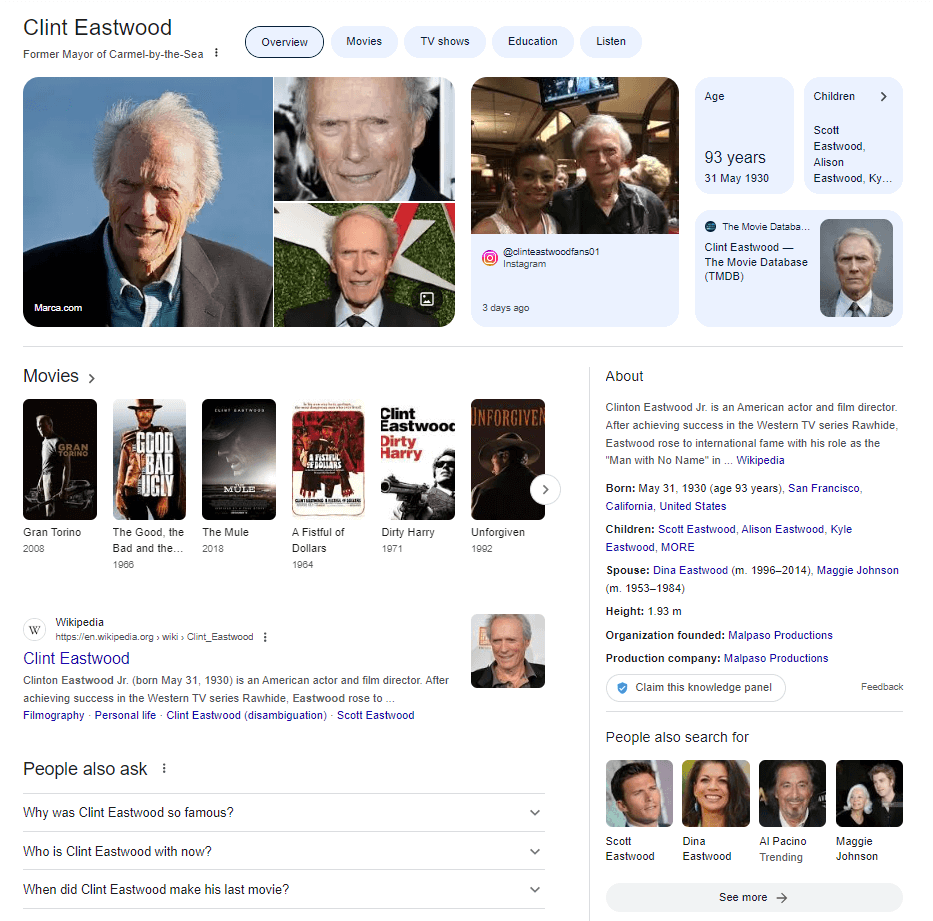
Google’s Knowledge Panels are important for your SEO because they help you:
It’s important to understand where Knowledge Panels fit into your SEO strategy. To do that, let’s use the Similarweb Keyword Analysis tool to understand how users interact with Knowledge Panels in general.
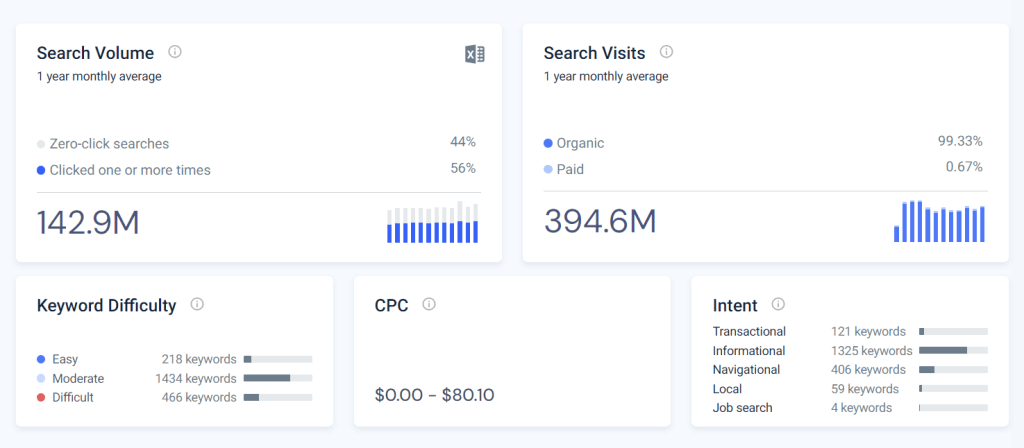
Here are some key Knowledge Panel stats:
The data indicates that the vast majority of the keywords serve informational or navigational search intent, which, in general, is not profitable to advertisers, resulting in almost no ads. This makes sense because Knowledge Panels exist to give users a high-level summary of a topic so that they can explore it further rather than drive commercial activity.
The key takeaway: Knowledge Panels are great for generating awareness and visibility at the top of the funnel. They will help your brand build authority but will not directly generate revenue.
You now understand how they affect your SEO strategy; now, before we get into how to optimize your site to achieve a Knowledge Panel, let’s first understand how Google creates them.
Knowledge Panels are populated by information sourced from Google’s Knowledge Graph. This includes two steps:
To understand who or what an entity is about, Google searches its index to find any mention of the entity and analyzes:
The strongest signal for Google is a page that directly describes the entity itself, for example:
Google also follows links that point to mentions of the entity. For instance, if a person authors content across the web and consistently links to a single author page, Google will assume that author page to be an authoritative page that describes the entity.
Consistent information about an entity across the web will be added to the entity information in the Knowledge Graph. The more reliable the information Google finds about an entity, the more likely it will add that information to the Knowledge Graph.
This is an ongoing process, and Google consistently updates the entities, their attributes, and their connections in its entity database.
When Google receives a search query, the search engine generates a Knowledge panel by:
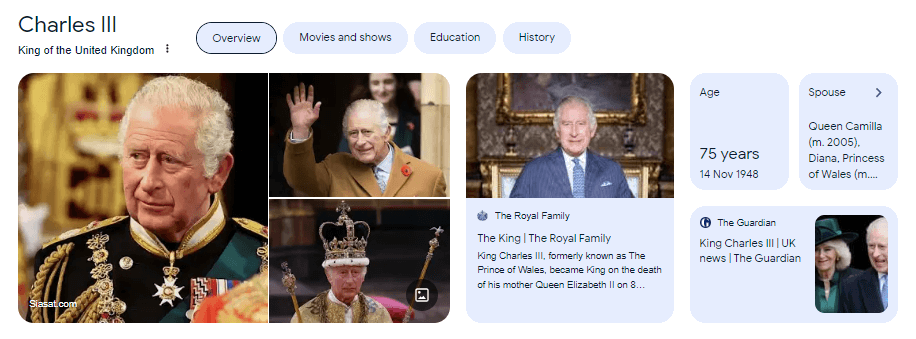
Information-rich Knowledge panel for Charles III
The basic strategy for winning your own Knowledge Graph is to:
Google needs to understand what or who that entity is and what other entities it relates to. Here are some ways to educate Google.
The first step is to establish an entity home. John Mueller recommends having a page dedicated to your entity.
On that page, you should include:
Speaking of author profiles and social media pages, any page representing your entity should have a description that matches your entity’s home. The key is to keep your description consistent across the web.
As we described above, this will help Google understand what your entity is about and where your entity appears across the web. Recognizing how these entities are grouped together is otherwise known as ‘Reconciliation’.
An entity’s home doesn’t have to be the home of your website. In fact, it can even be a social media profile page. However, Jason Barnard recommends using your About Us page as an entity home page because it’s:
When creating your entity home, use it to explain:
As we mentioned above, Google uses natural language processing (NLP) to gather data for its Knowledge Graph. However, the web consists of semi-structured or unstructured data, which means Google has to convert web content into a structured, machine-readable format.
Google doesn’t always get this right.
This means you should help the search engine understand your content by adding schema markup to your entity’s home page. Schema markup provides search engines with a structured, machine-readable version of your pages.
When implementing schema markup, using the appropriate schema type is crucial. For instance, if you want to inform Google about your personal entity, use the ‘person’ schema type. If you’re providing information about a local business, use the ‘local business’ schema type. This will ensure that Google receives the right structured data for your specific entity.
Google will verify that the information on your entity’s home is correct by finding credible sources around the web that mention your entity. It’s important to note that sites that you own or control don’t add much credibility because there’s an obvious conflict of interest.
This means you must have your entity description appear on sites that you do not control.
One of the best ways to do this is to create guest posts or to appear on podcasts.
Most sites that accept guest posts also include an author bio page. When setting yours up, make sure to include information that’s consistent with your entity home page.
Wherever possible, you should link from your entity home to any place where your entity appears across the web, including social media home and author bio pages.
You can also include a section that links to any podcasts you appear on or any guest posts you have created.
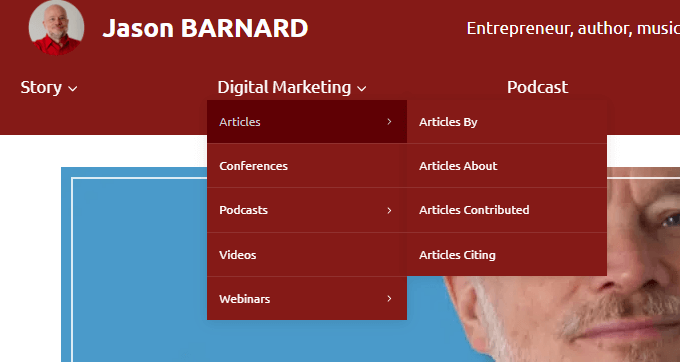
Jason Barnard’s entity home menu including links to pages where he appears around the web
Since your Knowledge Panel represents your entity in search, it’s only likely to show up in branded terms.
But Google will surprise you sometimes.
When tracking your branded terms, you might notice some obvious opportunities with the help of tools like Similarweb Rank Tracker. This specific tool has a SERP feature filter that can easily be set only to show Knowledge Panel keywords where your site is ranking.
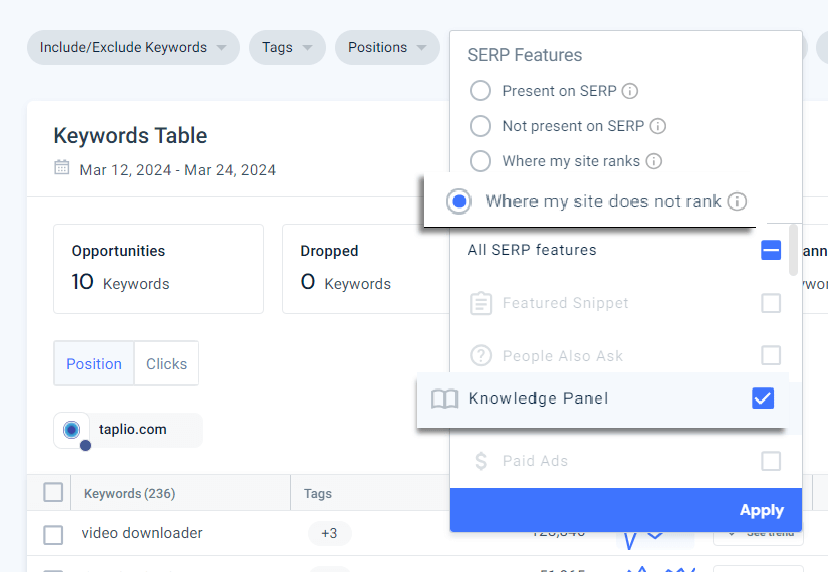
This will bring you a list of keywords where your site ranks but does not appear in the Knowledge Panel.
Knowledge Panels are all about showcasing your brand in the SERPs. Nothing gives your potential clients confidence than having an information rich Knowledge Panel.
Earning a Knowledge Panel comes down to one tactic: educating Google.
If you do that, with a little persistence and consistency, you can see your own Knowledge Panel in the SERPs.
How can I claim a Knowledge Panel?
To claim a Google Knowledge Panel, you need to be logged into a Google account.
Once you’ve done that, claim your Knowledge Panel by:
If the entity is associated with a site that has a Google Search Console account, you’ll be asked to sign in to that account to verify that you represent that entity. You’ll then be directed to a form that you should fill out in detail.
How long does it take to claim a Google Knowledge Panel?
There is no set time frame for claiming a Google Knowledge Panel. If you are eligible to claim a Knowledge Panel, you can request ownership through Google’s verification process. Once you have submitted your request, Google will review and respond to your request, typically within a few days or up to a few weeks.
How can I edit a Knowledge Panel?
Google Knowledge Panels are automatically generated by Google using information from various sources and cannot be directly edited. However, you can suggest changes or updates to the information in the panel using the “Suggest an edit” feature.
Where can I find a Knowledge Panel on Google?
A Knowledge Panel on Google can be found on the right-hand side of the search results page when you search for a well-known person, place, organization, or thing. The panel provides a summary of information related to the search query, including a brief description, images, related entities, and more.
How do you add photos to a Google Knowledge Panel?
Google Knowledge Panels are automatically generated by Google’s algorithms, so there is no direct way for individuals or organizations to add photos to their own Knowledge Panel. However, Google can pull photos from various sources, such as a Google Business Profile or the entity’s official website, so it’s important to ensure that your online presence accurately reflects your entity and includes high-quality images.

Darrell creates SEO content for Similarweb, drawing on his deep understanding of SEO and Google patents.

What Is Retail Intelligence? How It Works and Why It's Essential to Digital Commerce
Most Searched Things on Google in 2026
Give it a try or talk to our marketing team - it’s free!
