

Sie haben Ihr Suchlimit erreicht
Starten Sie Ihren kostenlosen Testzugang, um weiterhin alle Traffic- und Performance-Insights zu erkunden.
Los geht'sSA Group Text App-Analysen für 21. Februar

SA Group Text
- ShenZhen SamApp Technology Development Co., Ltd
- Apple App Store
- Bezahlt
- Produktivität
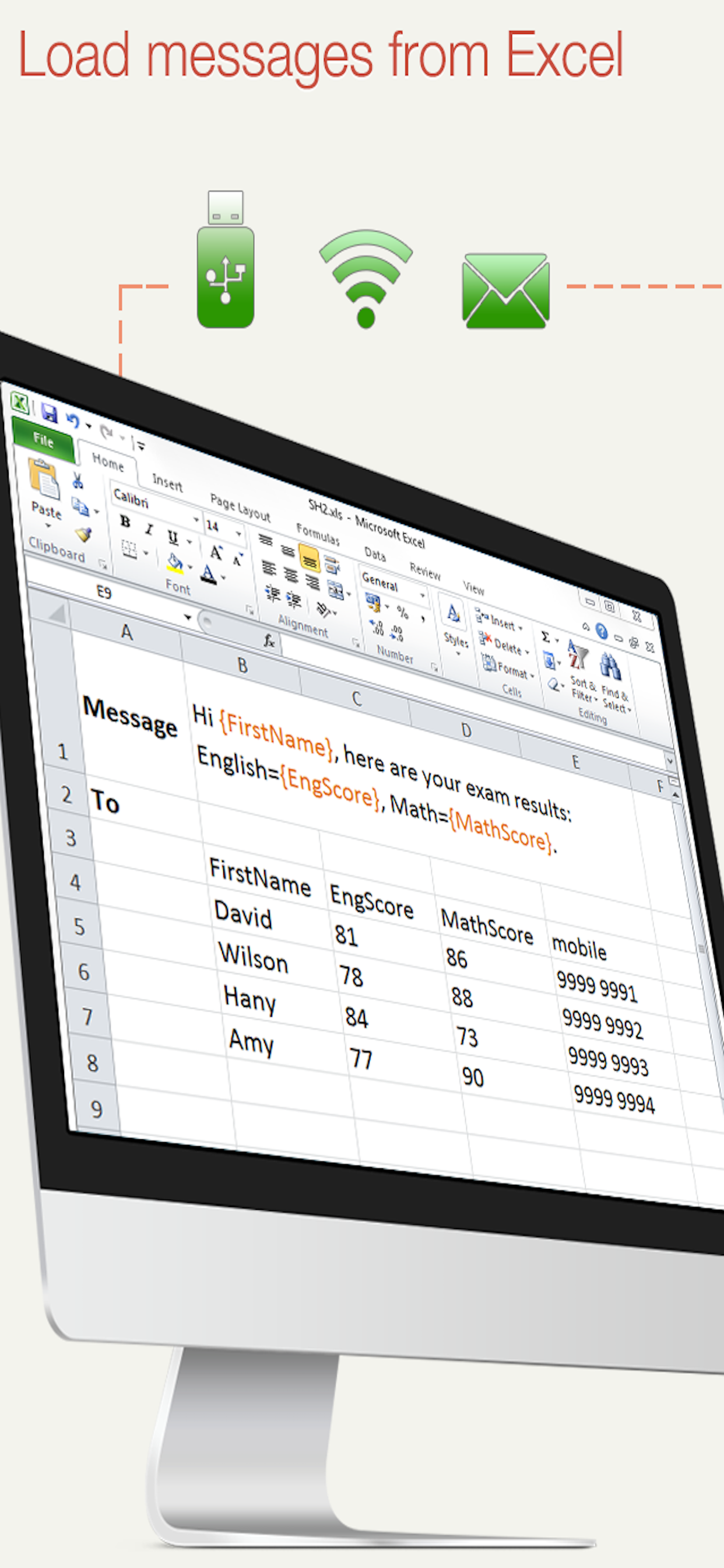
SA Group Text is the most efficient way to send group messages. You can add recipient names and phone numbers in an Excel file. You can enter static or personalized text messages right in the Excel spreadsheet. For example, if you enter “Hi {first name}, ...” in a message, the app will take the first name of the recipients and personalize the message, generating text such as “Hi David, …” , “Hi Michael, …”…
You can use an Excel spreadsheet again without editing the spreadsheet on your computer. You can just pick an Excel file, type in a quick message and send it. It is similar to sending a message to a group.
SA Group Text is also an easy way to send text messages to the contacts on your iPhone. Just pick groups or individual contacts, type in a static or personalized message and send it.
Who uses SA Group Text ?
1) Small Businesses
2) Religious Groups
3) Retail
4) Nightlife - Bars & Nightclubs
5) Restaurants
6) Banks/Financial Institutions
7) Insurance Companies
8) Event Marketers (With hundreds (or even thousands) of people attending your events)
9) Traditional Media
10) Schools
11) Social Groups
12) Real Estate
With SA Group Text you can :
1. Import group SMS from an Excel file via USB/WiFi/Email.
2. Create your own groups in an Excel spreadsheet and send messages to them.
3. Send unsent messages . If the app is terminated while sending group SMS, the sending task will be continued next time you launch the app..
4. Insert tags ({nickname},{firstname},{lastname},{nickname},{company} etc) in your text message in order to create personalized messages. When you use this function, each message has a personal touch. For example:
Dear {firstname}, Welcome to our dinner party.
5. Use MS Excel 2003 / 2007 / 2010 , OpenOffice.org , Apple Numbers or any other Excel-compatible applications to create your group text messages. Be sure to save as an Excel 97-2003 Workbook.
6. Export an Excel template , and use it to create your own Excel file.
7. Send SMS to as many recipients as you need within your Excel file
8. Limit the number of recipients per message. The app will split a large message into multiple separate messages.
9. Create a formatted Excel file easily. The file can contain only two columns : Mobile and Message. You can find more example spreadsheets on the app’s website.
10. Create flexible group SMS in your spreadsheet.
For example “{family} Family – Practice Tomorrow at 5pm for little {kidname}!” becomes “David Family – Practice Tomorrow at 5pm for little Johnny!”. The names change over and over again.
11. Create contact groups, you can create in-app groups for Exchange contacts.
12. Choose contacts organized in groups, companies, job titles and cities.
13. Preview messages before sending them out.
14. Skip duplicated phone numbers and messages.
15. The lite version has ads.
16. Send online sms, supporting Twilio and Nexmo.
17. Find a way to send messages without user interaction, please contact to samyuservice@gmail.com for details.
IMPORTANT NOTE :
Please check the setting of "Group Messaging" on the iPhone settings. If the option is available, set it to OFF (yes OFF) to be able to send to large groups. If it's on, the iPhone will try to send MMS instead of SMS and will fail to send to large groups.
More detail and up-to-date help guides are available in samapp.com.
Rang speichern
Der Store-Rang basiert auf mehreren Parametern, die von Google und Apple festgelegt wurden.
Alle Kategorien in
Vereinigte Staaten--
Produktivität in
Vereinigte Staaten--
Top-Wettbewerber und alternative Apps
Apps mit hoher Wahrscheinlichkeit, von denselben Benutzer:innen aus demselben Store verwendet zu werden.

Group SMS 2020

Mass Text Message: Group SMS

Speaker Aid

ComfortAI Installer Pro
 SA Group Text VS.
 Februar 21, 2026