

Sie haben Ihr Suchlimit erreicht
Starten Sie Ihren kostenlosen Testzugang, um weiterhin alle Traffic- und Performance-Insights zu erkunden.
Los geht'sSpeaking Alarm Clock - Hourly App-Analysen für 19. April
Speaking Alarm Clock - Hourly
- Comostudio
- Google Play Store
- Kostenlos
- Tools
■ Como Alarms
- days / specific date / last day / same day of the month / same day
- Math Calculation Alarm / Play to End of Music / Auto Dismiss / Auto Silent Mode
- Graudally Increase volume
- Repeat Speaking text/interval
- First Bell / Refrain Background Music / Ringtone / Music (mp3)
- Vibration pattern (heart rate / vital sign / knock)
- Only headset alarm
- Set different spoken languages for each alarm
■ Hourly reminder!
- You can make voice only, headset, baby voice (English baby, Korean baby version), bell only, LED only, status bar only, vibration only or each combination.
How do I get notifications?
✔ Vibration
✔ Vibration + 12 o'clock!
✔ Cuckoo sound
✔ 1 hour + 1 hour(one day) speaking with sentence + sea wave sound (using background music)
✔ Ding + current time + sound of nature
✔ Time + speaking schedule sentence + rainy sound
✔ Vibration + 2(Baby) + Hey! Now it's time to drink a glass of water + The sound of oriental gong
In addition to this, you can assemble more freely
■ Reminders (repeat/ recurring reminders)
1. You can set the number of notifications for each item 'once a day, several times a day (start time, end time, interval).
2. You can set the notification cycle for each item as 'Specify day of the week, every few days, same day every year / month, only one specific day, the end of every month'.
■ Counting / Counter
-Increase / decrease (tap / click / sensor)
-Basic units (kg, g, m, ml, rotation, etc.)
-Default increment / decrement value (integer / decimal point)
■ It's really easy to use.
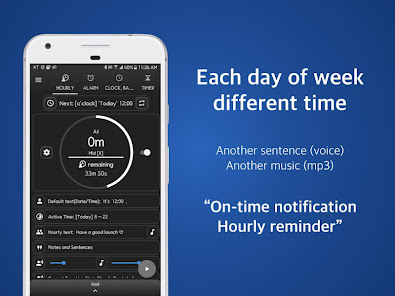
- Just turn on the app and you'll hear a ring every day from 8 am to 10 pm!(Do not worry, it will tell you every hour without setting anything! It's not hard at all!)
■ Set the time
- change the hour and min.(0 to 59 m)
- If you set 10 minutes to o'clock, it sounds 10 m every hour.
■ Hourly / weekly settings
- Time can be set from 0:00 to 24:00. and (Monday Tuesday Wednesday Thursday Friday Saturday Sunday)
- e.g) Monday 8-11, 13-15; Tuesday 9:00 to 22:00; Saturday 10-14, 19-21 ...
■ Hourly Talking Text
- You can write text and hear several sentences by day.
- e.g) Tuesday 3 p.m: drink water, Friday 3 p.m: Go swimming and not drink the water.
■ Set interval
- It will remind at o'clock and also alert again at regular intervals.(1 to 30 m)
- You can set a different time interval from the time you use.
- ex) Usage time is 8 ~ 20 o'clock, intervals are 8h, 9h, 19h.
■ Timetable
- Enter your schedule as easily as typing a timetable.
- You can manage day-to-day schedules on a daily basis.
■ Reminder (Timer)
- Drinking, drinking water, etc. by text / bell / vibration, etc., you will be notified regularly with words / bell / vibration / full screen.
■ Screen Lock, Desk Clock
- Entering Desk Clock mode when connecting the charger
■ Manner Mode
- Speak even in vibration mode/ silent / do not disturb mode
- Turn on the screen only in Vibrate or Silent mode.
■ Fullscreen notification
- Enable / disable the full-screen dialog window
- On / Off screen for full screen notification
- Automatically disappeared the full-screen or disappear manually after notification.
■ App Permissions Description
- This app does not collect personal information.
- Only the minimum permissions required to run the app.
- photo / media / file permissions; This is because we use music/bell(optional)
- Device ID and call information. Device IDs are not collected. Call information is used only to minimize or notify you immediately when you are in a call or during a call.(optional)
- Internet / Network: Permission to advertise (required / deleted when ad deleted)
- Do Not Disturb Mode - Adjust the volume control(optional)
■ It is designed to always ring at the right time, but the time to start reading can vary depending on the manufacturer, terminal, or TTS engine. (tts: text to speech)
Speaking Alarm Clock - Hourly-Nutzungsrang
Das Ranking der Nutzung basiert auf dem Algorithmus von Similarweb, der aktuelle Installationen und aktive Benutzer:innen über einen Zeitraum von 28 Tagen berechnet.
Alle Kategorien in
Vereinigte Staaten--
Tools in
Vereinigte Staaten#8,160
Top-Wettbewerber und alternative Apps
Apps mit hoher Wahrscheinlichkeit, von denselben Benutzer:innen aus demselben Store verwendet zu werden.
Talking Alarm Clock Beyond

Clock Phone 16, Alarm & Timer
Digital Clock Widget

Good Lock: Premium Lock Screen
 Speaking Alarm Clock - Hourly VS.
 April 19, 2026