

Sie haben Ihr Suchlimit erreicht
Starten Sie Ihren kostenlosen Testzugang, um weiterhin alle Traffic- und Performance-Insights zu erkunden.
Los geht'sPixolor - Live Color Picker App-Analysen für 22. Februar

Pixolor - Live Color Picker
- Hanping
- Google Play Store
- Kostenlos
- Tools
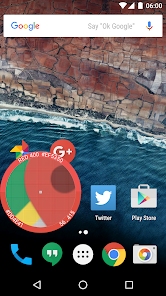
Pixolor is a circle floating over your apps showing a zoomed view of the underlying pixels, including color information and coordinates of the central pixel.
One of Android Police's 20 Best Android Apps of 2015
If you like the app, please consider supporting us by purchasing the "Remove Ads" feature.
QUICK FAQ: if you want to copy the code to clipboard please use the Share button in the notification. Alternatively, tap just outside the circle overlay (bottom-left or top-right corner).
This app is mainly for designers to know technical pixel-level information. It is also useful for people with poor eyesight who want to effortlessly zoom in on parts of the screen (e.g. to read text more easily).
Requires Android Lollipop (5.0) or higher.
Note: For Xiaomi (MIUI) devices, please enable the overlay permission in the app's system settings.
Known issue: On some devices (e.g. K3 Note running Android 5.0), when the circle overlay is shown, the rest of the screen is auto-dimmed and this can cause the recognized colors to be darker than they actually are. There is no way to rectify this unfortunately.
Your iPhone friends will be jealous when they realise this technology is not possible on their devices :)
Benefits:
★ Know the color code (RGB) or coordinates (DIP) of any pixel on the screen
★ Know the size (DIPs) of any region of the screen - before you release the circle you will see the x/y distance dragged
★ Know the nearest Material Design Color to the focus color
★ Study pixel arrangement
★ Share screenshot or circular image to another app (e.g. send by email) - long press on thumbnail
★ Enlarge hard-to-read text. Very handy for those with not so perfect eyesight
★ Generate color palette from latest screenshot or latest circular zoomed section
★ Share a cropped area of the screen - focus overlay on one corner, then drag overlay to opposite corner. You will see thumbnail of the dragged region in the main screen. Long-press to share the image!
Other features:
★ Pinch-to-zoom
★ Fine panning using two fingers (thereafter, free to release a finger)
★ Tap outside circle (bottom-left or top-right) to copy color RGB to clipboard
★ Quick Settings Tile to toggle on/off
★ Hue Wheel color picker
★ Notification allowing you to: hide/show overlay; quit application; share latest color code with other apps
Please note: this app shows ads after an initial ad-free period. You have the option to disable ads by making a small one-time in-app payment. Thank you for your support.
Privacy:
★ Pixolor takes a single screenshot each time you place your finger on the circle. This is indicated by the brief appearance of the Chromecast status bar icon. When the Chromecast icon is not visible, you can be sure no app is reading the screen.
★ Captured screenshot data is never sent (in full or part) from your device or made available outside of the app. The only exception to this is when you explicitly share the image (long-press on thumbnail), in which case it will be shared in the way you request.
Permissions are explained in our website FAQ: https://hanpingchinese.com/faq/#permissions-pixolor
Credits:
Launcher Icon (v1.0.8 and later): Vukašin Anđelković
https://play.google.com/store/apps/dev?id=6941105890231522296
Pixolor - Live Color Picker-Nutzungsrang
Das Ranking der Nutzung basiert auf dem Algorithmus von Similarweb, der aktuelle Installationen und aktive Benutzer:innen über einen Zeitraum von 28 Tagen berechnet.
Alle Kategorien in
Deutschland--
Tools in
Deutschland--
Benutzerinteressen und Top-Kategorien
Top-Kategorien und -Apps, die von Pixolor - Live Color Picker Benutzern verwendet werden
Top-Kategorien
Affinität
Top-Apps innerhalb der Kategorie
Weitere Apps
29%






17%





13%



8%


Top-Wettbewerber und alternative Apps
Apps mit hoher Wahrscheinlichkeit, von denselben Benutzer:innen aus demselben Store verwendet zu werden.

Loomi AI: Interior Design
Color Grab (color detection)

Congratulator: Wish Cards 2026

Sentenceify: My Text Converter
Pixolor - Live Color Picker VS. Februar 22, 2026