

Sie haben Ihr Suchlimit erreicht
Starten Sie Ihren kostenlosen Testzugang, um weiterhin alle Traffic- und Performance-Insights zu erkunden.
Los geht'sSatFinder App-Analysen für 22. April

SatFinder
- Maciej Grzegorczyk
- Google Play Store
- Kostenlos
- Tools
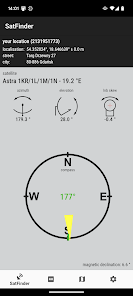
SatFinder (Satellite Finder) is a tool which will help you to set up satellite dish. It will give you azimuth, elevation and LNB tilt for your location (based on GPS) and chosen satellite from list. The result is shown both as numeric data and graphical on google maps. It has also built in compass which will help you to find proper satellite azimuth. It also can use augmented reality to show where is satellite on camera view.
Compass works only on devices with compass sensor (magnetometer).
How to use this app:
1. First of all, you should enable GPS and Internet on your phone. Remember – in most cases it is impossible to receive GPS signal inside buildings. So if you want to get very accurate location – please go near windows or go even outside.
In current app version location should be found quite immediately. So if you stuck with ‘no location’ message please make ensure that you got enabled all required features/permissions.
2. If app found your location, you must select desired satellite. To do this you must find icon with magnification glass and tap it. On the list you will find all satellites with elevation angle above zero degrees. Remember: satellite name doesn’t affect the calculation of angles. Important thing is satellite position.
3. The azimuth, elevation and skew angle is calculated for your location and chosen satellite. Under calculated values there is a compass with graphical representation of azimuth angle. The azimuth angle is calculated with magnetic inclination. Remember – every time you use compass – you should calibrate it. Green line represents your phone azimuth. So if on compass green and red indicators are on each other – front of the phone should show you direction to the satellite. If the compass value is correct – phone azimuth value will go green.
SatFinder-Nutzungsrang
Das Ranking der Nutzung basiert auf dem Algorithmus von Similarweb, der aktuelle Installationen und aktive Benutzer:innen über einen Zeitraum von 28 Tagen berechnet.
Alle Kategorien in
Vereinigte Staaten--
Tools in
Vereinigte Staaten#6,213
Top-Wettbewerber und alternative Apps
Apps mit hoher Wahrscheinlichkeit, von denselben Benutzer:innen aus demselben Store verwendet zu werden.

Yubii Home
Opensignal - 5G, 4G Speed Test

TP-Link Omada

Satellite Director
 SatFinder VS.
 April 22, 2026