

Sie haben Ihr Suchlimit erreicht
Starten Sie Ihren kostenlosen Testzugang, um weiterhin alle Traffic- und Performance-Insights zu erkunden.
Los geht'sNotification History Pro App-Analysen für 26. April

Notification History Pro
- Yotta Studio
- Google Play Store
- Bezahlt
- Tools
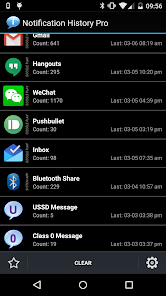
Notification History record USSD, Flash SMS/Class 0 messages, dialog, toasts and notifications. It can be used to:
1. Backup messages by apps and read them later
2. Find out which app pushed annoying status bar advertisement
3. Auto dismiss USSD or Flash SMS/Class 0 dialog.
Features:
* Record notifications on status bar
* Record toasts
* Record USSD messages
* Record all dialog messages
* Record app install/update/uninstall history
* Group messages by apps
* Sort message by time
* Clear notifications
* Ignore notifications from specific apps
* Ignore notifications with defined filters
* 12/24 hours time format
* Support copy notification to clipboard.
* Display installation source of apps (System app, Google play, amazon and unknown installer)
* Support search
* Launch app from notification
* Desktop widget to show the latest notifications
* Import notifications from free version
* Save USSD messages and Flash SMS/class 0 message
* Auto dismis(close) USSD and Flash SMS dialog
* Vibration, sound, LED for USSD and Flash SMS messages
* Show recent notifications on status bar
* Support regular expression in search and notifcation saving filter
Supported Class 0 dialog in these SMS apps:
* Stock SMS app
* GoSMS Pro
* Google Hangout
* Google Messenger
Permission Required:
Run at startup - used for auto purge notifications to reduce memory usage
Vibrate - used to vibrate when receiving USSD or class 0 (flash sms) messages.
Write to external storage - used to cache large notification data while exporting.
This app uses Accessibility services API to:
* Record USSD messages
* Record class 0 (Flash SMS) message
* Record all dialog messages
* Hide USD or Flash SMS dialogs
Information is only stored locally and not shared
And this app is using App Visibility (QUERY_ALL_PACKAGES) permission to:
* Show app name and icon of notifications
Usage on Android 5.0+:
* To start recording toasts, go to system Settings->Accessibility, then enable accessibility and Notifications History service
* To start recording notifications, go to system Notification Access settings and check Notification History
* To stop the record, just uncheck these settings.
How to hide USSD or Class 0 dialog automatically? Please be advised that it only works on android 4.1 and above.
Step 1. Check "Record USSD" or "Record Class 0 Message) to enable dialog detection and message recording
Step 2. Check "Hide Dialog" to enable auto hide. Also optionally check "Display Notification", "Enable Viration" or "Enable Sound" to get additional reminders.
What is a Class 0 messages (Flash SMS)?
It is a type of SMS that appears directly on the main screen without user interaction and is not automatically stored in the inbox.
It can be useful in emergencies, such as a fire alarm or cases of confidentiality, as in delivering one-time passwords.
Q&A:
Q: Why the app does not record any notifications?
A: There're 2 possible cause. #1. The accessibility service and Notification History Pro service was not enabled. #2. Other accessibility service are using the notification access. In this case, try to disable other services and have a try again. If still not working, please send me an email for further support.
Q: Why talkback service is enabled automaticall which brings voice on my phone?
A: It's a open bug related to specific ROM. Check out details and solutions in "help" section of this app.
Reviews:
http://www.addictivetips.com/android/log-export-share-your-android-notification-alerts-with-this-app/
http://www.androidpolice.com/2012/07/10/new-app-notification-history-keeps-tracks-of-notifications-lets-you-find-the-source-without-jelly-bean/
Notification History Pro-Nutzungsrang
Das Ranking der Nutzung basiert auf dem Algorithmus von Similarweb, der aktuelle Installationen und aktive Benutzer:innen über einen Zeitraum von 28 Tagen berechnet.
Alle Kategorien in
Deutschland#205
Tools in
Deutschland#42
Benutzerinteressen und Top-Kategorien
Top-Kategorien und -Apps, die von Notification History Pro Benutzern verwendet werden
Top-Kategorien
Affinität
Top-Apps innerhalb der Kategorie
Weitere Apps
44%




20%




13%


7%


Top-Wettbewerber und alternative Apps
Apps mit hoher Wahrscheinlichkeit, von denselben Benutzer:innen aus demselben Store verwendet zu werden.
Notisave - Notification Log

No Contact: Let Them Go

Mobile Hotel PMS by Hotel Sync

Secure Pass - Password Manager
Notification History Pro VS. April 26, 2026