

Sie haben Ihr Suchlimit erreicht
Starten Sie Ihren kostenlosen Testzugang, um weiterhin alle Traffic- und Performance-Insights zu erkunden.
Los geht'sFloating Clock On Screen App-Analysen für 24. Februar

Floating Clock On Screen
- Expressway Apps
- Google Play Store
- Kostenlos
- Tools
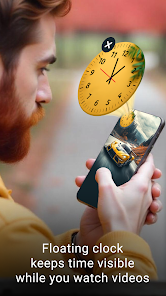
Floating Clock On Screen helps you manage time efficiently with always-visible floating tools. Display a digital clock, analog clock, world clock, timer, stopwatch, and alarm as movable overlays above all apps. Designed for multitasking, productivity, gaming, study, and daily time tracking.
⏰ Floating Clock Overlay ⏰
• Always-on-screen clock display
• Always visible on top of other apps
• Simple enable / disable toggle
• Lightweight floating widget
🕒 Digital Floating Clock 🕒
• Real-time digital clock overlay
• Current date & time zone display
• Optional seconds view
• Battery percentage indicator
• 12-hour or 24-hour format
• Custom time & date formats
• Manual time zone selection
🎨 Clock Customization 🎨
• Adjustable text size
• Padding & rounded corners
• Font color & background color
• Multiple font styles
• Floating backgrounds:
▸ Camera image capture
▸ Gallery image selection
▸ Built-in clock themes
🕰️ Analog Floating Clock 🕰️
• Classic analog clock widget
• Movable floating clock overlay
• Hour & minute hand color control
🖼️ Background Options 🖼️
• Solid background colors
• Pre-designed clock themes
• Camera & gallery image backgrounds
🌍 World Floating Clock 🌍
• World clock overlay for global time tracking
• Add multiple country clocks
• Each floating clock shows selected time zone
• Ideal for travel, business & remote work
⚙️ Customization ⚙️
• Font color & hand color
• Time zone selection
• Custom background images & themes
⏳ Floating Timer ⏳
• Countdown timer overlay
• Works without closing other apps
• Set timer duration easily
⏱️ Display Options ⏱️
• Show or hide hours
• Show or hide milliseconds
🎨 Style Controls 🎨
• Text size & padding
• Rounded corners
• Font & background colors
• Multiple font styles
⏱️ Floating Stopwatch ⏱️
• Accurate stopwatch overlay
• Stays visible while using other apps
• Ideal for workouts, study & productivity
⚙️ Display Options ⚙️
• Show or hide hours
• Show or hide milliseconds
• Custom fonts & colors
⏰ Floating Alarm ⏰
• Floating alarm notifications
• Simple alarm management
🛎️ Alarm Setup 🛎️
• Alarm name
• Time & date selection
• Repeat day options
• Custom ringtone
📋 Alarm History 📋
• View saved alarms
• Edit or delete anytime
🎨 Alarm Display 🎨
• Text size & padding
• Rounded corners
• Font & background colors
• Multiple font styles
🔐 Permission Disclosure 🔐
• SYSTEM_ALERT_WINDOW
Used only to display floating clock, timer, and alarm overlays on top of other apps.
No personal data is collected, stored, or shared.
Never lose track of time again. With always-on-screen clocks, floating timers, stopwatches, and alarms, you can multitask smarter, work faster, and stay organized all day with a smooth, customizable experience ⏱️
Floating Clock On Screen-Nutzungsrang
Das Ranking der Nutzung basiert auf dem Algorithmus von Similarweb, der aktuelle Installationen und aktive Benutzer:innen über einen Zeitraum von 28 Tagen berechnet.
Alle Kategorien in
Brasilien#8,518
Tools in
Brasilien#1,451
Benutzerinteressen und Top-Kategorien
Top-Kategorien und -Apps, die von Floating Clock On Screen Benutzern verwendet werden
Top-Kategorien
Affinität
Top-Apps innerhalb der Kategorie
31%


12%



11%



9%



Top-Wettbewerber und alternative Apps
Apps mit hoher Wahrscheinlichkeit, von denselben Benutzer:innen aus demselben Store verwendet zu werden.
The Clock: Alarm Clock & Timer

Atto - Time Clock & Scheduling

MultiTimer: Multiple timers

Clock Phone 16, Alarm & Timer
 Floating Clock On Screen VS.
 Februar 24, 2026