

Sie haben Ihr Suchlimit erreicht
Starten Sie Ihren kostenlosen Testzugang, um weiterhin alle Traffic- und Performance-Insights zu erkunden.
Los geht'sCast To TV - Screen Mirroring App-Analysen für 24. Februar

Cast To TV - Screen Mirroring
- AITools
- Google Play Store
- Kostenlos
- Tools
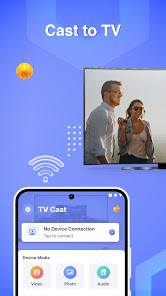
With the Cast To TV - Screen Mirroring app, you can effortlessly screen mirror your phone or tablet screen with your TV with just a tap. Enjoy the experience of watching movies, playing games, and viewing photos from your mobile device on the big screen of your TV without the hassle of complicated cables. You could cast to TV and screen share with your relatives or associates in a few easy steps.
Key Features:
● Screen Mirroring: Display content from your mobile device to your TV with a few simple steps. Airplay mirroring allows you to share your smartphone's screen with a wide TV assist with a stable transmission. Smartview on a larger screen allows you to experience your full-screen content precisely as it appears on the mobile device.
● Cast Videos: Screen cast, watch movies, video clips, and videos mirror from your favorite apps on your TV.
● Photo Slideshow: Screen share and showcase your memorable photos on the large screen of your TV.
● Game Streaming: Experience your favorite mobile games on the big screen.
● Cross-platform Support: Most smart TVs, LG, Samsung, Sony, TCL, Xiaomi, Hisense, Google Chromecast, Amazon Fire Stick & Fire TV, Roku Stick & Roku TV, AnyCast, Other DLNA Receivers, Other wireless adapters, etc
How to use Screen Mirroring app?
- Connect your phone and your TV to the same wifi network
- Open the "" Screen mirroring - cast to tv"" app and connect to Chromecast/ SamsungTV or other TV-compatible devices
- Allow your TV to connect to your phone
- After connecting successfully with the Cast to TV screen receiver, the app is now ready to use: Now, images, movies from the gallery collection, or any video you are interested in can be cast. You can use screen mirror for broadcasting on your smart TV.
Why choose Screen Mirroring - Cast To TV?
☆ Simple and user-friendly: No complex configurations are required, just a few simple steps to start screen sharing.
☆ Unlimited content: Watch any content from your mobile device on your TV.
☆ Compatibility with all devices: Supports leading TV brands and mobile devices in the market.
☆ No cable required: Free yourself from the hassle of setting up complicated cables and enjoy wireless connectivity.
☆ Record and share: Capture fantastic moments and share them with your family and friends.
You can easily connect & cast phone screen to big TV screen in high quality. Experience an excellent entertainment space right on your TV with Cast To TV - Screen Mirroring.
Cast To TV - Screen Mirroring-Nutzungsrang
Das Ranking der Nutzung basiert auf dem Algorithmus von Similarweb, der aktuelle Installationen und aktive Benutzer:innen über einen Zeitraum von 28 Tagen berechnet.
Alle Kategorien in
Vereinigte Staaten--
Tools in
Vereinigte Staaten#4,386
Benutzerinteressen und Top-Kategorien
Top-Kategorien und -Apps, die von Cast To TV - Screen Mirroring Benutzern verwendet werden
Top-Kategorien
Affinität
Top-Apps innerhalb der Kategorie
Weitere Apps
18%


13%



8%




7%


Top-Wettbewerber und alternative Apps
Apps mit hoher Wahrscheinlichkeit, von denselben Benutzer:innen aus demselben Store verwendet zu werden.

Roku Smart Home

Live Score: Football Live

myVW

Yubii Home
Cast To TV - Screen Mirroring VS. Februar 24, 2026