

Sie haben Ihr Suchlimit erreicht
Starten Sie Ihren kostenlosen Testzugang, um weiterhin alle Traffic- und Performance-Insights zu erkunden.
Los geht'sRemote Ripple PRO (TightVNC) App-Analysen für 4. April

Remote Ripple PRO (TightVNC)
- GlavSoft LLC
- Google Play Store
- Kostenlos
- Produktivität
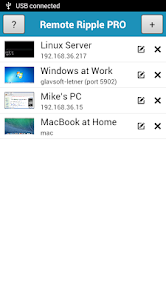
Fast remote desktop client from the developers of TightVNC. It allows you to access, view and control your PC, Mac and Unix systems remotely. As compared to competing VNC viewers, Remote Ripple offers:
✓ Clean and simple user interface
✓ Fast operation even on slow connections
✓ Smooth desktop scaling
✓ Low memory footprint
✓ Ultra low-bandwidth mode in the PRO version
✓ Perfect mouse emulation via a unique “mouse tool” (try it out!)
It works via Wi-Fi, 3G, 4G/LTE networks and connects straightly to your remote machines. It does not use intermediate servers and does not route your data to third-party services. While direct connections via Internet may require some configuration, they guarantee best performance and independence from online services.
How it can help you
From time to time, many of us need to access our “big computers” and use some “big software” installed on it. Remote Ripple allows you to do your work remotely. Also, you can:
✓ Monitor what's happening on your computers while you're away (use View-only mode to prevent from interfering with the desktop).
✓ Provide remote support to your friends and family. Assist in installing software, fix problems and demonstrate how to set up things.
✓ Administer servers, workstations and virtual machines remotely.
✓ Control your home computers while laying in a lounge chair. For example, you can use Remote Ripple as a remote control for your music or video player running on a PC.
✓ Copy a file forgotten on a remote host (while Remote Ripple does not support direct file transfers, it can help in transferring files with other services like Dropbox or Google Drive).
Install Remote Ripple, and find your own use cases!
Getting started
To connect with Remote Ripple, make sure your target computer runs a sort of VNC server.
✓ If the target PC runs Windows, install a VNC server on it. We strongly recommend TightVNC as it provides best performance and compatibility with Remote Ripple. You can download your free copy of TightVNC on its Web site — http://www.tightvnc.com/
✓ Mac OS X systems already have a VNC server included. It's a part of Apple Remote Desktop service. To enable it, go to System Preferences, choose Sharing, enable Remote Management, press Computer Settings, check “VNC viewers may control screen with password” and enter the password you will use when connecting.
✓ Most Linux distributions include a number of VNC servers as well. Just install a VNC server from your package collection, and type something like vncserver or tightvncserver (or whatever command starts that particular VNC server). Typically, it will offer you to enter new VNC password and will start sharing your desktop (or create new virtual desktop for you).
✓ Virtualization systems (such as VMware and QEMU) often include built-in VNC servers, although they may not be enabled by default.
Get news and support
✓ App page at Facebook: https://www.facebook.com/RemoteRipple (press Like to see updates in your news feed)
✓ Remote Ripple on Twitter: https://twitter.com/RemoteRipple (press Follow to get updates)
Like Remote Ripple? Rate and review it on Google Play!
Also, we will appreciate if you review Remote Ripple in your blog, social networks, other Web sites or forums. Send us links to your reviews!
Thank you!
Remote Ripple PRO (TightVNC)-Nutzungsrang
Das Ranking der Nutzung basiert auf dem Algorithmus von Similarweb, der aktuelle Installationen und aktive Benutzer:innen über einen Zeitraum von 28 Tagen berechnet.
Alle Kategorien in
Vereinigte Staaten--
Produktivität in
Vereinigte Staaten#3,209
Top-Wettbewerber und alternative Apps
Apps mit hoher Wahrscheinlichkeit, von denselben Benutzer:innen aus demselben Store verwendet zu werden.

Yubii Home

RealVNC Viewer: Remote Desktop

Valamar

Home V
 Remote Ripple PRO (TightVNC) VS.
 April 4, 2026