

Sie haben Ihr Suchlimit erreicht
Starten Sie Ihren kostenlosen Testzugang, um weiterhin alle Traffic- und Performance-Insights zu erkunden.
Los geht'sAdvanced EX for FIAT App-Analysen für 14. April
Advanced EX for FIAT
- Dare Apps
- Google Play Store
- Bezahlt
- Auto und Fahrzeuge
Monitor specific FIAT parameters in real-time, including engine and automatic transmission advanced sensor data by adding this plugin to Torque Pro.
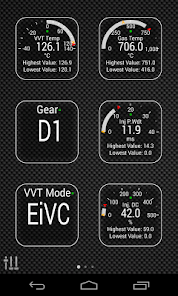
Advanced EX is a plugin for Torque Pro, extending the PID/Sensor list with more than 20 specific parameters from FIAT vehicles, including:
* VVT Oil Temperature
* VVT Operation Mode (LIVO / Multi-Lift / EIVC / Full-Lift / Closed) (*)
* Injector Pulse Width
* Injector Duty Cycle
* Exhaust Gas Temperature
* Instant Fuel Flow
* Engine Torque
* Throttle Body Opening
* Knock Voltage Cyl 1~4
* Current Engine Speed
* Target Engine Speed
* Canister Charge
* Canister Duty Cycle
* Cruise Control Target (*)
* Current Gear (P / N / R / D1~D6) (*)
* Lambda Heater Duty
* ECU Odometer
Sensors marked with (*) are not available on all cars, as it depends on special engine/parts like Turbo and/or Automatic Transmission.
For cars with FIAT Multiair engine, the VVT Operation Mode is really cool to monitor during a long road trip or even while driving in the city. As described on FIAT Service Manuals, VVT Operation Mode is the actual valve operation mode and it changes depending on the road and your driving style.
*PLEASE NOTE* that other FIAT models/engines may be supported, but the plugin was tested only on the following models/engines: (CAN BUS ONLY)
* 500 1.2 Fire 8V
* 500 1.4 MultiAir 16V
* 500 1.3 MultiJet 16V
* Bravo 1.4 T-Jet 16V
* Doblo 1.3 MultiJet 16V
* Giulietta 1.4 MultiAir 16V
* MiTo 1.2 Fire 8V
* MiTo 1.4 MultiAir 16V
* MiTo 1.3 MultiJet 16V
* Punto 1.2 Fire 8V
* Punto 1.4 Fire 8V
* Punto 1.4 MultiAir 16V
* Punto 1.4 T-Jet 16V
* Punto 1.3 MultiJet 16V
* Qubo 1.2 Fire 8V
* Qubo 1.3 MultiJet 16V
* Ypsilon 1.2 Fire 8V
* Ypsilon 1.3 MultiJet 16V
More information about this engine and car applications on: http://en.wikipedia.org/wiki/MultiAir.
Advanced EX requires the latest version of Torque Pro installed in order to function. This is *NOT* a standalone application and will *NOT* work without Torque Pro.
Plugin Installation
-------------------------
1) After purchasing the plugin on Google Play, make sure that you see the plugin listed on your Android device installed applications list.
2) Launch Torque Pro and click on the "Advanced EX" icon
3) Select the appropriate settings and return to Torque Pro main screen
4) Go to Torque Pro "Settings"
5) Make sure that you can see the plugin listed also on Torque Pro by clicking "Settings" > "Plugins"> "Installed Plugins".
6) Scroll down to "Manage extra PIDs/Sensors"
7) Usually this screen will not display any entries, unless you have added any pre-defined or custom PIDs in the past.
8) From the menu, choose "Add predefined set"
9) If your license is validated on Google Play you should see an entry for your engine. You may see predefined sets for other engine types, so make sure you pick the right one. If you don't see anything, probably you have an installation problem or validation error on Google Play. In this case, go back and repeat the installation procedure.
10) After clicking on the entry from the previous step, you should see several entries added to the Extra PIDs/Sensors list.
Note: Some sensors will be calculated real-time based on other sensors. Make sure that you keep all sensors added by the plugin to avoid calculation errors.
Adding Displays
------------------------
1) After adding the additional sensors, go to the Realtime Information/Dashboard.
2) Press the menu key and then click on "Add Display"
3) Select the appropriate display type (Dial, Bar, Graph, Digital Display, etc)
4) Select the appropriate sensor from the list. Sensors provided by Advanced EX begins with "[FADV]" and should be listed right after the time sensors in the top of the list.
More features/parameters will be added in further releases. If you have comments and/or suggestions please just let me know.
Advanced EX for FIAT-Nutzungsrang
Das Ranking der Nutzung basiert auf dem Algorithmus von Similarweb, der aktuelle Installationen und aktive Benutzer:innen über einen Zeitraum von 28 Tagen berechnet.
Alle Kategorien in
Vereinigte Staaten--
Auto und Fahrzeuge in
Vereinigte Staaten--
Top-Wettbewerber und alternative Apps
Apps mit hoher Wahrscheinlichkeit, von denselben Benutzer:innen aus demselben Store verwendet zu werden.

CMC Motorsports®

AUTOsist Fleet Maintenance App

NATIX Drive&
 Advanced EX for FIAT VS.
 April 14, 2026