

Sie haben Ihr Suchlimit erreicht
Starten Sie Ihren kostenlosen Testzugang, um weiterhin alle Traffic- und Performance-Insights zu erkunden.
Los geht'saRDP: Secure RDP Client App-Analysen für 19. April

aRDP: Secure RDP Client
- Iordan Iordanov (Undatech)
- Google Play Store
- Kostenlos
- Produktivität
Connect to your computers from anywhere without network configuration! Sign up for the free Morpheusly Beta by visiting www.morpheusly.com to Download and Get Started
Welcome to the best open-source RDP client in the world!
Need aRDP on iOS or Mac OS X? Now available at
https://apps.apple.com/ca/app/ardp-pro/id1620745523
Please support my work and GPL open-source software by buying the donation version of this program called aRDP Pro!
Release notes
https://github.com/iiordanov/remote-desktop-clients/blob/master/bVNC/CHANGELOG-aRDP
Older versions
https://github.com/iiordanov/remote-desktop-clients/releases
Report bugs
https://github.com/iiordanov/remote-desktop-clients/issues
If you have questions, please ask on the forum instead of in a review for everybody's benefit
https://groups.google.com/forum/#!forum/bvnc-ardp-aspice-opaque-remote-desktop-clients
Check out bVNC, my VNC Viewer as well
https://play.google.com/store/apps/details?id=com.iiordanov.freebVNC
See below for setup instructions on enabling RDP on Windows.
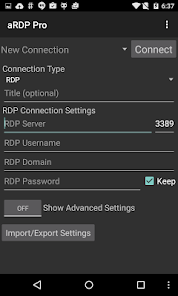
aRDP is a secure, SSH capable, open source Remote Desktop Protocol client that uses the excellent FreeRDP library and parts of aFreeRDP. Its features include:
- Remote desktop control of computers running any version of Windows except Windows 10 Home. Install a VNC server for Windows 10 Home and use bVNC
- RDP File support in Pro version
- Full Ubuntu 22.04+ support
- Remote desktop control of Linux computers with xrdp installed.
- Master password in aRDP Pro
- MFA/2FA SSH authentication in aRDP Pro
- Sound redirection in in aRDP Pro
- RDP Gateway Support
- SDcard redirection
- Console mode
- Fine control over remote desktop session styling
- Multi-touch control over the remote mouse. One finger tap left-clicks, two-finger tap right-clicks, and three-finger tap middle-clicks
- Right and middle-dragging if you don't lift the first finger that tapped
- Scrolling with a two-finger drag
- Pinch-zooming
- Force Landscape, Immersive Mode, Keep Screen Awake options in Main Menu
- Dynamic resolution changes, allowing you to reconfigure your desktop while connected, and control over virtual machines from BIOS to OS
- Full rotation support. Use the central lock rotation on your device to disable rotation
- Multi-language support
- Full mouse support on Android 4.0+
- Full desktop visibility even with soft keyboard extended
- SSH tunneling for added security or to reach machines behind a firewall.
- UI Optimizations for different screen sizes (for tablets and smartphones)
- Samsung multi-window support
- SSH public/private (pubkey) support
- Importing encrypted/unencrypted RSA keys in PEM format, unencrypted DSA keys in PKCS#8 format
- Automatic connection session saving
- Zoomable, Fit to Screen, and One to One scaling modes
- Two Direct, one Simulated Touchpad, and one Single-handed input modes
- Long-tap to get a choice of clicks, drag modes, scroll, and zoom in single-handed input mode
- Stowable on-screen Ctrl/Alt/Tab/Super and arrow keys
- Sending ESC key using the "Back" button of your device
- Ability to rotate and use D-pad for arrows
- Minimum zoom fits screen, and snaps to 1:1 while zooming
- FlexT9 and hardware keyboard support
- Available on-device help on creating a new connection in the Menu when setting up connections
- Available on-device help on available input modes in the Menu when connected
- Tested with Hackerskeyboard. Using it is recommended (get hackers keyboard from Google Play).
- Export/Import of settings
- Samsung DEX, Alt-Tab, Start Button capture
- Ctrl+Space capture
- Clipboard integration for copy/pasting from your device
- Audio support
Enabling Remote Desktop on Windows:
https://docs.microsoft.com/en-us/windows-server/remote/remote-desktop-services/clients/remote-desktop-allow-access
Enabling RDP on Linux:
- Install xrdp package
Code:
https://github.com/iiordanov/remote-desktop-clients
aRDP: Secure RDP Client-Nutzungsrang
Das Ranking der Nutzung basiert auf dem Algorithmus von Similarweb, der aktuelle Installationen und aktive Benutzer:innen über einen Zeitraum von 28 Tagen berechnet.
Alle Kategorien in
Vereinigte Staaten--
Produktivität in
Vereinigte Staaten#3,034
Benutzerinteressen und Top-Kategorien
Top-Kategorien und -Apps, die von aRDP: Secure RDP Client Benutzern verwendet werden
Top-Kategorien
Affinität
Top-Apps innerhalb der Kategorie
Weitere Apps
23%



22%


11%




6%




Top-Wettbewerber und alternative Apps
Apps mit hoher Wahrscheinlichkeit, von denselben Benutzer:innen aus demselben Store verwendet zu werden.

Excelmind: PQ Simulator

Control+

CSV File Viewer - Smart CSV

yescan - PDF OCR Scanner
aRDP: Secure RDP Client VS. April 19, 2026