

Sie haben Ihr Suchlimit erreicht
Starten Sie Ihren kostenlosen Testzugang, um weiterhin alle Traffic- und Performance-Insights zu erkunden.
Los geht'sLock-Hide File App-Analysen für 27. Februar

Lock-Hide File
- smartkts app
- Google Play Store
- Kostenlos
- Tools
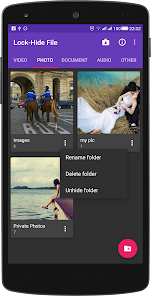
Keep file hidden safe from prying eyes in Lock-Hide File! - The ultimate secret gallery lock app to hide any files on your Android devices.
Lock-Hide File locker is the easiest and safest way to create a secure location on your device to store and protect your personal/important photos and videos and ensure that friends who use your phone don’t see your personal photos/videos if they browse through your gallery.
Sensitive videos and Sensitive photos from your Android explorer can be kept safely locked away in a secure accessible only via a secret PIN code
All features are enabled without limitations. Get Hide file and Lock file and folder like photos, videos, documents, audios safely and secretly for FREE.!
Features:
- App lock file and hide file to keep your privacy safe!
- Hidden photos, hidden videos and any other files ( document, audio, etc)
- Hide file - Unhide file secretly and safely!
- This app lock fast when you click HOME button
- File will be hidden and locked in the advanced level
- Through storage device / SD card of the phone to lock and unlock file.
- No any storage limitation to hide photo and hide video
- Filtering, sorting and searching of secret, hidden or restored files
- Fast and reliable file locker
- Manage your pictures and videos(new folder, rename, delete)
- Hide file locker app will not appear in the list of recent applications
- Scan gallery fastest. It will scan your phone's file, allowing you to manage the file explorer more easily.
- With optimized features and user- friendly material interface, lock-hide file is considered one of the best apps on security “hide video”, “hide photo” and document etc…
Instruction of Lock-Hide File:
- Step 1: Enter the Password to access Lock-Hide File.
- Step 2: Create folders to make management easier.
- Step 3: Select the any file that needs to be hidden from the Storage / SD card.
- Step 4: Click the app lock icon and complete the hidden file.
Experience the great features of the app right now and give us your rating in order for us to improve, adding necessary features relating to the operation of applications. As well as many other questions can be send feedback in application. If you like our app, please take a minute to rate it on Google Play.
Lock-Hide File-Nutzungsrang
Das Ranking der Nutzung basiert auf dem Algorithmus von Similarweb, der aktuelle Installationen und aktive Benutzer:innen über einen Zeitraum von 28 Tagen berechnet.
Alle Kategorien in
Vereinigte Staaten--
Tools in
Vereinigte Staaten--
Top-Wettbewerber und alternative Apps
Apps mit hoher Wahrscheinlichkeit, von denselben Benutzer:innen aus demselben Store verwendet zu werden.

LockMyPix Photo Vault PREMIUM

Authenticator 2FA - OTP

Duplifix: Duplicate Photos

My Folder : Safe Secure Hidden
 Lock-Hide File VS.
 Februar 27, 2026