

Sie haben Ihr Suchlimit erreicht
Starten Sie Ihren kostenlosen Testzugang, um weiterhin alle Traffic- und Performance-Insights zu erkunden.
Los geht'sWordHolic | DIY Flash Cards! App-Analysen für 15. Februar

WordHolic | DIY Flash Cards!
- Langholic Ltd.
- Google Play Store
- Kostenlos
- Bildung
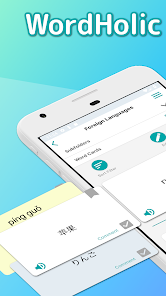
WordHolic is the simple, useful and multifunctional flashcard maker app for any purpose: learning languages, test preparation, etc.
● Easy to operate with easy-to-see design, so you can learn smoothly
● Simple but sufficient functions, so you can use them conveniently
● Create as many flashcards as you want for free and learn Chinese, French, Japanese, Korean, Spanish, etc. or prepare for your exams
◇ Main learning functions ◇
● Learn effectively by utilizing bookmarks and memorize flags on flash cards
(Front side, back side and tag comment)
● Practice listening with the voice reading function (30 languages)
(You can also play voice readings simultaneously while listening to music.)
● Easy to learn with the auto rotate slideshow
(You can adjust speeds, reverse front and back sides of cards, shuffle cards etc.)
● Enjoy the folding card list
● Add photos or images on flashcards to memorize visually
● Review repeatedly based on forgetting curve
● Quizzes (Self-Review)
◇ Main management functions ◇
● Organize flashcards in folders
(Multiple subfolders can be also provided.)
● Search folders and flash cards by keywords and so on
● Export card backup files
(You can easily share your card data with your friends.)
● Import data files to create flash cards
(You can create data files in PC and import it.)
◇ Other useful functions ◇
● Set the default reading language. These are set as initial values when you create new cards, so you don’t have to set each time.
(This is available from the menu button on the upper right of the app screen > [Preferences] > [New Card Settings].)
● Set the horizontal alignments and text sizes on each side of cards.
(This is available from the menu button on the upper right of the app screen > [Preferences] > [Card Basic Display Settings].)
◇ How to share cards with your friends ◇
(1) Select the menu button on the upper right of the app screen > [Export Backup]
(2) Follow the instructions and export a card data file in the way you like (mail attachment, Google Drive, etc.) and share the file with your friends
(3) Store the file in a place of a friend’s phone or Google Drive, etc.
(4) Select the menu button on the upper right of the app screen > [Import Card Data] and let the file imported into a folder.
(If you use some cloud storage services for the export and import purpose, Google Drive is recommended.)
◇ Upgrades (In-App Purchases / From v1.10) ◇
Go to [Menu] > [Upgrades] in the app to purchase the upgrades!
● Premium Plans
By upgrading to the premium plan, you will be able to use many features such as data sync, background player, ad free, etc.
- 1 year plan (Auto Renewal Subscription)etc.
● Restore Your Purchases
You can restore your purchases from:
[Menu] > [Upgrades] > [Restore]
* Before restoring, log in your Google Play with your Google account that you purchased your plan with.
● Current Plan and Cancellation
The payments will be charged to your Google account. To check your current plans or turn off auto-renewal, go to:
Google Play App in your device > Menu (Right Upper Corner) > Subscriptions
● Auto-Renewal Subscription
Your Google account will be charged prior to the end of the current period. Refer to Google Play Help for more details.
● Note
- To turn off auto-renewal, you have to do so in the Google Play and basically cannot cancel the month that your plan starts from.
- Before making a purchase, accept the following Terms of Use.
● Terms of Use
https://www.langholic.com/wordholic-android-terms-of-use-en
Enjoy WordHolic!
WordHolic | DIY Flash Cards!-Nutzungsrang
Das Ranking der Nutzung basiert auf dem Algorithmus von Similarweb, der aktuelle Installationen und aktive Benutzer:innen über einen Zeitraum von 28 Tagen berechnet.
Alle Kategorien in
Vereinigte Staaten--
Bildung in
Vereinigte Staaten--
Top-Wettbewerber und alternative Apps
Apps mit hoher Wahrscheinlichkeit, von denselben Benutzer:innen aus demselben Store verwendet zu werden.

AlgoApp - Flashcards

Santa - AI TOEIC&TOEFL

Brainscape: Smarter Flashcards

Noji: Study with Flashcards
 WordHolic | DIY Flash Cards! VS.
 Februar 15, 2026