

Sie haben Ihr Suchlimit erreicht
Starten Sie Ihren kostenlosen Testzugang, um weiterhin alle Traffic- und Performance-Insights zu erkunden.
Los geht'sAssistive Touch iOS App-Analysen für 24. April

Assistive Touch iOS
- LuuTinh Developer
- Google Play Store
- Kostenlos
- Tools
We using API Accessibility Service to helps people with disabilities easily control their phones on large phone screens.
"This app uses the Device Administrator permission." It is necessary and used only for locking the device when you use feature turn off the screen. You need to enable Administration before it can be used that feature. To uninstall the app, please open my app and click the "Uninstall" button.
"This app uses Accessibility services." It is necessary and used only to perform a global action. For example going back, going home, opening recent, power dialog, notification etc. You need grant this permission to use that action.
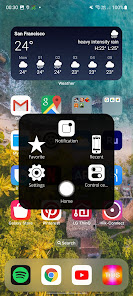
When you turn on Assistive Touch iOS 26, you’ll see the AssistiveTouch menu. You can drag it to any edge of the screen, then tap the menu to open it.
1. To turn on AssistiveTouch iOS 26:
Open my app > Switch on AssistiveTouch.
2. To use more actions:
Go to Settings > Accessibility > Services and turn on AssistiveTouch.
You can also use AssistiveTouch to access your Home screen, Recent screen and use Back Key. Just open the AssistiveTouch menu and tap Home, Recent, Back action.
To access your Notifications, open the AssistiveTouch menu and tap Notification. To get to the control, open the AssistiveTouch menu. From here, you'll be able to do things like turn Bluetooth on and off, use Wifi on and off, take screenshots, and more.
FEATURES:
- Control your device with Assistive Touch menu.
- Custom size and color Floating icon.
- Custom color Assistive Touch menu.
- And more.
SUPPORT:
- Email: andywill.itplus@gmail.com
- Website: https://www.luutinhdeveloper.com
THANKS FOR USING MY APPS.
Assistive Touch iOS-Nutzungsrang
Das Ranking der Nutzung basiert auf dem Algorithmus von Similarweb, der aktuelle Installationen und aktive Benutzer:innen über einen Zeitraum von 28 Tagen berechnet.
Alle Kategorien in
Vereinigte Staaten--
Tools in
Vereinigte Staaten--
Top-Wettbewerber und alternative Apps
Apps mit hoher Wahrscheinlichkeit, von denselben Benutzer:innen aus demselben Store verwendet zu werden.

Borealis - Icon Pack

Move to iOS

HiOS Launcher - Fast

Tapet Wallpapers Generator
 Assistive Touch iOS VS.
 April 24, 2026