

Sie haben Ihr Suchlimit erreicht
Starten Sie Ihren kostenlosen Testzugang, um weiterhin alle Traffic- und Performance-Insights zu erkunden.
Los geht'sNoto | Minimal Note-Taking App App-Analysen für 19. April

Noto | Minimal Note-Taking App
- Ali Albaali
- Google Play Store
- Kostenlos
- Produktivität
Ad-free
We all hate ads. Well, Noto doesn't have any, and it never will. Enjoy the full experience without any ads and free of cost.
Open source
Noto is an open-source application. You can view its source code on GitHub at anytime using this link https://www.github.com/alialbaali/Noto
Privacy
All your notes and folders are stored locally on your device, and they will never leave it.
Minimal and modern design
With its modern and simplistic design, Noto makes it easier to navigate and look things up.
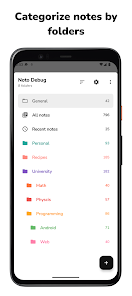
Folders
Use folders to group different types of notes. Customize each folder with various names and colors, so you can easily find them and organize your notes.
Folders vault
Want to keep some stuff private? You can add as many folders as you want to the vault and lock them with passcode, fingerprint, or facial recognition.
Labels
Each folder has its own set of labels, and you can use them to filter your notes in the anyway you want. Including, inclusive or exclusive filtering.
Pinned folders & notes
You can pin folders & notes to stay at the top, without the need to search for it.
Folders & Notes archive
Done with a folder or a note but you don't want to delete them? Just archive it. There is folders archive. In addition to, each folder has its own archive where you can keep your notes just in case you need them at a later time.
Duplicate/Copy/Move notes
Noto supports duplicating, moving, and copying notes across different folders.
Auto save
You don't need to worry about saving your notes constantly. Noto automatically saves your notes immediately while you're typing.
Notes word-count
Noto keeps track of the number of written words in each note.
Light/Dark/Black/System themes
Do you want to check your notes at night? No problem! Noto supports auto dark mode by default. You can also keep Noto’s theme always light, dark, or black depending on your needs.
List and grid layout modes
You can customize folders’ and notes’ layouts to list or grid, depending on what you prefer.
Undo/Redo with history view
Have you ever typed something but accidentally deleted it? You can easily undo that, or if you wish, you can view the history and jump to any previous version you like. On top of that, Noto supports swiping left or right to undo/redo for faster usage.
Reminders
You can attach reminders for your notes, and you will get notified about them in time.
Reading Mode
Don't want to get distracted? Noto features Reading Mode, where you can read your notes without any interruptions.
Custom sorting and grouping
You can sort folders or notes alphabetically, by creation date, or manually, group notes by label, or by creation date.
All notes/Recent notes
Don't remember which folder had the note? With all notes view, you can quickly search for it. Or, if you have checked it recently, it would be in your recent notes view.
Remembering scroll position
Noto can remember your scrolling position for each note and folder.
Supported languages
Noto is available in these languages: English, Turkish, Arabic, Indonesian, Czech, German, Italian, Spanish, and French.
Folders and notes widgets
With widgets support, you can easily perform many actions directly from your home screen.
Export folders and notes
Do you want to back up your data? Noto provides an easy way to export your folders and notes.
Noto | Minimal Note-Taking App-Nutzungsrang
Das Ranking der Nutzung basiert auf dem Algorithmus von Similarweb, der aktuelle Installationen und aktive Benutzer:innen über einen Zeitraum von 28 Tagen berechnet.
Alle Kategorien in
Brasilien--
Produktivität in
Brasilien--
Benutzerinteressen und Top-Kategorien
Top-Kategorien und -Apps, die von Noto | Minimal Note-Taking App Benutzern verwendet werden
Top-Kategorien
Affinität
Top-Apps innerhalb der Kategorie
Weitere Apps
10%





10%

10%




9%


Top-Wettbewerber und alternative Apps
Apps mit hoher Wahrscheinlichkeit, von denselben Benutzer:innen aus demselben Store verwendet zu werden.
BlackNote: Dark Notes, Notepad
Notepad - simple notes

TicNote: AI Recorder & Agent

Wondr Note: All-in-One Notes
Noto | Minimal Note-Taking App VS. April 19, 2026