

Sie haben Ihr Suchlimit erreicht
Starten Sie Ihren kostenlosen Testzugang, um weiterhin alle Traffic- und Performance-Insights zu erkunden.
Los geht'sGrammar checker and corrector App-Analysen für 22. Februar

Grammar checker and corrector
- TextAdviser
- Google Play Store
- Kostenlos
- Bildung
The Grammar and Punctuation mobile app is a language tool designed to help users improve their writing skills. The app offers a wide range of features to assist users in identifying and correcting grammar and punctuation errors in their written content.
The app's interface is user-friendly and easy to navigate, with a clean design and intuitive icons. The main features of the app include a grammar checker, a punctuation checker, and a proofreading tool.
The grammar checker scans text for grammatical errors, such as subject-verb agreement, improper tense usage, and sentence structure issues. The punctuation checker analyzes text for errors in the use of punctuation marks, such as commas, periods, and quotation marks.
The proofreading tool allows users to review their writing for spelling errors, typos, and other common mistakes. Additionally, the app includes a feature that provides suggestions for synonyms and alternative words to improve the overall quality of the text.
The app also offers a feature that allows users to customize the level of feedback they receive. Users can choose to receive in-depth explanations of grammar and punctuation rules, or they can opt for a more general overview of their errors.
Overall, the Grammar and Punctuation mobile app is an excellent tool for anyone looking to improve their writing skills. Whether you're a student, professional writer, or simply looking to improve your communication skills, this app is an invaluable resource that can help you write with confidence and accuracy.
Punctuation checker is currently only available for English. Spell checking is available in several languages, you can select the language in the program settings.
If the program does not find errors, check that the language in the settings matches the language of the text. By default, the language set in the phone settings is used.
Limitations on the amount of text in one check - 10 thousand characters for spell checking, 1000 characters for commas.
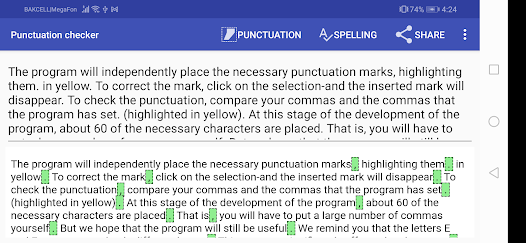
Checking spelling and punctuation occurs in two steps: first check the spelling by pressing the first button on the navigation bar, then check the punctuation.
After performing a spell check, misspelled words are highlighted in red. Click on these words to bring up a menu with correction options.
If you want to edit the text after checking the spelling, then click on the clear formatting button to remove the highlighting of words.
At the moment, the punctuation check finds about 80% of errors, so you will need to correct some of the errors yourself. Also keep in mind that the punctuation option may not match your intention, since the meaning of the text depends on the placement of characters.
Signs are highlighted in red, according to the program, which need to be removed. Yellow - the signs that the program put automatically. The rest of the characters remain unselected.
Why is TextAdviser’s Grammar and Punctuation Checker better than other editing tools?
1. Comprehensive Checking: TextAdviser's system is designed to check for a wide range of grammatical and punctuation errors, from basic syntax issues to more complex problems involving tense, agreement, and style.
2. Contextual Understanding: The AI-powered model behind TextAdviser is capable of understanding context, which allows it to provide more accurate and helpful suggestions. This is in contrast to some other tools that may miss errors in more complex sentences.
3. User-friendly Interface: The interface is designed to be intuitive and easy to use, making it accessible to users with varying levels of technical expertise.
4. Multilingual Support: TextAdviser supports multiple languages, making it a versatile tool for users who write in different languages or need to translate their work.
5. Advanced AI technology: TextAdviser uses state-of-the-art AI technology, which is designed to understand context and nuances in language. This means it can catch errors that other tools might miss.
Grammar checker and corrector-Nutzungsrang
Das Ranking der Nutzung basiert auf dem Algorithmus von Similarweb, der aktuelle Installationen und aktive Benutzer:innen über einen Zeitraum von 28 Tagen berechnet.
Alle Kategorien in
Vereinigte Staaten--
Bildung in
Vereinigte Staaten--
Benutzerinteressen und Top-Kategorien
Top-Kategorien und -Apps, die von Grammar checker and corrector Benutzern verwendet werden







Top-Wettbewerber und alternative Apps
Apps mit hoher Wahrscheinlichkeit, von denselben Benutzer:innen aus demselben Store verwendet zu werden.

Sentenceify: My Text Converter

AI Grammar Checker App
AI Grammar Checker for English

Daily Slang
 Grammar checker and corrector VS.
 Februar 22, 2026