

Sie haben Ihr Suchlimit erreicht
Starten Sie Ihren kostenlosen Testzugang, um weiterhin alle Traffic- und Performance-Insights zu erkunden.
Los geht'sSuper Screen Recorder, Capture App-Analysen für 24. April

Super Screen Recorder, Capture
- AIO Studio (Apps For Mobile)
- Google Play Store
- Kostenlos
- Videoplayer und -editoren
Capture high-quality screenshots and screen recordings.
It's easy to revisit TV shows, gameplay sessions, or video playbacks with screen recording software that captures both audio and video.
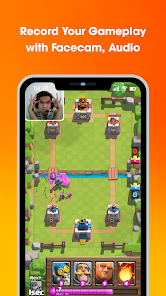
Super Recorder is a FREE & STABLE, high-quality screen recorder with internal audio that helps you smoothly and clearly record videos on your phone screen. With features like screen capture, video screen recording, image editing, and no need for root access, Super Recorder makes it simple to record screen everything, from video games and video calls to live performances. Enhance your recordings with audio and facecam features!
Easily live stream your screen to YouTube, Facebook, and Twitch from your Android device. Record in HD, add webcam, microphone, and overlays for pro-quality broadcasts. Perfect for gamers, tutorials, and live events. Simple, powerful, and free to use. Start streaming now!
SUPER RECORDER FEATURES
1. Screen recorder with facecam, audio, and editor
The screen video recorder is completely non-rooted and optimized for smooth performance on mobile platforms. Use it to record live videos, gameplay, or any activity on your screen with the following features:
- Control the video screenshot recorder via the notification bar or on-screen controls.
- Pause/Resume recording during screen recording.
- Turn external audio recording on/off.
- Display an instructional pointer while recording the screen.
2. Capture your phone screen and edit photos
With a single touch, you can easily take screenshots and capture screenshot, even while recording a video. No need for long presses—you can take screenshots and edit them in just 3 seconds with these tools:
- Instant screenshot: Capture a screenshot that instantly appears on the screen.
- Crop pictures: Cut out unwanted parts of your screenshots.
- Mosaic photo effect: Blur specific areas of the image to mask sensitive details.
- Brush painting: Draw on your screenshots to add personal touches.
- Collage feature: Combine multiple images into one.
3. View and share videos
- Watch your recorded videos with ease and share them instantly on popular social networks like Facebook, YouTube, and Twitch.
- Easy sharing: Post your videos directly to social media platforms.
- Custom settings: Adjust video quality and countdown timers.
- Advanced options: Configure settings for professional-quality video recordings.
- Playback feature: Playback your recorded videos.
Super Recorder Key Features:
⚡ Quick control panel in the notification bar and floating window.
⚡ Video resolution options: HD 720p, FullHD 1080p, 2K, 4K, and more.
⚡ Screen recording without root access.
⚡ Capture video screens directly from a quick access panel.
⚡ Professional image editing tools: crop, blur, and draw on photos.
⚡ Record high-quality videos with audio using the quick control panel.
⚡ Best-in-class screen recorder with facecam and audio.
⚡ Share videos/screenshots with friends on social media platforms.
⚡ Start/Stop recording easily while screen video recorder with sound.
⚡ Pause/Resume button for screen recording.
⚡ Capture screenshots during video recording.
⚡ HD screen recording without a watermark.
⚡ Screen recorder with internal audio and external audio (for Android 10+).
⚡ Language support: English, Spanish, Portuguese, Indonesian, Vietnamese, and more.
⚡ Screen recorder with facecam for YouTube creators.
⚡ Completely FREE with no in-app purchases.
⚡ No root required, no recording time limit, and no watermark.
⚡ Intuitive interface for hassle-free video recording.
Download this best-in-class screen recorder for Android now and create your first great video!
If you have any comments or suggestions for our screen video recorder app with sound, please let us know. We appreciate your feedback!
Super Screen Recorder, Capture-Nutzungsrang
Das Ranking der Nutzung basiert auf dem Algorithmus von Similarweb, der aktuelle Installationen und aktive Benutzer:innen über einen Zeitraum von 28 Tagen berechnet.
Alle Kategorien in
Vereinigte Staaten--
Videoplayer und -editoren in
Vereinigte Staaten--
Top-Wettbewerber und alternative Apps
Apps mit hoher Wahrscheinlichkeit, von denselben Benutzer:innen aus demselben Store verwendet zu werden.

Screen Recorder - AZ Recorder

Screen Recorder - Vidma Record

ADV Screen Recorder

Screen Recorder - XRecorder
 Super Screen Recorder, Capture VS.
 April 24, 2026