

Sie haben Ihr Suchlimit erreicht
Starten Sie Ihren kostenlosen Testzugang, um weiterhin alle Traffic- und Performance-Insights zu erkunden.
Los geht'sWiFi Monitor: network analyzer App-Analysen für 29. April

WiFi Monitor: network analyzer
- Alexander Kozyukov
- Google Play Store
- Kostenlos
- Tools
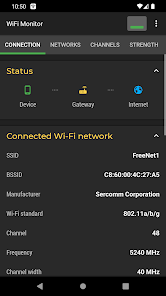
WiFi Monitor is a powerful tool that allows you to analyze the state of WiFi networks and track its parameters (signal strength, frequency, connection speed, etc). It is useful for setting up a wireless router and Wi-Fi usage monitoring. It can also be used as a scanner helping to discover devices connected to WLAN.
"Connection" tab helps to track information about the connected WiFi hotspot:
• name (SSID) and identifier (BSSID)
• router manufacturer
• connection speed
• router signal strength
• frequency and channel number
• ping info
• hotspot security options
• MAC address and IP address of smartphone
• subnet mask, default gateway and DNS address.
"Networks" tab allows to analyze all available WiFi networks by the following parameters: type, equipment manufacturer, signal level, security protocol. Access points with the same name (SSID) are grouped together.
"Channels" tab displays hotspots signal level depending on its frequencies. Routers using same frequencies provide bad quality of a Wi-Fi connection.
"Strength" chart helps to compare received power levels of available WiFi hotspots and track its dynamics. The higher router signal strength, the better quality of wireless connection.
"Speed" chart displays the real amount of transmitted and received data in the connected network. This will help to analyze usage of a hotspot.
"Scanning" section performs search of devices in the connected network and displays its parameters. If scanner reports about foreign devices in your WLAN, block them in router settings.
Collected data can be saved to log file and exported to other applications.
https://signalmonitoring.com/en/wifi-monitoring-description
WiFi Monitor: network analyzer-Nutzungsrang
Das Ranking der Nutzung basiert auf dem Algorithmus von Similarweb, der aktuelle Installationen und aktive Benutzer:innen über einen Zeitraum von 28 Tagen berechnet.
Alle Kategorien in
Deutschland--
Tools in
Deutschland#2,060
Benutzerinteressen und Top-Kategorien
Top-Kategorien und -Apps, die von WiFi Monitor: network analyzer Benutzern verwendet werden
Top-Kategorien
Affinität
Top-Apps innerhalb der Kategorie
Weitere Apps
14%





13%



9%



7%





Top-Wettbewerber und alternative Apps
Apps mit hoher Wahrscheinlichkeit, von denselben Benutzer:innen aus demselben Store verwendet zu werden.

WiFiman

Wi-Fi Toolkit

FAST Speed Test

WiFi Analyzer (open-source)
WiFi Monitor: network analyzer VS. April 29, 2026