

Sie haben Ihr Suchlimit erreicht
Starten Sie Ihren kostenlosen Testzugang, um weiterhin alle Traffic- und Performance-Insights zu erkunden.
Los geht'seDrawings App-Analysen für 26. März

eDrawings
- SolidWorks
- Google Play Store
- Bezahlt
- Produktivität
eDrawings Pro with in-app purchase.
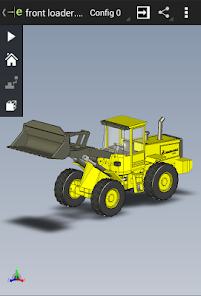
eDrawings® is the only CAD viewer on Android phones and tablets that allows you to view native eDrawings files as well as native SolidWorks® parts, assemblies and drawings files.
eDrawings is the email-enabled communication tool that dramatically eases sharing of product design information. You can load and send files via email to collaborate more effectively with everyone involved in product development, including people who are not regular CAD software users to interpret and understand 2D and 3D designs.
Multi-touch gestures let you pan, zoom, and rotate models easily. eDrawings also supports drawing sheets, and exploded views for eDrawings files published from SolidWorks®.
Features:
* Intuitive and easy-to-use user interface
* Open 3D (EASM, EPRT, SLDASM, SLDPRT, IGES, IGS, JT, STEP, STP, IFC), 2D (EDRW, SLDDRW, DWG, DXF) and associated files from any source: email attachments, cloud storage services (Dropbox™, SkyDrive®, Google Drive, Hightail®, and others), web and FTP sites and network folders.
* Zoom, pan and rotate your 2D or 3D CAD data using multi-touch
* Animate 3D standard views
* Browse your 2D drawing sheets
* View your designs in full screen and double tap to fit it on screen
* Sample files included
Upgrade to eDrawings Pro using In-app purchase and enable new capabilities :
* Measure your designs (distance, angles, lengths, point to point and more)
* Dynamically view cross sections of your models in XY, YZ, or ZX directions from both sides and easily drag the cross section plane
* Create markups in your designs, including text notes and freehand notations
* Share marked up eDrawings files with others for review and further comments. All markups with history are saved within the eDrawings file.
Thanks for using eDrawings! Don't forget to review the app. Your feedback is important to us! Please reach out to support@edrawingsviewer.com with any suggestions.
Known Issue with Augmented Reality:
Some devices clipped the Get Marker buttons and made them unavailable, you can now access them from the settings button in the top right corner when in AR mode
For more information, visit http://www.solidworks.com or http://www.edrawingsviewer.com
eDrawings-Nutzungsrang
Das Ranking der Nutzung basiert auf dem Algorithmus von Similarweb, der aktuelle Installationen und aktive Benutzer:innen über einen Zeitraum von 28 Tagen berechnet.
Alle Kategorien in
Vereinigte Staaten#627
Produktivität in
Vereinigte Staaten#76
Benutzerinteressen und Top-Kategorien
Top-Kategorien und -Apps, die von eDrawings Benutzern verwendet werden
Top-Kategorien
Affinität
Top-Apps innerhalb der Kategorie
Weitere Apps
17%





14%



14%





13%


Top-Wettbewerber und alternative Apps
Apps mit hoher Wahrscheinlichkeit, von denselben Benutzer:innen aus demselben Store verwendet zu werden.

ZWCAD Mobile - DWG Viewer

EdrawMax: AI Flowchart Diagram

Thingiverse MakerWorld | 3Drop
AutoCAD - DWG Viewer & Editor
eDrawings VS. März 26, 2026