

Sie haben Ihr Suchlimit erreicht
Starten Sie Ihren kostenlosen Testzugang, um weiterhin alle Traffic- und Performance-Insights zu erkunden.
Los geht'sSamsung Remote: Voice Control App-Analysen für 1. April

Samsung Remote: Voice Control
- Wac Labs
- Google Play Store
- Kostenlos
- Tools
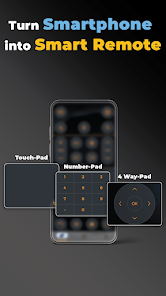
🗑 Move over the old Smart TV remote! Control your Samsung Smart TV with your phone and say goodbye 👋 to your old bulky remote! Download the app Now 📲!
So, you've decided to ditch your big bulky remote? Say hello to the newest All in one Remote Control for Samsung.
Remote Control for Samsung TV app allows you to control your Samsung TV using your phone 🤳
The Smart Remote has a multi-button design that enables a simple, intuitive, and comfortable operation.
Watch your favorite TV shows and movies using our unique streaming buttons for Netflix, Prime, Youtube, Disney+, Ambient Mode, and more.
Remote Control for Samsung TV makes watching what you love easier, browsing online, and accessing your favorite content.
🍿Let us make your TV experience more straightforward and seamless with the new Samsung Smart Remote.
For people who want easy & fast access to control their Samsung TV right from their mobile device!
To use the app, connect the mobile device and Smart TV to the same WIFI network (recommend 5Ghz network) and start using it.
No need to buy new batteries🔋, and no more wasting time looking for your lost Samsung remote controller.
This APP is what you need!
➡️Download Remote Control for Samsung TV Now!
This app gives you complete control over your Samsung Smart TV, including all of the
features of your old physical remote control and much more intelligent functions
Buttons:
👉 Turn ON and OFF the TV
👉 All classic and mordern buttons on Samsung Smart TV
👉 Numbers keyboard buttons(Enter a channel number for jumping right to it)
👉 Colors buttons (red, yellow, green, blue)
👉 Change channels (next and previous )
👉 Increase or decrease the volume
👉 Mute the sound (silent mode)
👉 Change TV source (HDMI, PC, AV...)
👉 Access the 4 favorite buttons - Up / Down / Left / Right Navigation + center button “OK”
👉 Play / pause / Reverse / Fast Forward.
👉 Launch Netflix, Amazon Prime, Youtube, Disney Plus, Samsung Tv Plus, and much more
Features list:
✅ No infrared equipment required, just Wi-Fi connection.
✅ Every time you open the app, your TV will be auto-connected for quick and easy access.
✅ Use your phone to control TV via AI Assistant, why not!
✅ Realistic and user-friendly app design with huge of themes including modern & classic same as your physical remote.
✅ Vibration when pressing.
✅ Input text on TV using your phone.
✅ Use your phone as Fly Mouse.
For people who want easy & fast access to control their Samsung TV right from their mobile device! Give it a try!😉
Supported Samsung TVs:
un82tu7000fxza
un70tu700d
un70tu7000bxza
un70tu6980fxza
un65tu8000fxza
un65tu700dfxza
un65tu700d
un65tu7000fxza
un65tu7000
un65au8000fxza
un55tu8000fxza
un55tu7000fxza
un55tu7000
un50tu8000fxza
un50tu7000fxza
un50tu7000
un50nu6900
un43tu8000fxza
un43tu7000fxza
un43au8000fxza
un40n5200afxza
uhd 6 series
ue43tu7100
ue32t5300
tu8500
tu8300
tu8200
tu8000
tu7100
tu700d
tu7000
tu 8000
tm1240a
tizen smart
tizen
the wall
the sero
the frame 65
the frame 55 inch
the frame 32
the frame 2020
the frame
smartthings
smart view 2.0
smart view
smart tizen
smart price
serif
ru9000
ru8000
ru7100
qn95a
qn90a 75
qn90a 65
qn90a
qn900a
qn90
qn85qn90aafxza
qn85a
qn85
qn82q6dtafxza
qn800a
qn75qn90aafxza
qn75q80tafxza
qn75q60aafxza
qn65qn90aafxza
qn65q80tafxza
qn65q80aafxza
qn65q70aafxza
qn65ls03aafxza
qn55qn90aafxza
qn55q80tafxza
qn43q60aafxza
qn32q50rafxza
qe65q70t
qe55q60t
qe50q60t
q95t
q950ts
q95
q90t 65
q90t 55
q90t
q90r
q90a
q900
q90
q80t qled
q80t 75
q80t 65 inch
q80t 65
q80t 55
q80t
q80r
q800t
q80
q70t 55
q70t
q70r
q70a
q70
q7
q6dt
q6da
q60t
q60r
q60a
q60 series
q60
q6
q50r
nu8000
nu7100
nu6900
n5300
led 32 inch
ks8000
best 85 inch
au9000
au8000
au7100
au7000
65tu7000
65au8000
55au8000
4k 55 inch
43tu7000
and much more..
Got a Samsung Smart TV? Try our Remote Control for Samsung TV now for free!
Disclaimer:
🚨 This app is not an official Samsung application or any other trademark. We are not affiliated with Samsung Electronics in any way.
Samsung Remote: Voice Control-Nutzungsrang
Das Ranking der Nutzung basiert auf dem Algorithmus von Similarweb, der aktuelle Installationen und aktive Benutzer:innen über einen Zeitraum von 28 Tagen berechnet.
Alle Kategorien in
Vereinigte Staaten--
Tools in
Vereinigte Staaten--
Top-Wettbewerber und alternative Apps
Apps mit hoher Wahrscheinlichkeit, von denselben Benutzer:innen aus demselben Store verwendet zu werden.

Control+

Food Scanner AI: Gluten & Diet

ZUMIMALL

Antique Identifier - AntiqAI
 Samsung Remote: Voice Control VS.
 April 1, 2026