

Sie haben Ihr Suchlimit erreicht
Starten Sie Ihren kostenlosen Testzugang, um weiterhin alle Traffic- und Performance-Insights zu erkunden.
Los geht'sVolume Control Panel Pro App-Analysen für 23. Februar

Volume Control Panel Pro
- LeeDrOiD Apps
- Google Play Store
- Bezahlt
- Personalisierung
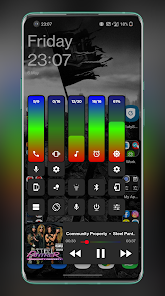
Volume Panel is an enhanced replacement for your system volume control panel with an array of customization options, all system volume controls available in one place plus screen brightness, media playback controls and a selection of additional shortcuts!
Check out our design pre-sets channel on Telegram and see what's possible at: t.me/VPPresets
Try it for Free: https://play.google.com/store/apps/details?id=leedroiddevelopments.volumepanelads
Join in the conversation at: t.me/volumepanel
Replace your system volume panel with the Volume Button Override service, launch the panel from the non-obtrusive floating trigger or map the handy shortcuts to other applications, it's also extra useful if your volume keys are worn or damaged.
Features:
* Horizontal or Vertical Sliders
* Volume button override
* Swipe Up/Down floating trigger
- Long press & slide over the trigger to directly change the volume
* Launcher shortcuts
* Multiple design template options
* Choose Media or Ring as the default button response
* Configurable Dark/Light Modes
* Gradient colour options.
* Animated gradients colours - RGB IT UP!!
* Auto Dark/Light Modes (Android 9+)
* Custom vibration intensity
* Custom animation duration
* Start collapsed or expanded
* Left or Right handed mode
* Left or Right handed in landscape
* Left or right trigger
-- The panel will open on the same side as the trigger when launched from the trigger
* Custom vertical position
* Custom panel timeout
* Media control from your volume panel!
* Screen brightness control
* Swap/Invert Buttons
* Force close system dialog
* Optional Audio Feedback
* Custom background, slider & icon colours
* Adjustable panel height & width
* Adjustable panel margin
* Option to exclude from certain applications
* Volume streams: Cast, Media, Ring, Notification (If Supported), Call & Alarm
* Bluetooth volume control
* Quick Settings Pull-down Tiles
* Pinned Launcher Shortcuts (Oreo+)
* Screen Shot shortcut(Android 9+)
* Split Screen shortcut(Android 9+)
* Lock Rotation shortcut
* Power Menu Shortcut.
* Google Assistant shortcut
* Bluetooth shortcut
* Flashlight shortcut
And more!
Quick Access Icons (in the panel):
* Instant access to alarm clock & alarm status.
* Mute microphone in call.
* Mute media or casting streams.
* Switch between speaker/earpiece when in call.
* Toggle between Ring, Vibrate or do Not Disturb (Silent).
* Screen Shot (Android 9+).
Quick Settings Pull Down Tiles:
* Mute Media.
* Toggle Ring Mode.
* Launch Volume Panel.
Launcher Shortcuts:
* Mute Media.
* Toggle Ring Mode.
* Launch Volume Panel.
* Volume + / Volume-
Notification Volume
- If the Notification Panel is enabled and splitting ring & notification is supported by the system, ring & notification are independent, if the notification panel is hidden, both stream's are tied together and follow ring volume.
PLEASE NOTE: Button Mapping apps such as Button Mapper or Bixby Button Re-mapper may interfere if volume button customisation is enabled, you can negate this by launching volume panel from your button mapper and assigning the Vol+/- shortcuts.
Required Permissions (Feature Linked):
* Accessibility - Detect volume +/- key presses.
* Do Not Disturb Access.
* Notification Listener Access - Detect audio casting.
* Overlay Permissions - Show the panel as a system overlay.
* Usage Access: Detect the presence of excluded applications.
Despite the generic Android system warning for all accessibility services, The Volume Control Panel Accessibility service does not capture or store any information, it simply listens for volume +/- button presses.
Volume Control Panel does not collect, store or share any personal information, it doesn't even connect to the Internet!.
Volume Control Panel Pro-Nutzungsrang
Das Ranking der Nutzung basiert auf dem Algorithmus von Similarweb, der aktuelle Installationen und aktive Benutzer:innen über einen Zeitraum von 28 Tagen berechnet.
Alle Kategorien in
Vereinigte Staaten#528
Personalisierung in
Vereinigte Staaten#38
Benutzerinteressen und Top-Kategorien
Top-Kategorien und -Apps, die von Volume Control Panel Pro Benutzern verwendet werden
Top-Kategorien
Affinität
Top-Apps innerhalb der Kategorie
Weitere Apps
23%






11%



10%





8%





Top-Wettbewerber und alternative Apps
Apps mit hoher Wahrscheinlichkeit, von denselben Benutzer:innen aus demselben Store verwendet zu werden.

Shortcut Maker

Quikshort: Shortcut Creator

SoundID™ Headphone Equalizer

Boom: Bass Booster & Equalizer
Volume Control Panel Pro VS. Februar 23, 2026