

Battery Charging Monitor App-Analysen für 4. April

Battery Charging Monitor
- tcnet
- Google Play Store
- Kostenlos
- Tools
If a phone no longer charges to 100%, then the battery is not always to blame. In most cases you are using a defect cable or charger. Not every cable is suitable for charging and not every charger keeps what he promises. Test the cables and chargers to find the best combination. This app will help you.
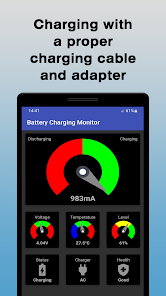
The app shows the charging current in milliamperes. A negative value means the battery is discharging and a positive value means the battery is charging. There is no specific rule for the charging current. However, some sources say that the charging current should be around 10% of the battery capacities in mAh. This means that a battery with 3000 mAh should be charged at about 300 mA.
Note
Please note that the charging current may not be displayed on all devices as some manufacturers have decided to prevent this.
Voltage
The voltage should not fall below a certain value. Otherwise the device will not work properly. If the voltage is too high, the device can be damaged.
Temperature
If the temperature is too low the battery might not provide the necessary power. A high temperature might have a negative effect on the battery's lifetime.
Level
The level is an indication of the battery's state of charge.
Status
The status can have one of the following states:
• Charging
• Full
• Discharging
• Not charging (in case of a problem)
Charger
Specifies the type of the charger which can be:
• USB (connected to a computer)
• AC (common cable charger)
• Dock (docking station)
• Wireless (wireless charger)
Health
This information comes from the device and actually hasn't so much to do with the health status of the battery. It can have one of the following states:
• Cold (battery is too cold)
• Dead (battery doesn't charge anymore)
• Good (Non of the other states)
• Overheat (battery is too hot)
• Over voltage (battery has over voltage)
• Failure (there is a problem with the battery)
Update interval
The update interval depends on the device. Anything between 1 second and 60 seconds is possible. The app shows changes immediately, however, cannot affect the interval.
Battery Charging Monitor-Nutzungsrang
Das Ranking der Nutzung basiert auf dem Algorithmus von Similarweb, der aktuelle Installationen und aktive Benutzer:innen über einen Zeitraum von 28 Tagen berechnet.
Alle Kategorien in
Vereinigte Staaten--
Tools in
Vereinigte Staaten--
Top-Wettbewerber und alternative Apps
Apps mit hoher Wahrscheinlichkeit, von denselben Benutzer:innen aus demselben Store verwendet zu werden.
Charge Meter

CPU Monitor - temperature
AccuBattery

3D Fish Live Wallpapers 4k HD
 Battery Charging Monitor VS.
 April 4, 2026