

You’ve hit your search limit
Start your free trial to keep exploring full traffic and performance insights.
Get StartedMove to iOS app analytics for May 1

Move to iOS
- Apple
- Google Play Store
- Free
- Tools
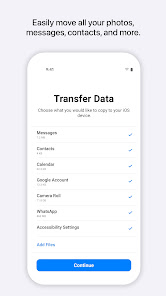
Everything about iOS is designed to be easy. That includes switching to it. With just a few steps, you can migrate your content automatically and securely from your Android device with the Move to iOS app. No need to save your stuff elsewhere before switching from Android. The Move to iOS app securely transfers all kinds of content data for you:
Apps
Calendars
Call logs
Contacts
Camera photos and videos
Mail accounts
Message history
Voice memos
WhatsApp content
Make sure to keep your devices nearby and connected to power until the transfer is complete. When you choose to migrate your data, your new iPhone or iPad will create a private Wi-Fi network and find your nearby Android device running Move to iOS. After you enter a security code, it will begin transferring your content and put it in the right places. Just like that. Once your content has been transferred, you’re ready to get going. That’s it — you can start using your new iPhone or iPad and experiencing its endless possibilities. Enjoy.
Required App Permission
Location: To establish a Wi-Fi connection between the Android device and the iPhone or iPad, which is needed to migrate the data.
Optional App Permission
- SMS: To migrate your text messages, including multi-media messages and group chats, on iPhone or iPad.
- Photos and Videos: To migrate your photos, videos, and related metadata to iPhone or iPad.
- Notifications: To allow local Android notifications about the status of your migration to iPhone or iPad.
- Contacts: To migrate your contacts to iPhone or iPad.
- Music and Audio: To migrate your downloaded media, audio recordings, and voice memos to iPhone or iPad.
- Phone: To migrate your SIM and carrier information so you can make and manage phone calls on iPhone or iPad.
- Calendar: To migrate your calendar events to iPhone or iPad.
- Call Logs: To migrate your call history to iPhone or iPad.
You can use Move to iOS even without providing consent to any of the above optional app permissions. However, some features of the service may not be available.
Move to iOS Usage Rank
The usage rank is based on Similarweb's algorithm that calculates current installs and active users over a 28-day period.
All Categories in
United States#2,324
Tools in
United States#259
Users Interests & Top Categories
Top categories and apps used by Move to iOS users
Top categories
Affinity
Top apps within the category
More apps
22%



10%


10%





9%




Top Competitors & Alternative Apps
Apps with a high probability of being used by the same users, from the same store.

Nova Launcher

Switch Access

Virtual Master - Android Clone

TECNO SPOT
Move to iOS VS. May 1, 2026