

You’ve hit your search limit
Start your free trial to keep exploring full traffic and performance insights.
Get StartedPhotoSync – Transfer Photos app analytics for February 16

PhotoSync – Transfer Photos
- touchbyte
- Google Play Store
- Free
- Photography
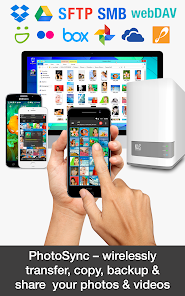
Wirelessly and automatically transfer, backup and share photos & videos between your Android devices, computer, iPhone, iPad, NAS, cloud and photo services. Any kind of transfer – PhotoSync can handle it!
★ Over 10,000 positive reviews, thousands of happy users and millions of photo transfers
★ Number one cross-platform solution with native apps for Android, iOS, Windows & Mac
★ Reliable and secure software – operating 10 years in the market and continuously updated
★ Total user control and fully customisable
ABOUT PHOTOSYNC
• Transfer photos & videos to and from computer (Windows PC and Mac)
• Share photos & videos between phones and tablets (Android and iOS)
• Automatically backup photos & videos in the background to pre-selected targets (computer, NAS, cloud and photo services)
• Transfer photos & videos to and from NAS over SMB, (S)FTP and WebDav
• Share photos & videos to and from cloud and photo services
• Download photos, videos & RAWs from Wi-Fi SD cards in Camera to Android
Key transfer features:
TRANSFER TO AND FROM COMPUTER *** FREE ***
• Backup photos & videos from Android phone / tablet to computer over WiFi or Portable WiFi Hotspot
• Drag & drop photos & videos from Windows PC or Mac to Android directly over the local network
(Requires either a web browser or the recommended, FREE PhotoSync Companion utility installed on your computer. Download the PhotoSync Companion from our website: https://www.photosync-app.com/downloads)
TRANSFER BETWEEN PHONES AND TABLETS *** FREE ***
• Directly send photos & videos from one Android device to another over WiFi or Portable WiFi Hotspot. No computer or cloud needed!
• Exchange photos & videos between Android devices and iPhone / iPad over the local network
(Requires PhotoSync for iOS installed on iPhone / iPad / iPod touch)
AUTOTRANSFER – AUTOMATICALLY BACKUP PHOTOS & VIDEOS IN THE BACKGROUND
• Automatically backup photos & videos directly from Android to computer (PC & Mac)
• Securely auto upload photos & videos straight from Android to NAS, wireless mobile storage device or remote server
• Automatically copy and share photos & videos directly from Android to supported cloud / photo services
Automatically and wirelessly backup photos & videos, whenever:
- You take a new picture or video [Instant transfer]
- Your device connects to a pre-selected WiFi network [Wi-Fi access point (SSID)]
- You arrive at a pre-selected geolocation [Location based transfer]
- You charge your device [Trigger transfer]
- A pre-set time schedule is met [Time schedule]
– 7 day trial available! –
TRANSFER TO AND FROM NAS
• Securely backup photos & videos to your NAS, remote server or personal cloud over SMB, (S)FTP or WebDav
• Download and view photos & videos on SMB, (S)FTP and WebDAV servers
• PhotoSync supports NAS storage devices, servers and personal cloud services from:
- Synology
- QNAP & Buffalo NAS
- ownCloud
- NextCloud
- WD MyCloud
- FreeNAS
- OpenMediaVault
- Seagate Personal Cloud
- NETGEAR ReadyNAS
- and many more …
• Quickly upload and download photos & videos whilst on-the-go to your wireless portable hard drive over SMB, (S)FTP and WebDav
• PhotoSync supports all major mobile storage solutions (wireless USB sticks, portable hard drives…) from:
- Western Digital
- Seagate
- Toshiba (http://www.canvio.jp/apps/en/)
- HyperDrive
- SanDisk
- and many more …
– 7 day trial available! –
TRANSFER TO AND FROM CLOUD AND PHOTO SERVICES
• Upload and share photos & videos from Android straight to supported cloud and photo services over 3G / LTE
• Import photos & videos stored on cloud and photo services directly to Android. Import selected, all or new photos / videos
• PhotoSync supports:
- Dropbox
- Google Drive
- Google Photos
- Flickr
- OneDrive
- SmugMug
- Box
- Zenfolio
- PhotoPrism
– 7 day trial available! –
PhotoSync – Transfer Photos Usage Rank
The usage rank is based on Similarweb's algorithm that calculates current installs and active users over a 28-day period.
All Categories in
United States--
Photography in
United States#508
Users Interests & Top Categories
Top categories and apps used by PhotoSync – Transfer Photos users
Top categories
Affinity
Top apps within the category
More apps
22%





17%



12%



11%




Top Competitors & Alternative Apps
Apps with a high probability of being used by the same users, from the same store.

WeTransfer : File Transfer

Tinybeans Private Family Album

Send Anywhere (File Transfer)

Verizon Home
PhotoSync – Transfer Photos VS. February 16, 2026