

You’ve hit your search limit
Start your free trial to keep exploring full traffic and performance insights.
Get StartedBin Viewer - Bin File Opener analisi dell'app per 4 aprile

Bin Viewer - Bin File Opener
- Computer Bytes
- Google Play Store
- Gratis
- Produttività
Bin file viewer is an advantageous app that permits the user to view, open and read binary files using a smartphone. The bin file viewer app lets the user store information in binary format. These bin files are considered compatible with disc storage, therefore, allowing the media files to download on a disc. The bin file viewer and converter are extremely popular since downloading the content on the disc is not practiced anymore. These bin files can be easily opened and viewed using the bin file opener.
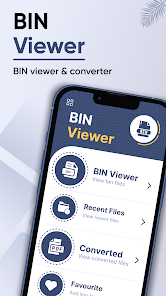
The interface of the file reader includes four main tabs; bin viewer, recent files, converted, and favorite. The bin viewer feature of the file opener authorizes the user to view all the bin files using a smartphone. The recent files feature of bin open file lets the user open recently viewed files. The converted files feature of bins allows the user to open converted files. The favorite files feature of the bin manager permits the user to view favorite files. The UI of Bin Viewer is easy to navigate and requires no professional support.
Features of Bin Viewer - Bin File Opener
1. The interface of the bin file opener and viewer / document reader includes four main tabs; bin viewer, recent files, converted, and favorite.
2. The bin viewer feature of the bin file opener for Android authorizes the user to view all the bin files using a smartphone. Using this feature, one can pick any bin file from mobile storage. There are a total of four formats available to the user including, binary, hexa, decimal, and octal. The user can view the file as well as convert it into PDF.
3. The recent files feature of the bin file opener viewer reader lets the user open recently viewed files. By clicking on this tab, the bin file reader will display a list of recently viewed files. The user can determine the title of the file along with its size. They can do the following with the recent file; view it, convert it into PDF, favorite it, share it with friends and family, and delete it without closing the app.
4. The converted files feature of the bin file converter allows the user to open converted files. By clicking on this feature, the bin file extractor will display a list of converted files. The user can determine the title of the file along with its size. They can do the following with the converted file; view it, share it with friends and family, and delete it directly from the app.
5. The favorite files feature of the bin checker permits the user to view favorite files. By clicking on this feature, the bin converter will display a list of favorite files. The user can determine the title of the file along with its size. They can do the following with their favorite file; view it, share it with friends and family, and delete it without closing the app.
How to Use Bin Viewer - Bin File Opener
1. The file viewer is a user-friendly app. If the user wants to view the Bin files stored in the device, they just need to select the Bin Viewer tab. The folders containing bin files will be displayed to the user. Also, the user can view the files in binary, hexa, decimal, and octal formats. For this, the user just needs to select the required option at the top navigation.
2. If the user wants to convert the Bin files to pdf, they just need to click on the convert tab at the bottom. In order to view it, the user needs to select the converted tab.
3. To view the recent files, the user needs to select the recent files tab and a list will appear in front of the user.
4. Finally, the favorite files can be viewed by clicking on the favorite tab.
Disclaimers
1. All copyrights reserved.
2. We have kept this app absolutely free by showing non-personalized ads.
3. The Bin Viewer - Bin File Opener is not keeping any sort of data without user permission neither it is saving any data secretly for itself.
4. If you find any content in our app that violates copyrights then please inform us.
Ranking di utilizzo di Bin Viewer - Bin File Opener
Il ranking di utilizzo si basa sull'algoritmo di Similarweb che calcola le installazioni correnti e gli utenti attivi su un periodo di 28 giorni.
Tutte le categorie in
Stati Uniti--
Produttività in
Stati Uniti--








Principali concorrenti e app alternative
App con un'alta probabilità di essere utilizzate dagli stessi utenti, provenienti dallo stesso store.

Document Reader, PDF Converter

CSV File Viewer - Smart CSV

QmetaRam AI: Quantum Assistant

Tetra Browser & VPN
 Bin Viewer - Bin File Opener VS.
 aprile 4, 2026