

You’ve hit your search limit
Start your free trial to keep exploring full traffic and performance insights.
Get StartedScreen Lock - Time Password analisi dell'app per 22 aprile

Screen Lock - Time Password
- Adria Devs
- Google Play Store
- Gratis
- Strumenti
Are you worried about exposing your PIN while you unlock your phone?
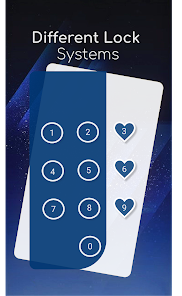
★ Screen lock Here comes Screen Lock - Time Password (Dynamic Password) for the rescue.You can make your phone current time its lock screen password.And time changes every minute, so does the password too, so no one can even guess it.
★ Vault (Hide/protect photos & videos): Keep your secret photos and videos in a safe place.
★ Private Browser: With Private browser, your internet surf will leave no traces behind.
NEW FEATURES
★ Cool iPhone style lock screen for your android.
★ Support on most of android phone.
★ Fully customisable lock screen.
★ Highly secure lock screen.
★ One of the best parallax effect Lock.
★ Customise sliding text. You can put your name or your friend's name on your lock screen.
Features
✔ Customise wallpaper for lock screen
You can apply HD Screen wallpaper or choose from Gallery.
✔ Unlock sound enable/disable.
✔ Unlock vibration enable/disable.
✔ 12 hour and 24 hour format both supported.
✔ Consume less memory and battery, Simple and Clean device.
✔ 100% safe and secure Screen Lock- Time Password
✔ Choose your own lock type
You can choose your own way to lock your android phone(Passcode change dynamically).
► Current Time : It is default password of your lock screen. e.g. If the time is 01:47, your PIN will be 0147.
► Pin Passcode - User can choose any password.
► Pin + Minute Passcode - e.g. if you choose digit is 12 and the time is 01:45 your PIN will be 1245.
► Pin + Current Time Passcode - e.g. if your choose digit is 45 and the time is 02:37 your PIN will be 450237.
► Pin + Day Passcode - e.g. if your choose digit is 45 and the date is 4 July 2017 your PIN will be 450407.
► Pin + Hour Passcode - e.g. if you choose digit is 12 and the time is 01:45 your PIN will be 4501.
---FAQ---
★How to open hidden Screen Lock - Time Password?
1. Go to app info page (Settings > Applications >Screen Lock > Storage) and tap to Manage space/Clear storage button.
★ How to lock Xiaomi / MI phones?
►Xiaomi / MI phones have different permission management style. To use Screen Lock - Time Password on Xiaomi / MI phones, please follow the following steps.
1. Open Security App -> permissions.
Choose option permissions -> Screen Lock - Time Password -> Allow all the permissions.
2. Go back to Permissions -> Auto Start -> Allow Screen Lock - Time Password to Auto Start.
★ Explanation for the permissions:
android.permission.INTERNET
android.permission.READ_PHONE_STATE
android.premission.ACCESS_NETWORK_STATE
AD company need read phone state and network state to display and improve there AD quality.
android.permission.SYSTEM_ALERT_WINDOW : to lock screen
android.permission.RECEIVE_BOOT_COMPLETED : To lock device as soon as it restarts
android.permission.CAMERA : Image capture for lock screen wallpaper
android.permission.READ_EXTERNAL_STORAGE : For change lock screen wallpaper
android.permission.PROCESS_OUTGOING_CALLS : For open lock screen
★ IMPORTANT: Do not uninstall this app before restoring your personal files otherwise it will be lost forever.
Screen Lock - Time Password will not collect your any information.
Ranking di utilizzo di Screen Lock - Time Password
Il ranking di utilizzo si basa sull'algoritmo di Similarweb che calcola le installazioni correnti e gli utenti attivi su un periodo di 28 giorni.
Tutte le categorie in
Stati Uniti--
Strumenti in
Stati Uniti#3,577
Interessi degli utenti e categorie principali
Le categorie principali e le app utilizzate dagli utenti di Screen Lock - Time Password
Categorie principali
Affinità
Le migliori app all'interno della categoria
Altri applicazioni
19%


13%





11%






10%

Principali concorrenti e app alternative
App con un'alta probabilità di essere utilizzate dagli stessi utenti, provenienti dallo stesso store.

Battery Transfer / Receiver

App Lock: Fingerprint, Pattern

Calculator Lock - Hide Photos

NetGuard - no-root firewall
Screen Lock - Time Password VS. aprile 22, 2026