

You’ve hit your search limit
Start your free trial to keep exploring full traffic and performance insights.
Get StartedArtRage: Draw, Paint, Create analisi dell'app per 20 febbraio
ArtRage: Draw, Paint, Create
- Ambient Design Ltd.
- Google Play Store
- A pagamento
- Arte e Design
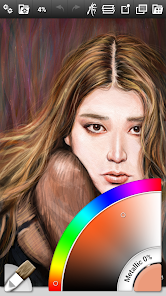
ArtRage for Android is a realistic painting and drawing app that gives you a toolkit filled with tools that work just like the real thing. Smear and blend thick oils on the screen, sketch with pencils and smudge the strokes to create gradients, work like you would on canvas or paper.
Each tool includes settings that mirror real world properties such as Paint Thinners, Pencil Softness, and other familiar properties. The app includes a range of default presets for every tool, and you can easily create your own specialized custom presets. It also supports pressure data from the Samsung S-Pen to add an element of natural expressiveness to your paint strokes.
Along with the full range of familiar tools like the oil brush, inking pen and pencil tools, ArtRage includes important digital features like Layers with Blend Modes, a Fill Tool, the ability to add Reference and Tracing images while you draw, and more.
ArtRage for Android comes with an intuitive interface that keeps all the important settings readily available but gets out of your way as you work so that you creative flow isn't interrupted.
ArtRage Paintings are fully compatible with desktop versions of ArtRage, and can also be exported as PNG and JPG images. You can import photos as paint layers, reference images or tracing images. Record your paintings as Script files for playback at larger resolutions in our desktop software
Tools:
Oil Brush, Watercolor, Airbrush, Palette Knife, Paint Roller, Paint Tube, Ink Pen, Pencil, Felt Pen, Wax/Chalk Pastel, Eraser, Flood Fill, Glitter Tube, Gloop Pen.
Each tool has a range of settings that reflect familiar properties such as paint thinners or pencil tip softness. Tools apply texture as well as color, and blend under the brush.
Add unlimited Layers to your painting, adjust visibility and opacity, rearrange and merge. ArtRage also supports a full range of Photoshop Layer Blend Modes.
Interface:
Designed for compact operation at different resolutions and screen orientations. The interface has been designed to maximize your creative space without hiding away critical functions such as tool and color selection. As you paint, it gets out of the way so that you don’t have to stop and manually adjust panels. With support for Multi-Touch gestures for canvas manipulation, Undo/Redo, and Brush Size, important shortcuts are available without needing menus. Also supports Stylus-only mode to avoid accidental finger painting.
Help & Support:
Includes a built in manual. Free product support available via our Forums or by email to our support team. Please contact us if you encounter any issues.
Forums: https://forums.artrage.com
Support: https://www.artrage.com/support
Permissions
ArtRage for Android requires access to storage, camera, and media on your device in order to load, open, export, and import resources for ArtRage. It requires network and licence connections for the Google Play licencing and PEN.UP.
ArtRage can be used offline. If you are having licence problems, see: https://www.artrage.com/faqs/cant-validate-artrage-android-asked-pay-google-play-store/
Also:
Thanks to Bo Paweena for the fantastic screenshots.
Ranking di utilizzo di ArtRage: Draw, Paint, Create
Il ranking di utilizzo si basa sull'algoritmo di Similarweb che calcola le installazioni correnti e gli utenti attivi su un periodo di 28 giorni.
Tutte le categorie in
Stati Uniti#485
Arte e Design in
Stati Uniti#8
Interessi degli utenti e categorie principali
Le categorie principali e le app utilizzate dagli utenti di ArtRage: Draw, Paint, Create
Categorie principali
Affinità
Le migliori app all'interno della categoria
30%



20%

14%
9%



Principali concorrenti e app alternative
App con un'alta probabilità di essere utilizzate dagli stessi utenti, provenienti dallo stesso store.

Easy Draw Animals

Nooksy: Childrens Story Time

Little Monster Home

Magic Mitten
 ArtRage: Draw, Paint, Create VS.
 febbraio 20, 2026