

You’ve hit your search limit
Start your free trial to keep exploring full traffic and performance insights.
Get StartedHome Theater VR analisi dell'app per 21 febbraio
Home Theater VR
- blevok LLC
- Google Play Store
- Gratis
- Lettori video ed editor
Home Theater VR is an advanced virtual reality video player, PC streamer, Web Browser, and Image Viewer. It's designed to be compatible with nearly every Android phone and headset.
Note: This is a paid app, but you can evaluate it in trial mode for as long as you want before purchasing.
A Unique VR Theater Experience
Home Theater VR is unlike any VR player you've used before. It was designed to be different and to offer unmatched flexibility and features.
You can control everything about the app, from inside the app, without being dependent on any external VR services. It doesn't require that your phone is compatible with Cardboard, Daydream, GearVR/Oculus, or anything else. All adjustments including IPD are handled using the built-in settings.
Video Sources
• Local Files - Stored on your phone or memory card. Use the in-app file browser, or use "Open With" or "Send To" from other file browsers.
• Web Streams - Watch online videos by entering a direct link to a video. Works with Youtube, Odysee, Twitch, Daily Motion, Peer Tube, and more.
• Http Video Streams - Streams from VLC, Jellyfin, FFMPEG, or other video streaming software. A companion app called "Stream Helper" is provided for PC, which uses VLC to stream video files or your Windows desktop.
• Web Browser - Browse the web right in the app. (A gamepad is recommended to use this feature)
• PC Monitor Mode - Mirror your PC monitor in VR. Useful for gaming, web browsing, reading, or anything else you do with your PC. A companion app called "HTVR PC Streamer" offers a simple one-click connection, while also giving you full control of the stream quality.
Note: PC Monitor streaming works only on Windows 8 and above.
There are 2 stream types, DDA and SDG.
DDA requires an Intel CPU, and can stream at up to 60 FPS with very low latency, so it's ideal for any PC activity, including fast-paced gaming.
SDG mode is more widely compatible, but has a lower frame rate and higher latency, so it may not be ideal for certain activities.
Video Types
• Up to 4K resolution
• Standard "flat" videos in all aspect ratios, including vertical
• 360°, 180°, and 3D HSBS/HOU
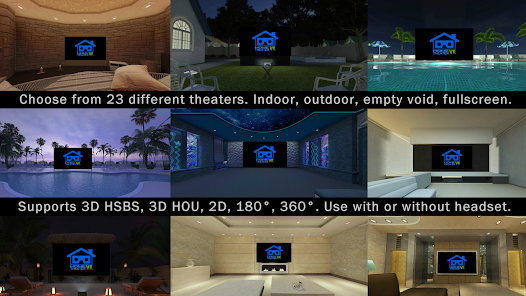
24 Theaters Included
• 8 indoor
• 6 outdoor
• 6 theaters for different types of 180° and 360° videos
• Empty void
• Full screen
• Camera view-through
• Flat screens or curved
Create Your Custom Theater
• Import your own 360° photo to use as the theater environment
• Adjust screen distance and tilt angle of the image
Subtitles
• Subtitles supported in .srt format for local videos.
• Adjust the text size, alignment, font style, color, and outline color.
Flexible Head Tracking Options
• 5 different head tracking modes. Cardboard, 2 gyroscope options, and 2 accelerometer options, for phones that don't have a gyro.
• Use the back camera to simulate full gyro-style tracking without a gyro.
• Manually re-center in any direction at any time, or lock the view in place.
• If screen drift is a problem for your phone, you can try the other modes, or use auto-center to return to center at a regular interval.
• Use with or without a headset
Controller Support and UI
• Supports game controllers such as XBOX, Playstation, MOGA, mini VR remotes, etc.
• Full control of the app without taking off your headset. Click the VR menu using gaze, gamepad, or screen tap.
• Color options for the VR pointer
• Full touch menu also included
Screen Captures
• Save screenshots from any source to any folder on your device
Advanced Options
• Tweak the advanced settings for the best performance on almost any phone, and prevent overheating or excessive battery drain.
Detailed support documents
• The in-app help screens include common troubleshooting info, and links to additional info, tutorials, related downloads, and support.
Ranking di utilizzo di Home Theater VR
Il ranking di utilizzo si basa sull'algoritmo di Similarweb che calcola le installazioni correnti e gli utenti attivi su un periodo di 28 giorni.
Tutte le categorie in
Stati Uniti--
Lettori video ed editor in
Stati Uniti#298
Interessi degli utenti e categorie principali
Le categorie principali e le app utilizzate dagli utenti di Home Theater VR
Categorie principali
Affinità
Le migliori app all'interno della categoria
Altri applicazioni
22%






14%





11%


11%



Principali concorrenti e app alternative
App con un'alta probabilità di essere utilizzate dagli stessi utenti, provenienti dallo stesso store.

DK Virtual Reality

Earth Map App - Live Cam View

Quietly

TapSlide
Home Theater VR VS. febbraio 21, 2026