

You’ve hit your search limit
Start your free trial to keep exploring full traffic and performance insights.
Get StartedLegacy View analisi dell'app per 3 maggio

Legacy View
- Chandler Systems
- Google Play Store
- Gratis
- Casa
Legacy View makes setting up and monitoring your Chandler Systems water treatment system easier than ever! This App covers systems sold under Chandler Systems' three brands (CSI, Clearion and WaterSoft) that use the Legacy View Valve. When used with a Legacy View Valve the user, through the app, can do the following functions:
- Connect to all the Legacy View valves in your system.
- Conveniently view the status of your valve.
- Easily view and change valve settings.
- View current water usage information.
- Graphically view and export water usage information.
- Start a regeneration or backwash cycle from your phone or tablet.
- Set, view, import and export the servicing water treatment dealer information.
- Better understand how your system is working and understand what settings are for.
- Update firmware on the Bluetooth LE valves.
Permissions:
- Access Bluetooth setting, Pair with Bluetooth devices: This app uses your devices Bluetooth radio to communicate with the Legacy View valve.
- Approximate location (network-based): This is a requirement of the Android operating system for the App to scan for Bluetooth devices on Android Marshmallow +.
- Write External Storage: This is a requirement to manage valve firmware, export graph data and import/export dealer information. We do not modify or view anything outside of the “/Documents/Water System” directory, we only export mentioned data to this directory.
- Read External Storage: This is inherited from the write external storage permission. We do not read anything from external storage.
Troubleshooting:
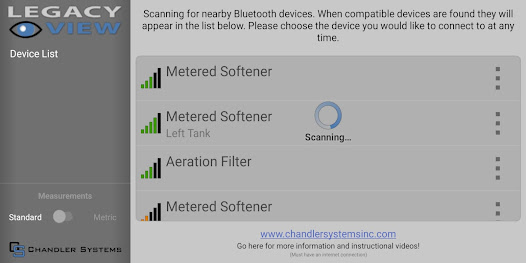
Some users experience difficulty with their valve not showing up on the device list. When this occurs, here are some things to try.
1. Make sure Bluetooth is turned on for your valve. Go into the Advanced menu on the valve by pressing and holding both buttons for 5 seconds until the screen starts flashing. Then press the Menu/Enter button repeatedly until you see "bE 0" or "bE 1". If it is "bE 0", then Bluetooth is turned off, press the Set/Change button to enable it, changing the setting to "bE 1". Then press Menu/Enter button repeatedly until you are back at time of day. If your valve will not set and stay at "bE 1" then contact us, your board may need replaced.
2. Unplug your valve and remove the 9V battery (if installed). Wait 30 seconds, then re-power your valve.
3. Turn Bluetooth on your phone off and then back on.
4. Reboot your phone.
5. Make sure your location permission is turned on for the Legacy View app. Location permission is required by Google to use the Bluetooth LE scanner. We do not need or access your location, but because Bluetooth can be used to determine your location, we have to have the location permission just to do a scan for our valves.
Once you can connect to your valve, make sure that you allow your valve to update firmware if the app prompts you to do a firmware update.
Ranking di utilizzo di Legacy View
Il ranking di utilizzo si basa sull'algoritmo di Similarweb che calcola le installazioni correnti e gli utenti attivi su un periodo di 28 giorni.
Tutte le categorie in
Stati Uniti--
Casa in
Stati Uniti#118
Interessi degli utenti e categorie principali
Le categorie principali e le app utilizzate dagli utenti di Legacy View
Categorie principali
Affinità
Le migliori app all'interno della categoria
Altri applicazioni
20%






11%




10%




9%




Principali concorrenti e app alternative
App con un'alta probabilità di essere utilizzate dagli stessi utenti, provenienti dallo stesso store.

RentCheck

Invitation Homes

Homes And Rentals

Aescape
Legacy View VS. maggio 3, 2026