

You’ve hit your search limit
Start your free trial to keep exploring full traffic and performance insights.
Get StartedNote Daily Calendar & Notebook analisi dell'app per 22 febbraio
Note Daily Calendar & Notebook
- DailyMobApps
- Google Play Store
- Gratis
- Produttività
Are you looking for easy to use notepad for daily writing? notebook organizer to catgorize daily notes, tasks, manage daily lists, daily to do tasks, daily work items, ideas and work plans? Want to note on planning daily top list items, Note Organizer to organise all your stuff like Notes, Tasks, PDF Scan at one place? Meet Note Daily a Good Notes app does it all for you
🗒️ Notes : Take notes with rich text and insert images, record video or audio and insert drawing, paint, PDF or any file attachment, assign color, use rich text editor, word format options like bold, italic, underline, font color, background color, strike.
📅 Calendar : Organise your meetings schedule. Create and send meeting invites. Link notes to meeting event. Seamless integration with Google Calendar. Provides you Schedule, Month and Week view. Day view gives you all meetings, events and notes linked to that day to manage schedule. Create log of daily activities.
📅 Planner : Create monthly planner, Weekly planner, Daily Planner. Plan agenda for business meeting, powerpoint presentation. Create plans or things to do for weekend, holiday, birthday, holidays. Create a daily plan and make it a habit to execute and keep status. Like workout plan or medicine reminder
☑️ Task Lists : Create to do list or checklist, shopping list for groceries or daily work note list. Rearrange items with drag and drop and mark tasks when complete. Add subtasks for more detailed task description.
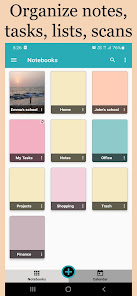
📒 Notes organizer: Create notebooks and organize all notes for daily writing. Copy or Move notes from one notepad to other. Copy and paste any web page content or article to read later
📷 Camera Scanner : Scan documents, photos, Scan receipts, business cards or book pages. Extract text from images. Create PDF & share!
🎨 Photo Editor : Add text on photo. Draw on photo, Add emoji and convert image to pdf. Create art, sketch, drawing, painting, and add to note.
🔔 Reminder : Manage Schedule using Daily, Weekly, Monthly reminders for tasks, birthdays, appointments, bill pay, medicines as per your Calendar schedule
🎤 Voice recorder: Record audio. Take voice notes from meetings. Record lecture or conference call notes, meeting memo
📔 Diary : Write about your daily activities, feelings and emotions. Plan daily and track habits
🗒️ PDF Maker : Create PDF of Text note, Images, Image to PDF, Scan documents and Share with friends, family and colleagues
💡Other important features:
☆ Sync: store and keep your notes on Google Drive to avoid loss of notes when the device is lost or changed
☆ Lock: password protect your notes, set a password to open and access notes
☆ Widgets: access notebooks and notes from the home screen
☆ Multi-device: Sync your notes and access across devices
☆ Shortcuts: Add shortcut to notes, todo list, scan document on home screen.
☆ “Pin as notification” - stop procrastinating on important tasks and get things done
Free Notes App in Daily Life:
☆ Capture and take note of ideas
☆ Create lists & reminders
☆ Create shopping lists or grocery lists
☆ Scan documents, bills, receipts or photos
☆ Set reminders and track activities
Notebook in professional life:
☆ Create detail notes of your ideas and inspiration or business plans and execution plan
☆ Plan your ideas for execution and strategy
☆ Take business meeting notes, record audio for future.
☆ Create detail schedule, agenda of business meeting
☆ Plan your career milestones and steps to achieve.
☆ User note daily as your day planner, memo writing, journal writing
☆ Plan/manage office tasks.
Notepad in Education:
☆ Take lecture notes with rich text, drawing, photo, audio, video & attach files
☆ Plan/organize your study, assignments, examination
☆ Create notes for various subjects like maths, history, physics and share the PDF with students
Contact: dailymobapps@gmail.com
Ranking di utilizzo di Note Daily Calendar & Notebook
Il ranking di utilizzo si basa sull'algoritmo di Similarweb che calcola le installazioni correnti e gli utenti attivi su un periodo di 28 giorni.
Tutte le categorie in
Germania--
Produttività in
Germania--
Interessi degli utenti e categorie principali
Le categorie principali e le app utilizzate dagli utenti di Note Daily Calendar & Notebook
Categorie principali
Affinità
Le migliori app all'interno della categoria
54%



22%

21%



3%

Principali concorrenti e app alternative
App con un'alta probabilità di essere utilizzate dagli stessi utenti, provenienti dallo stesso store.

Nested Folder Notes - Folino

Weekly Planner - Diary, Notes

Twos: Remember & Share Things

Listok: To do list & Notes
 Note Daily Calendar & Notebook VS.
 febbraio 22, 2026